
Nova Act Server
FreeNot checkedExposes Amazon Nova Act web automation capabilities through the Model Context Protocol, enabling AI agents to perform browser tasks like navigation, data extrac

About
Exposes Amazon Nova Act web automation capabilities through the Model Context Protocol, enabling AI agents to perform browser tasks like navigation, data extraction, and form interaction.
README
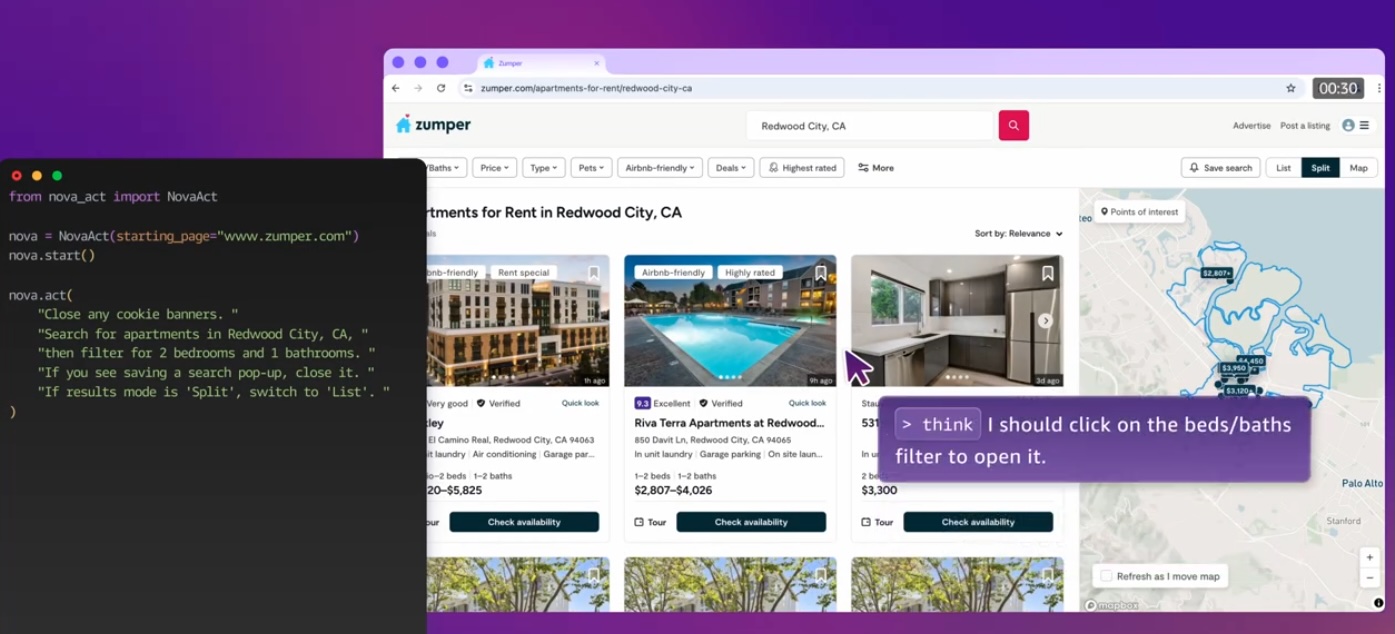
This repository demonstrates how to build intelligent web automation agents using Amazon Nova Act integrated with MCP (Model Context Protocol). MCP provides a standardized way to connect AI models to different data sources and tools - think of it like a "USB-C port for AI applications."
Overview
This project showcases the integration between:
- Amazon Nova Act: A powerful web automation tool for creating agents that interact with web pages
- MCP (Model Context Protocol): An open protocol that standardizes how applications provide context to LLMs
- Amazon Bedrock: Managed service that provides foundation models through a unified API
Architecture
The project follows MCP's client-server architecture:
- MCP Host: Claude Desktop or other AI tools that want to access Nova Act capabilities
- MCP Client: Protocol clients maintaining 1:1 connections with the Nova Act server
- MCP Server: A Nova Act server exposing web automation capabilities through the standardized protocol
- Remote Services: Web services that Nova Act interacts with through browser automation
Key Features
- Standardized LLM integration through MCP
- Automated web navigation and interaction via Nova Act
- Parallel execution of multiple browser tasks
- Data extraction and processing
- Screenshot capture and visual verification
- Session management and browser control
- Seamless integration with Claude Desktop
- Access to foundation models via Amazon Bedrock
Prerequisites
- Operating System: MacOS or Ubuntu (Nova Act requirements)
- Python 3.10 or higher
- A valid Nova Act API key (obtain from https://nova.amazon.com/act)
- Node.js (for Claude Desktop integration)
- Amazon Bedrock access:
- Amazon Bedrock enabled in your AWS account
- Claude 3.5 Sonnet V2 model enabled (this is default for this example)
- AWS credentials and region properly configured - AWS CLI Quickstart Guide
Project Structure
The repository contains two main example directories:
1. Streamlit Examples (streamlit_examples/)
video_game_research_st.py: A comprehensive tool that:- Finds top games for any selected gaming system
- Searches Amazon in parallel for pricing and details
- Creates interactive result tables
- Saves research data for future reference
2. MCP Examples (mcp_examples/)
nova_act_mcp_server.py: MCP-compliant server implementation exposing Nova Act capabilitiesnova_act_mcp_client.py: Example MCP client implementation- Demonstrates integration with Claude Desktop and other MCP hosts
3. Nova Act Examples (nova_act_examples/)
get_coffee_maker.py: Simple example demonstrating how to:- Initialize Nova Act with a starting web page
- Perform basic web search and selection actions
- Extract information from product pages
multi_monitor.py: Advanced example showing:- Parallel execution of web tasks using ThreadPoolExecutor
- Searching and comparing multiple products simultaneously
- Structured data extraction and comparison
- Error handling for robust web automation
Getting Started
Clone this repository
Install dependencies:
pip install -r requirements.txtSet your Nova Act API key:
export NOVA_ACT_API_KEY="your_api_key"Make sure your environment has AWS configured correctly - https://docs.aws.amazon.com/cli/latest/userguide/getting-started-quickstart.html
Usage
Running Streamlit Examples
cd streamlit_examples
streamlit run video_game_research_st.py
Running the MCP Server and Client
cd mcp_examples
python nova_act_mcp_client.py nova_act_mcp_server.py
The command above will:
- Start the MCP server that exposes Nova Act capabilities
- Launch the MCP client that connects to the server
- Enable communication between Claude and the Nova Act browser automation
Claude Desktop Integration
For setting up and using this server with Claude Desktop, please follow the official Claude Desktop MCP Setup Guide. The guide covers:
- Installing and configuring Claude Desktop
- Setting up MCP servers in Claude Desktop
- Troubleshooting common issues
- Example usage and best practices
Best Practices
- Follow MCP's standardized approach for exposing capabilities
- Always close browser sessions when done
- Use headless mode for automated tasks not requiring visual feedback
- Break down complex actions into smaller, specific instructions
- Use schemas when expecting structured data responses
- Save important results to files for persistence
- Handle errors appropriately in your code
Security
See CONTRIBUTING for more information.
License
This library is licensed under the MIT-0 License. See the LICENSE file.
Additional Resources
from github.com/aws-samples/sample-agents-with-nova-act-and-mcp
Installing Nova Act Server
This server has no published package — it is built from source. Open the repository and follow its README.
▸ github.com/aws-samples/sample-agents-with-nova-act-and-mcpFAQ
Is Nova Act Server MCP free?
Yes, Nova Act Server MCP is free — one-click install via Unyly at no cost.
Does Nova Act Server need an API key?
No, Nova Act Server runs without API keys or environment variables.
Is Nova Act Server hosted or self-hosted?
Self-hosted: the server runs locally on your machine via the install command above.
How do I install Nova Act Server in Claude Desktop, Claude Code or Cursor?
Open Nova Act Server on unyly.org, pick your client tab (Claude Desktop, Claude Code, Cursor) and press Install — the config is generated automatically, no JSON editing.
Related MCPs
Playwright
Browser automation, scraping, screenshots
 by Microsoft
Puppeteer
Browser automation and web scraping.
 by modelcontextprotocol
Garmin Connect
An MCP server for Garmin Connect that provides access to fitness activities, health statistics, and sleep data by routing requests through a headless browser to
 by etweisberg
Higgsfield Unlimited
MCP server for Higgsfield AI that enables unlimited-mode image, video, audio generation, uploads, and job management via multiple parallel accounts, using brows
 by nukIeer
opentabs-dev/opentabs
Plugin-based server and Chrome extension that gives AI agents access to web apps through your authenticated browser session, with a plugin SDK.
 by opentabs-dev
hlydecker/ucsc-genome-mcp
Interact with the UCSC Genome Browser API to find genomes, chromosomes and more.
 by hlydecker
34892002/bilibili-mcp-js
Search Bilibili content, with LangChain integration examples.
 by 34892002
achiya-automation/safari-mcp
Native Safari browser automation without a Chrome dependency.
 by achiya-automation
agent-infra/mcp-server-browser
Browser automation using Puppeteer, supporting local and remote browser connections.
 by bytedance
aparajithn/agent-scraper-mcp
Web scraping: clean content extraction, CSS-selector scraping, Playwright screenshots, link and metadata extraction, and Google search.
 by aparajithn
Compare Nova Act Server with
Not sure what to pick?
Find your stack in 60 seconds
Author?
Embed badge for your README
Browse similar
All browse MCPs