
Whoop Chatgpt App
FreeNot checkedMCP server that connects WHOOP health tracker data to ChatGPT, enabling read-only search, fetch, summary, and a React dashboard widget for recovery, sleep, stra

About
MCP server that connects WHOOP health tracker data to ChatGPT, enabling read-only search, fetch, summary, and a React dashboard widget for recovery, sleep, strain, and workouts.
README







A ChatGPT Apps SDK project that connects WHOOP health tracker data to ChatGPT through a remote MCP server and renders an interactive WHOOP dashboard widget in ChatGPT.
The app is a read-only health-data connector. It can search WHOOP records, fetch individual records, summarize recent recovery/sleep/strain/workout data, and render a dashboard UI from either freshly loaded WHOOP data or previously returned structured content.
This project is for software integration and personal health-data exploration. It is not medical advice.
Screenshots
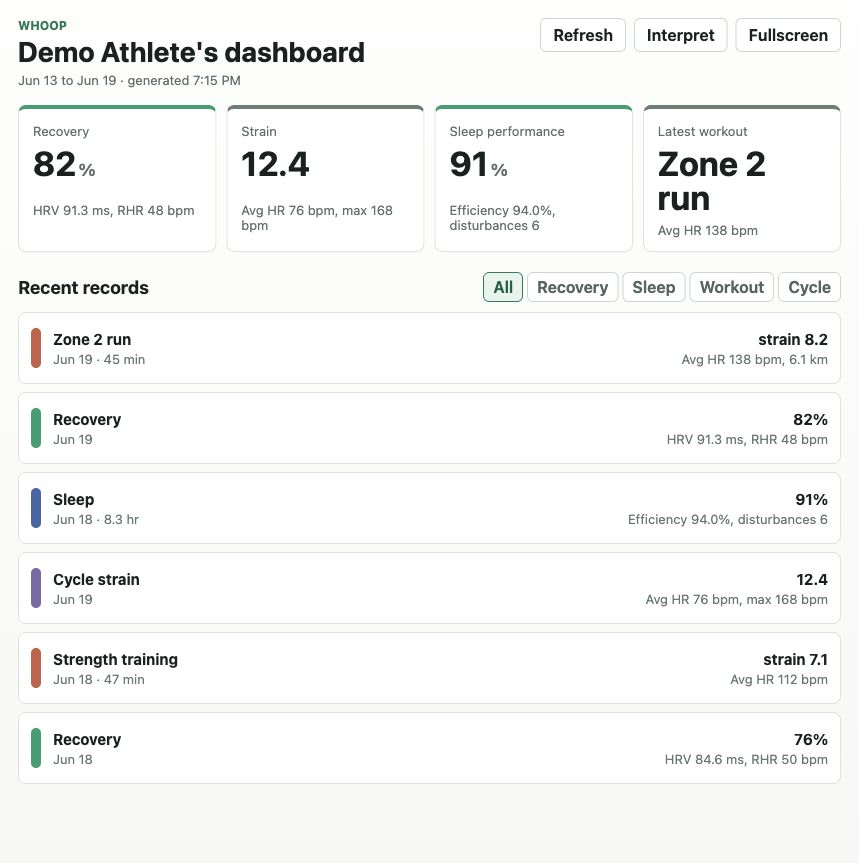
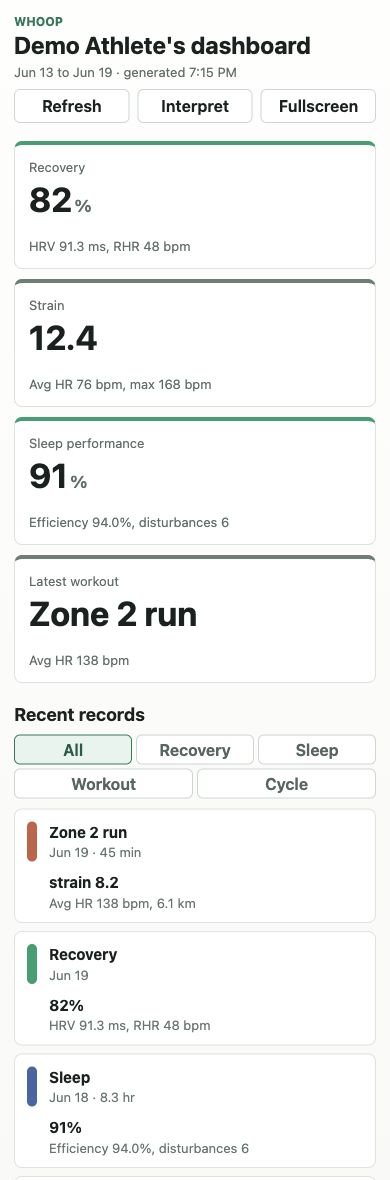
These screenshots use synthetic demo data and are safe to publish.
| Desktop | Mobile |
|---|---|
 |
 |
Features
- ChatGPT Apps SDK-compatible MCP server at
/mcp - Connector-style
searchandfetchtools for read-only WHOOP data retrieval - WHOOP OAuth helper for local development
- React widget rendered inside ChatGPT
- Dashboard cards for recovery, strain, sleep performance, and latest workout
- Recent records timeline with filters for recovery, sleep, workout, and cycle strain
- Widget actions for refresh, interpretation follow-up, and fullscreen display
- Synthetic demo mode for safe screenshots and README assets
Architecture
ChatGPT
  |
  | remote MCP over HTTPS
  v
server/
  - MCP tools
  - WHOOP OAuth helper
  - WHOOP API client
  - widget resource registration
  |
  | embeds bundled widget resource
  v
web/
  - React dashboard widget
  - MCP Apps bridge integration
App shape:
- Archetype:
react-widget - Architecture: decoupled data/render
- Connector surface: standard read-only
searchandfetchtools - Widget rendering:
render_whoop_dashboard
Tools
All tools are read-only.
| Tool | Purpose |
|---|---|
search(query) |
Finds recent WHOOP profile, recovery, cycle, sleep, and workout records. |
fetch(id) |
Fetches one record returned by search. |
get_whoop_summary(days, includeProfile) |
Returns a compact model-readable WHOOP summary. |
render_whoop_dashboard(days, includeProfile, dashboard) |
Renders the React widget. It can load data directly using days/includeProfile, or render a dashboard object returned by get_whoop_summary. |
Requirements
- Node.js 20 or newer
- npm
- A WHOOP Developer app for live data
- An HTTPS tunnel for ChatGPT Developer Mode testing, such as ngrok
Quick Start
npm install
cp .env.example .env
npm run build
npm start
The server listens on:
http://localhost:8787/mcp
WHOOP Setup
Create a WHOOP Developer app and configure these read scopes:
read:profile read:body_measurement read:cycles read:recovery read:sleep read:workout
For local development:
- Start a public HTTPS tunnel to port
8787. - Set
PUBLIC_BASE_URLto the tunnel origin. - Set
WHOOP_CLIENT_ID,WHOOP_CLIENT_SECRET, andWHOOP_REDIRECT_URIin.env. - Register the same redirect URI in WHOOP, for example
https://example.ngrok.app/oauth/callback. - Restart the server.
- Open
https://example.ngrok.app/oauth/startin your browser and link WHOOP.
The local OAuth helper stores the WHOOP access token in server memory. Restarting the server clears the link.
ChatGPT Developer Mode
ChatGPT requires a public HTTPS MCP URL for remote app testing.
npm start
ngrok http 8787
Use the tunneled MCP URL:
https://example.ngrok.app/mcp
In ChatGPT:
- Enable Developer Mode under Settings -> Apps & Connectors -> Advanced settings.
- Create a new app/connector.
- Paste the tunneled
/mcpURL. - Use No Auth for local development with
CHATGPT_APP_AUTH=none. - Refresh or reconnect the app after tool, metadata, or widget changes.
Example prompt:
Use the Whoop app to show my WHOOP dashboard for the last 7 days.
Environment Variables
Copy .env.example to .env and fill in local values.
| Variable | Required | Description |
|---|---|---|
PORT |
No | Local HTTP port. Defaults to 8787. |
PUBLIC_BASE_URL |
Yes for OAuth/ChatGPT | Public origin for OAuth redirects and metadata. |
WHOOP_CLIENT_ID |
Yes for OAuth | WHOOP Developer app client ID. |
WHOOP_CLIENT_SECRET |
Yes for OAuth | WHOOP Developer app client secret. Do not commit it. |
WHOOP_REDIRECT_URI |
Yes for OAuth | Redirect URI registered in WHOOP. |
CHATGPT_APP_AUTH |
No | Use none for local Developer Mode testing. |
WHOOP_ACCESS_TOKEN |
No | Local single-user shortcut. Prefer OAuth for normal testing. |
AUTHORIZATION_SERVER_URL |
Production only | OAuth 2.1 authorization server for production ChatGPT linking. |
WHOOP_API_BASE_URL |
No | WHOOP API override for tests or proxies. |
Development
npm run dev      # run the TypeScript server with tsx
npm run build    # build web widget and server
npm run check    # type-check web and server
npm start        # run the built server
MCP Inspector:
npx @modelcontextprotocol/inspector@latest --server-url http://localhost:8787/mcp --transport http
Project Structure
.
├── docs/screenshots/        # publishable screenshots with synthetic data
├── server/
│   └── src/
│       ├── index.ts         # MCP server, tools, OAuth routes, resource registration
│       ├── whoop-client.ts  # WHOOP API client
│       └── whoop-format.ts  # record formatting and dashboard summarization
├── web/
│   └── src/
│       ├── main.tsx         # React widget and Apps bridge integration
│       └── styles.css       # responsive widget styling
├── .env.example
├── package.json
└── README.md
Security and Privacy
.envis ignored by git.- Do not commit WHOOP client secrets, access tokens, refresh tokens, or tunnel URLs.
- WHOOP tokens stay server-side and are never exposed to the widget.
- The local OAuth helper stores tokens in memory only.
- Screenshots in
docs/screenshotsuse synthetic data. - Production apps should validate token issuer, audience/resource, expiry, and scopes before calling WHOOP.
Production Notes
The local setup uses CHATGPT_APP_AUTH=none so ChatGPT Developer Mode can connect while the server uses the locally linked WHOOP token. For production, put a ChatGPT-compatible OAuth 2.1 authorization layer in front of WHOOP and advertise OAuth security schemes from the MCP server.
Production hosting should include:
- Stable public HTTPS endpoint
- Secure secret storage
- Token verification and refresh handling
- Request logging without sensitive data
- Rate-limit and WHOOP API error handling
- Re-test in ChatGPT Developer Mode before submission
Open Source Checklist
Before publishing:
- Confirm
.envis not staged. - Replace any local tunnel URLs in docs or examples with placeholders.
- Run
npm run check. - Run
npm run build. - Review screenshots for synthetic data only.
License
MIT. See LICENSE.
Installing Whoop Chatgpt App
This server has no published package — it is built from source. Open the repository and follow its README.
▸ github.com/colesmcintosh/whoop-chatgpt-appFAQ
Is Whoop Chatgpt App MCP free?
Yes, Whoop Chatgpt App MCP is free — one-click install via Unyly at no cost.
Does Whoop Chatgpt App need an API key?
No, Whoop Chatgpt App runs without API keys or environment variables.
Is Whoop Chatgpt App hosted or self-hosted?
A hosted option is available: Unyly runs the server in the cloud, no local setup required.
How do I install Whoop Chatgpt App in Claude Desktop, Claude Code or Cursor?
Open Whoop Chatgpt App on unyly.org, pick your client tab (Claude Desktop, Claude Code, Cursor) and press Install — the config is generated automatically, no JSON editing.
Related MCPs
GitHub
PRs, issues, code search, CI status
 by GitHub
Filesystem
Secure file operations with configurable access controls.
Memory
Knowledge graph-based persistent memory system.
Template MCP Server
A CLI tool to create a new Model Context Protocol server project with TypeScript support, dual transport options, and an extensible structure
 by mcpdotdirect
Amap Maps Mcp Server
MCP server for using the AMap Maps API
 by duxiaohui
Supabase
Database, auth and storage
 by Supabase
Everything
Reference / test server with prompts, resources, and tools.
Git
Tools to read, search, and manipulate Git repositories.
Sequential Thinking
Dynamic and reflective problem-solving through thought sequences.
Time
Time and timezone conversion capabilities.
Compare Whoop Chatgpt App with
Not sure what to pick?
Find your stack in 60 seconds
Author?
Embed badge for your README
Browse similar
All development MCPs