
Stitch Mcp
FreeStale (192d)Universal MCP server for Google Stitch - AI-powered UI/UX design tool. Works with Claude, Cursor, Antigravity, and any MCP-compatible AI.

About
Universal MCP server for Google Stitch - AI-powered UI/UX design tool. Works with Claude, Cursor, Antigravity, and any MCP-compatible AI.
README
Universal MCP Server for Google Stitch
Build amazing UI/UX designs instantly with AI. Works seamlessly with Cursor, Claude, Antigravity, and any MCP-compatible editor.
Created by Aakash Kargathara.
🚀 How It Works
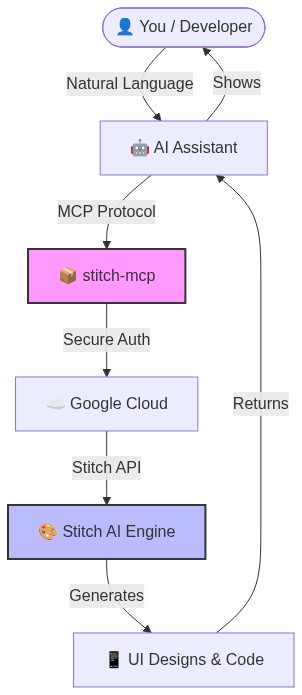
✨ Why this is cool
- Zero Config: Just login once and it works everywhere.
- Universal: Works on Windows, Mac, and Linux.
- Free: Google Stitch API is free to use.
�️ Quick Setup (2 Minutes)
1. Prerequisite: Google Cloud
You need a Google Cloud project with the Stitch API enabled.
# Login to your Google Cloud
gcloud auth login

# Set your project (replace with your actual project ID)
gcloud config set project YOUR_PROJECT_ID
gcloud auth application-default set-quota-project YOUR_PROJECT_ID

# Enable the magic
gcloud beta services mcp enable stitch.googleapis.com
2. Install the Credentials
This gives stitch-mcp permission to talk to Google on your behalf.
gcloud auth application-default login
3. Add to Your AI Editor
Copy and paste this into your MCP config file:
For Claude Desktop:
~/Library/Application Support/Claude/claude_desktop_config.json
For Cursor: Settings > MCP > Add New Server
{
  "mcpServers": {
    "stitch": {
      "command": "npx",
      "args": ["-y", "stitch-mcp"],
      "env": {
         "GOOGLE_CLOUD_PROJECT": "YOUR_PROJECT_ID"
      }
    }
  }
}
🛠️ Available Tools
| Tool Name | What it does |
|---|---|
extract_design_context |
🧠 Scans a screen to extract "Design DNA" (Fonts, Colors, Layouts). Use this to keep style consistent. |
fetch_screen_code |
💾 Downloads the raw HTML/Frontend code of a screen. |
fetch_screen_image |
🖼️ Downloads the high-res screenshot of a screen. |
generate_screen_from_text |
✨ Generates a NEW screen based on your prompt (and context). |
create_project |
📁 Creates a new workspace/project folder. |
list_projects |
📋 Lists all your available Stitch projects. |
list_screens |
📱 Lists all screens within a specific project. |
get_project |
🔍 Retrieves details of a specific project. |
get_screen |
ℹ️ Gets metadata for a specific screen. |
💡 Pro Tip: The "Designer Flow"
To generate consistent UI, use this 2-step flow:
- Extract: "Get design context from the Home Screen..."
- Generate: "Using that context, generate a Chat Screen..."
This ensures your new screen matches your existing design system perfectly.
📄 License
Apache 2.0 - Open source and free to use.
Star History
Built with ❤️ by Aakash Kargathara
Install Stitch Mcp in Claude Desktop, Claude Code & Cursor
unyly install stitch-mcpInstalls into Claude Desktop, Claude Code, Cursor & VS Code — handles npx, uvx and build-from-source repos for you.
First time? Get the CLI: curl -fsSL https://unyly.org/install | sh
Or configure manually
Run in your terminal:
claude mcp add stitch-mcp --env GOOGLE_CLOUD_PROJECT="" -- npx -y stitch-mcpStep-by-step: how to install Stitch Mcp
FAQ
Is Stitch Mcp MCP free?
Yes, Stitch Mcp MCP is free — one-click install via Unyly at no cost.
Does Stitch Mcp need an API key?
Yes, it requires environment variables: GOOGLE_CLOUD_PROJECT. Unyly injects them into the config during install.
Is Stitch Mcp hosted or self-hosted?
Self-hosted: the server runs locally on your machine via the install command above.
How do I install Stitch Mcp in Claude Desktop, Claude Code or Cursor?
Open Stitch Mcp on unyly.org, pick your client tab (Claude Desktop, Claude Code, Cursor) and press Install — the config is generated automatically, no JSON editing.
Changes
Versions and requested access over time.
- New version published
- New version published
Related MCPs
LibreOffice Tools
Enables AI agents to read, write, and edit Office documents via LibreOffice with token-efficient design. Supports multiple formats including DOCX, XLSX, PPTX, a
 by passerbyflutter
dannote/figma-use
Full Figma control: create shapes, text, components, set styles, auto-layout, variables, export. 80+ tools.
 by dannote
Logo.dev
Search and retrieve company logos by brand or domain. Customize size, format, and theme to match your design needs. Accelerate design, prototyping, and content
 by NOVA-3951
Design Inspiration Server
Searches top design platforms like Dribbble and Behance to provide UI inspiration, color palettes, and layout patterns via the Serper API. It allows users to re
 by YonasValentin
PIX4Dmatic
Enables GUI automation for controlling PIX4Dmatic on Windows through MCP. Supports launching, focusing, capturing screenshots, sending hotkeys, clicking UI elem
 by jangjo123
Figma
Extract design specs and assets
 by Figma
mcp-dockmaster
An Open-Sourced UI to install and manage MCP servers for Windows, Linux and macOS.
ariekogan/ateam-mcp
Build, validate, and deploy multi-agent AI solutions on the ADAS platform. Design skills with tools, manage solution lifecycle, and connect from any AI environm
 by ariekogan
thinkchainai/mcpbundles
MCP Bundles: Create custom bundles of tools and connect providers with OAuth or API keys. Use one MCP server across thousands of integrations, with programmatic
 by thinkchainai
arikusi/nakkas
MCP server that turns AI into an SVG artist. One rendering engine with JSON config, AI controls all design parameters. CSS @keyframes + SMIL animations, 16+ ele
 by arikusi
Compare Stitch Mcp with
Not sure what to pick?
Find your stack in 60 seconds
Author?
Embed badge for your README
Browse similar
All design MCPs