
ReadyTrader FOREX
FreeNot checkedEnables AI agents to perform forex trading operations through brokerages with risk controls and safety guardrails.

About
Enables AI agents to perform forex trading operations through brokerages with risk controls and safety guardrails.
README
Important Disclaimer (Read Before Use)
ReadyTrader-FOREX is provided for informational and educational purposes only and does not constitute financial, investment, legal, or tax advice. Trading forex and CFDs involves substantial risk and may result in partial or total loss of funds. Past performance is not indicative of future results. You are solely responsible for any decisions, trades, configurations, supervision, and the security of your credentials/API keys. ReadyTrader-FOREX is provided “AS IS”, without warranties of any kind, and we make no guarantees regarding profitability, performance, availability, or outcomes. By using ReadyTrader-FOREX, you acknowledge and accept these risks.
See also: DISCLAIMER.md.
🌎 The Big Picture
ReadyTrader-FOREX is an MCP server that turns your AI agent (Claude, Agent Zero, or any MCP client) into a supervised forex trading operator.
Your agent provides the Intelligence (reading rates, the economic calendar, news and its own analysis); ReadyTrader-FOREX provides the Hands (a paper FX account, market data and brokerage connections) and the Safety Brakes (a Risk Guardian every order must pass). You can delegate FX trading to an agent without giving it unchecked access to your capital.
🛡️ The Trust Model: Intelligence vs. Execution
- The AI Agent (The Brain): decides what and when to trade. It can research history, read news and the calendar, and backtest strategies, but it has no direct power to move money.
- The MCP Server (The Guardrail): owns the API keys and enforces your policies. Every order goes through the Risk Guardian, which rejects trades that are too large, too risky or against your limits.
💰 Funding Model (Non-Custodial)
- You keep your funds in your own brokerage account (OANDA is the default live venue).
- You control the keys: give the server API keys that can trade but (recommended) not withdraw.
- Agent as operator: the server sends order instructions to your broker with your keys; the broker executes and settles.
Paper Mode (the default) trades a simulated FX account instead: USD cash, one netted position per pair, margin at 30:1 and P&L converted to USD. It is kept in
data/paper.dbbetween runs.
🔄 A Day in the Life of a Trade
- Research: you ask, "Find a good entry for EUR/USD." The agent calls
get_forex_market_brief("EURUSD"),fetch_ohlcv,get_market_regimeandget_economic_calendar. - Proposal: it decides to buy 4,000 EURUSD and calls
place_market_order("EUR/USD", "buy", 4000). Amounts are units of the base currency: 4,000 EUR, about 4,500 USD. - Governance: the Risk Guardian judges the part of the order that opens or adds to a position (an order that reduces or closes one is an exit), at its USD notional (from the market rate, never a price the order carries) against your account: no more than 5% of the account per trade, nothing that adds exposure after a 5% daily loss or a 10% drawdown (on the paper account only: a live account has no loss history here, and live orders list both rules under
inactive_rules), no BUY into a collapsing pair, and no trade at all on a pair in a volatility halt (docs/FALLING_KNIFE.md). Live orders also pass yourMAX_BROKERAGE_ORDER_AMOUNT/ALLOW_BROKERAGE_SYMBOLSpolicy and needLIVE_TRADING_ENABLED=true. - Consent: with
EXECUTION_APPROVAL_MODE=approve_eachthe order comes back as a pending proposal. You approve it through the API or the dashboard; the Risk Guardian checks it again with fresh data, and only then does it execute.
🖥️ Next.js Dashboard
A small dashboard backed by the API server (app/api_server.py).
How to enable:
- Start the API server from the repository root:
python app/api_server.py(serves127.0.0.1:8000; setAPI_HOST/API_PORTto change it). - In another terminal:
cd frontend && npm install && npm run dev - Open
http://localhost:3000. If the API runs elsewhere, setNEXT_PUBLIC_API_URL(andNEXT_PUBLIC_WS_URL) before starting the dashboard; if the dashboard is served from another address, add it to the API'sAPI_CORS_ORIGINS.
What it shows:
- Paper Account: equity, cash, open positions with unrealized P&L, margin used/free, today's P&L and drawdown, from
/api/portfolio(the live-account view is not implemented yet). - Mode: Paper Mode or LIVE TRADING, read from
/api/health. - Guard Rail: pending
approve_eachproposals with the order each would place (pair, side, amount, type, venue, paper or live); Approve and Reject ask for the proposal'sconfirm_tokenand call/api/approve-trade. When the API runs withAPI_OPERATOR_TOKEN, the dashboard asks for that token once per browser tab (kept in the tab's session storage). - Live Markets: tickers pushed over the API's WebSocket (
/ws). No tool starts a market-data stream in this release, so this panel stays empty.
🚀 Key Features
- 📉 Paper FX account: persistent USD cash, netted positions per pair (long or short), margin and leverage, P&L in the quote currency converted to USD. Market orders fill at the latest rate; limit orders fill only when marketable.
- 🛡️ Risk Guardian with market data: position sizing by USD notional, daily-loss and drawdown limits, the price-based Falling Knife rule and a volatility halt read from recent daily bars (tested on 24 pairs they had never seen;
docs/FALLING_KNIFE.md). - 📅 Calendar & news: this week's high-impact events (no key), FX headlines from free RSS feeds, the DXY trend, plus NewsAPI / Alpha Vantage / X / Reddit when you add keys. No invented sentiment scores (
docs/SENTIMENT.md). - 🧠 Strategy research: a backtesting engine for agent-written strategies, synthetic black-swan stress tests and a market-regime detector.
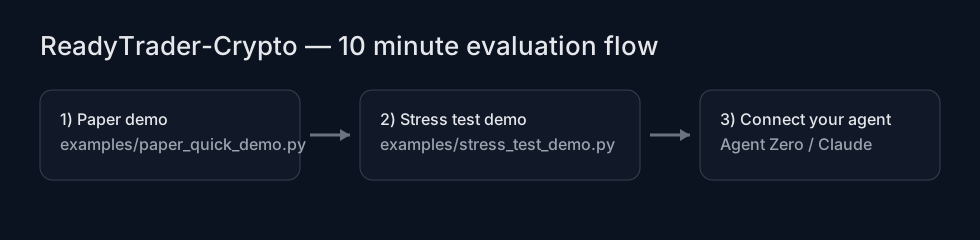
⚡ 10-minute evaluation
Run both demos locally (no keys needed; Python 3.12+, dependencies installed as below):
python examples/paper_quick_demo.py    # the paper FX account, offline, with self-checks
python examples/stress_test_demo.py    # the synthetic stress lab
The stress demo writes exportable artifacts under artifacts/demo_stress/ (gitignored).
Prompt pack (copy/paste): prompts/READYTRADER_PROMPT_PACK.md.
🛠️ Installation & Setup
Prerequisites
- Docker, or Python 3.12+ for a local install (below)
1. Build & Run (Docker)
The image runs the MCP server on stdio.
cd ReadyTrader-FOREX
docker build -t readytrader-forex .
# Run interactively (to test); the named volume keeps the paper account between runs
docker run --rm -i -v readytrader-forex-data:/app/data readytrader-forex
Local development (no Docker)
Requires Python 3.12 or newer (pandas_ta has no release for older versions).
python3.12 -m venv .venv && source .venv/bin/activate
pip install -r requirements-dev.txt
python app/main.py   # MCP server on stdio; an MCP client launches it the same way
python tools/setup_wizard.py checks the dependencies, the data sources and your .env.
2. Configuration (.env)
Paper mode needs no configuration. To change anything, copy env.example to .env: it lists every variable the server reads, with safe defaults.
🛡️ Live Trading Safety & Approval
| Variable | Default | Description |
|---|---|---|
PAPER_MODE |
true |
false (or 0, no, off) for live trading; any other value stays on paper. |
LIVE_TRADING_ENABLED |
false |
Must be exactly true for any live execution. |
TRADING_HALTED |
false |
Kill switch: any value other than empty, false, 0, no or off refuses every live order. Read at start-up, so restart after changing it. |
EXECUTION_APPROVAL_MODE |
auto |
auto executes immediately; approve_each (or any value other than auto) makes every order a proposal a human approves. |
LEVERAGE |
30 |
Leverage of the paper account (margin = USD notional / leverage). A value that is not a positive number stops the server at start. |
MAX_BROKERAGE_ORDER_AMOUNT |
unset | Largest live order, in units of the base currency. A value that is not a number refuses every live order (invalid_policy_config). |
ALLOW_EXCHANGES, ALLOW_BROKERAGE_SYMBOLS |
unset (all) | Comma-separated allowlists for live orders (EUR/USD and EURUSD match the same entry), checked when an order is proposed and again when it executes. |
MARKET_GUARD_ENABLED |
true |
The Falling Knife rule and the volatility halt. Only false/0/no/off turns them off. See docs/FALLING_KNIFE.md. |
MARKET_GUARD_ON_DATA_ERROR |
unset | What a BUY does when the daily bars cannot be read: block or allow. Unset blocks in live mode and allows (flagged) in paper mode. |
API_PORT, API_HOST |
8000, 127.0.0.1 |
The API server's address. The approval API has no login: keep it on 127.0.0.1 unless something in front of it authenticates. |
API_CORS_ORIGINS |
http://localhost:3000,http://127.0.0.1:3000 |
Browser origins allowed to call the API. |
API_OPERATOR_TOKEN |
unset | Operator secret for the API server only: when set, every /api/ call but /api/health needs Authorization: Bearer <it>; live proposals can be approved only when it is set. |
EXECUTION_DB_PATH, EXECUTION_SESSION_ID |
unset | Give both processes the same values so the API can approve the MCP server's proposals. |
DISCORD_WEBHOOK_URL, TELEGRAM_BOT_TOKEN, TELEGRAM_CHAT_ID |
unset | Optional notifications when a proposal needs approval. |
🔑 Brokerage credentials
| Variable | Description |
|---|---|
OANDA_API_KEY, OANDA_ACCOUNT_ID |
The default live venue. |
OANDA_ENVIRONMENT |
practice (default, OANDA's demo API) or live. |
OANDA is the only connector that trades currency pairs. The Interactive Brokers, Alpaca, Tradier, Schwab, E*TRADE and Robinhood connectors are inherited from ReadyTrader-Stocks and place stock orders; their variables are in env.example.
📰 News, calendar & sentiment keys (all optional)
| Variable | Used by |
|---|---|
| none | get_economic_calendar, get_forex_news, fetch_rss_news, get_forex_market_brief |
ALPHAVANTAGE_API_KEY |
get_market_news |
NEWSAPI_KEY |
get_financial_news, fetch_financial_news |
TWITTER_BEARER_TOKEN, REDDIT_CLIENT_ID, REDDIT_CLIENT_SECRET |
get_social_sentiment, analyze_social_sentiment |
A tool whose key is missing answers not_configured; a source that fails answers source_unavailable (never an empty "all clear").
🛠️ Storage & logging
| Variable | Default | Description |
|---|---|---|
READYTRADER_DATA_DIR |
<repo>/data |
Where the SQLite files live (paper account, insights, strategies, approvals), whatever folder the MCP client starts the server in. |
PAPER_DB_PATH |
data/paper.db |
The paper account alone. |
LOG_LEVEL |
INFO |
Log level for the API server's JSON logs. |
RISK_PROFILE, EXECUTION_MODE, RATE_LIMIT_DEFAULT_PER_MIN and CIRCUIT_BREAKER_PCT are read but not applied: the Risk Guardian's limits are fixed and no rate limit is enforced.
Live trading
Live orders go out only with PAPER_MODE=false and LIVE_TRADING_ENABLED=true; TRADING_HALTED=true refuses them all, closing orders included (close positions on the OANDA platform while halted). Each is sized against the brokerage account's equity, and an order that adds exposure whose account cannot be read is refused. The daily-loss and drawdown limits run on the paper account only (live orders list them under inactive_rules): watch a live account's losses at the broker. Every OANDA order is fill-or-kill: a limit order is sent as a market order with a priceBound (the worst price it may fill at), so it fills now at that price or better, or not at all, and nothing rests at OANDA where later fills would escape the Risk Guardian and the kill switch. OANDA orders go to OANDA's practice API until you set OANDA_ENVIRONMENT=live, so you can test the whole live path without real money. Capabilities per brokerage: docs/EXCHANGES.md.
Order tools:
place_market_order(symbol, side, amount)andplace_limit_order(symbol, side, amount, price): OANDA in live mode.place_forex_order(symbol, side, amount, order_type='market', price=0.0, exchange='oanda'): the same with an explicit order type and brokerage.get_paper_account(),deposit_paper_funds("USD", amount),reset_paper_account(): the paper account.
✅ Approving trades (approve_each)
With EXECUTION_APPROVAL_MODE=approve_each, every order that passes the Risk Guardian comes back as {"status": "pending_approval", "request_id", "confirm_token"} instead of executing. To approve it through the API (or the dashboard), run the MCP server and python app/api_server.py with the same EXECUTION_DB_PATH and EXECUTION_SESSION_ID; then:
GET /api/pending-approvalslists the proposals with their orders, never their tokens (they expire after 120 s).POST /api/approve-trade {"request_id", "confirm_token", "approve": true}re-runs the Risk Guardian with fresh data and executes;"approve": falsecancels (the token is needed for both). A refusal answers409with the reason; an unknown proposal404; a wrong token403. A proposal executes only in the mode it was made in: a paper proposal approved by an API running live is refused (mode_mismatch).- The agent receives each proposal's
confirm_token, so that token alone never proves a person approved. SetAPI_OPERATOR_TOKENon the API server (not on the MCP server): every/api/call but/api/healththen needsAuthorization: Bearer <token>(401without it), and a live proposal is approved only when it is set (403 operator_token_requiredotherwise). Every response carries anX-Request-IDthat matches the API's log lines.
🔌 Integration Guide
Option A: Agent Zero
With the Agent Zero plugin: install a0-readytrader-forex-plugin (2.0.0 or later) from Agent Zero's Plugins page (Git URL or ZIP). It installs this server into the plugin's folder, registers it with Agent Zero's MCP client in paper mode, and adds a paper-trading skill.
By hand: in Agent Zero, open Settings → MCP/A2A → External MCP Servers and add the server to
the JSON there. Copy/paste file: configs/agent_zero.mcp.json.
{
  "mcpServers": {
    "readytrader_forex": {
      "type": "stdio",
      "command": "docker",
      "args": [
        "run",
        "-i",
        "--rm",
        "-v",
        "readytrader-forex-data:/app/data",
        "-e",
        "PAPER_MODE=true",
        "readytrader-forex"
      ]
    }
  }
}
- The agent sees the tools as
readytrader_forex.<tool>(Agent Zero lowercases the server name and turns other characters into_). Saving the settings reloads Agent Zero's MCP servers. - Agent Zero starts the server afresh for every call, so the
-vvolume is what keeps the paper account between calls. Agent Zero must be able to rundockerwhere it runs. - Without Docker: set
"command"to the Python 3.12 interpreter of a ReadyTrader-FOREX checkout with its requirements installed (e.g./path/to/ReadyTrader-FOREX/.venv/bin/python) and"args"to["/path/to/ReadyTrader-FOREX/app/main.py"], paths Agent Zero can reach. Agent Zero passes the server only a minimal environment, so put settings in the entry's"env"(for example{"PAPER_MODE": "true"}) or in the checkout's.env.
Option B: Claude Desktop and other MCP clients
Add this to the client's MCP configuration (for Claude Desktop, claude_desktop_config.json). Copy/paste file: configs/claude_desktop.mcp-server-config.json.
{
  "mcpServers": {
    "readytrader_forex": {
      "command": "docker",
      "args": [
        "run",
        "-i",
        "--rm",
        "-v", "readytrader-forex-data:/app/data",
        "-e", "PAPER_MODE=true",
        "readytrader-forex"
      ]
    }
  }
}
📚 Feature Guide
1. Strategy backtesting
Example prompt:
"Create a mean-reversion strategy for GBP/USD. Write a Python function
on_candlethat uses RSI. Backtest it on daily bars and tell me the PnL and the trades."
What happens:
- The agent calls
fetch_ohlcv("GBPUSD", "1d", 100)to see the data. - It writes
on_candle(close, rsi, state)returning'buy','sell'or'hold'. - It calls
run_backtest_simulation(code, "GBPUSD", "1d"): the last 500 bars, from $10,000. - The server runs the code with dangerous imports (such as
os) refused and returns{"pnl_percent": ..., "total_trades": ..., "trades_log": [...], ...}; a strategy that fails returnsbacktest_error.
2. Paper trading laboratory (no keys)
- Fund the account:
deposit_paper_funds("USD", 100000) - Research:
get_stock_price("EURUSD")(the latest rate; the name is kept for compatibility),get_multiple_prices("EURUSD,GBPUSD,USDJPY"),fetch_ohlcv,get_market_regime - Read the calendar and news:
get_economic_calendar(),get_forex_news(),get_forex_market_brief("EURUSD") - Trade:
place_market_order("EUR/USD", "buy", 4000)fills at the latest rate (4,000 EUR is about 4.5% of a 100,000 USD account; more than 5% is refused);place_limit_orderfills only if marketable (resting orders are not simulated; live OANDA limits are fill-or-kill too). Selling more than you hold opens a short. - Check the account:
get_paper_account()(cash, equity, positions, unrealized P&L, margin) - Start over:
reset_paper_account()
3. Market regime & risk
- Tool:
get_market_regime("EURUSD") - Output:
{"regime": "TRENDING", "direction": "UP", "adx": 31.2, "atr_pct": 0.55, "summary": "..."} - Agent logic: "The market is trending (ADX > 25). I will use my trend-following strategy."
The Guardian (passive safety): if the agent tries to put 50% of the account on one trade, the order is refused. validate_trade_risk(side, symbol, amount_usd, portfolio_value) runs the same checks without placing anything.
It also refuses a BUY into a collapsing pair (down 5%+ from its highest close of the last four days and still at its lowest close) and halts every trade on a pair whose daily move is more than 4.5x its 20-day norm. The rules, the data they read and the evidence behind the thresholds are in docs/FALLING_KNIFE.md. Not implemented yet, and reported under inactive_rules in every verdict: a news blackout around high-impact releases.
🧰 Tool Reference
The complete catalog, generated from the running server: docs/TOOLS.md.
| Category | Tool | Description |
|---|---|---|
| Trading | place_market_order |
Market order through the Risk Guardian. |
place_limit_order |
Limit order (paper: fills only if marketable). | |
place_forex_order |
Either, with a brokerage choice for live orders. | |
place_stock_order |
The general order tool (kept for compatibility). | |
validate_trade_risk |
Check a trade without placing it. | |
| Paper account | get_paper_account |
Cash, equity, positions, margin. |
deposit_paper_funds |
Add virtual USD. | |
reset_paper_account |
Clear the paper account. | |
| Market data | get_stock_price |
Latest rate for a pair (yfinance). |
get_multiple_prices |
Latest rates for several pairs. | |
fetch_ohlcv |
Historical candles. | |
get_market_regime |
Trend / range / volatility detection. | |
| Calendar & news | get_forex_market_brief |
Rate, DXY trend, calendar and headlines in one call. |
get_economic_calendar |
This week's high-impact events (UTC). | |
get_market_sentiment |
The DXY trend and the calendar (not a score). | |
get_forex_news, fetch_rss_news, get_free_news |
Free RSS headlines. | |
fetch_custom_feed |
Any public RSS/Atom feed. | |
get_market_news, get_financial_news, fetch_financial_news |
Alpha Vantage / NewsAPI headlines (keys). | |
get_social_sentiment, analyze_social_sentiment |
Recent X/Reddit posts for you to judge (keys). | |
| Research | run_backtest_simulation |
Backtest a strategy. |
run_synthetic_stress_test |
Synthetic black-swan stress test with deterministic replay. | |
post_market_insight, get_latest_insights |
Share signals between agents. |
start_brokerage_private_ws is registered for compatibility and answers not_implemented.
🧪 Synthetic Stress Testing
A randomized but deterministic-by-seed market simulator: trending, ranging and volatile regimes with injected black-swan crashes and parabolic blow-off tops.
Tool: run_synthetic_stress_test(strategy_code, config_json='{}')
Returns JSON with:
- a metrics summary across scenarios
- replay seeds (master and per scenario)
- artifacts: scenario metrics CSV, worst-case equity curve CSV and trades JSON
- recommendations: suggested parameter changes (applied to
PARAMSkeys if present)
Example config_json:
{
  "master_seed": 123,
  "scenarios": 200,
  "length": 500,
  "timeframe": "1h",
  "initial_capital": 10000,
  "start_price": 100,
  "base_vol": 0.01,
  "black_swan_prob": 0.02,
  "parabolic_prob": 0.02
}
📌 Project docs
docs/TOOLS.md: the complete tool catalog (generated from the running server)docs/ERRORS.md: error codes and troubleshootingdocs/EXCHANGES.md: brokerage capability matrix (what is wired, what is not)docs/MARKETDATA.md: where market data comes fromdocs/FALLING_KNIFE.md: the Falling Knife rule and volatility halt, and the study behind the thresholdsdocs/SENTIMENT.md: why this server does not score sentiment, and how to supply your own readingdocs/THREAT_MODEL.md: operator-focused threat model (live trading)docs/CUSTODY.md: key custody and rotationdocs/POSITIONING.md: credibility-safe messagingRUNBOOK.md: operating the serverCHANGELOG.md: version-to-version changes
Built for the Agentic Future.
Installing ReadyTrader FOREX
This server has no published package — it is built from source. Open the repository and follow its README.
▸ github.com/up2itnow0822/ReadyTrader-FOREXFAQ
Is ReadyTrader FOREX MCP free?
Yes, ReadyTrader FOREX MCP is free — one-click install via Unyly at no cost.
Does ReadyTrader FOREX need an API key?
No, ReadyTrader FOREX runs without API keys or environment variables.
Is ReadyTrader FOREX hosted or self-hosted?
A hosted option is available: Unyly runs the server in the cloud, no local setup required.
How do I install ReadyTrader FOREX in Claude Desktop, Claude Code or Cursor?
Open ReadyTrader FOREX on unyly.org, pick your client tab (Claude Desktop, Claude Code, Cursor) and press Install — the config is generated automatically, no JSON editing.
Related MCPs
Opencode Omniroute Plugin
OpenCode plugin for the OmniRoute AI Gateway. Drives dynamic model discovery, /connect auth flow, and multi-instance OmniRoute providers via the official @openc
 by GitHub Actions
Roblox Studio
Enables AI coding tools to control Roblox Studio for workspace exploration, instance manipulation, and script management. It provides tools for playtesting, sce
 by paralov
Antigravity Drawio
MCP server that enables AI assistants to create, parse, render, and validate Draw.io diagrams programmatically.
 by S-SUJAN-S
Fetch
Web content fetching and conversion for efficient LLM usage.
AWS KB Retrieval
Retrieval from AWS Knowledge Base using Bedrock Agent Runtime.
 by modelcontextprotocol
Spring AI MCP Server
Provides auto-configuration for setting up an MCP server in Spring Boot applications.
llm-analysis-assistant
A very streamlined mcp client that supports calling and monitoring stdio/sse/streamableHttp, and can also view request responses through the /logs page. It also
 by xuzexin-hz
MCP-Agent
A simple, composable framework to build agents using Model Context Protocol by [LastMile AI](https://www.lastmileai.dev)
 by lastmile-ai
Spring AI MCP Client
Provides auto-configuration for MCP client functionality in Spring Boot applications.
mcp.natoma.ai
A Hosted MCP Platform to discover, install, manage and deploy MCP servers by [Natoma Labs](https://www.natoma.ai)
Compare ReadyTrader FOREX with
Not sure what to pick?
Find your stack in 60 seconds
Author?
Embed badge for your README
Browse similar
All ai MCPs