
Postgresql Ssh Mcp
FreeStale (305d)PostgreSQL MCP Server with built-in SSH tunneling for secure database access through bastion hosts

About
PostgreSQL MCP Server with built-in SSH tunneling for secure database access through bastion hosts
README
npm version npm downloads license
A secure PostgreSQL MCP server with built-in SSH tunneling. Connect to databases through bastion hosts automatically — no manual ssh -L required.
Features
- Dual Transport — STDIO for Claude Desktop, Streamable HTTP for ChatGPT
- SSH Tunneling — Built-in tunnel with auto-reconnect and TOFU (trust on first use)
- Read-Only by Default — Safe for production; enable writes explicitly
- OAuth Support — Auth0 integration for secure ChatGPT connections
- Connection Pooling — Efficient resource management with configurable limits
Architecture
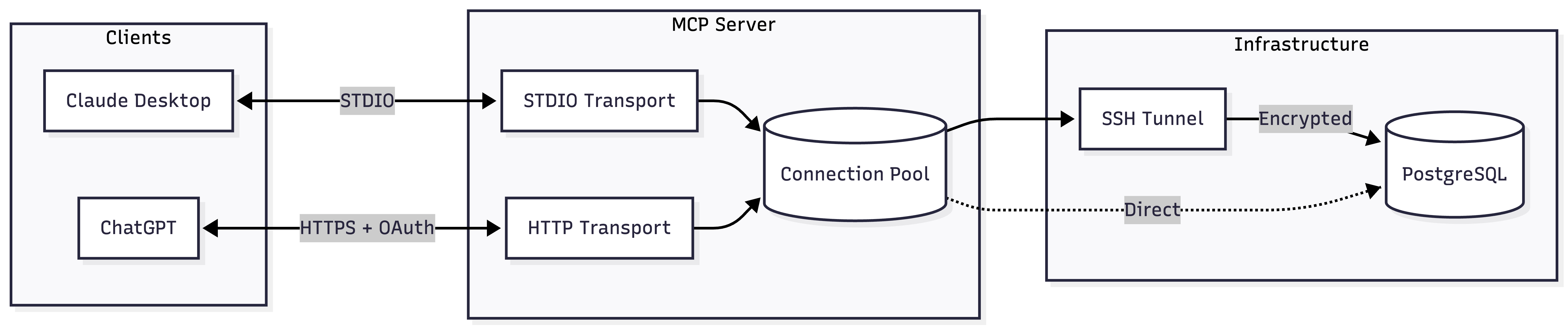
Quick Start
Claude Desktop (STDIO)
Add to your Claude Desktop config:
| Platform | Config Location |
|---|---|
| macOS | ~/Library/Application Support/Claude/claude_desktop_config.json |
| Windows | %APPDATA%/Claude/claude_desktop_config.json |
{
  "mcpServers": {
    "postgres": {
      "command": "npx",
      "args": ["-y", "@zlash65/postgresql-ssh-mcp"],
      "env": {
        "DATABASE_URI": "postgresql://user:password@localhost:5432/mydb"
      }
    }
  }
}
ChatGPT (Streamable HTTP)
DATABASE_URI="postgresql://user:pass@localhost:5432/mydb" npx @zlash65/postgresql-ssh-mcp-http
Then configure ChatGPT to connect to https://your-subdomain.example.com/mcp.
Note: ChatGPT requires HTTPS. Use a tunnel (ngrok, Cloudflare Tunnel) for local testing.
Available Tools
Query Tools
| Tool | Description |
|---|---|
execute_query |
Execute SQL with parameterized queries. Results capped by MAX_ROWS. |
explain_query |
Get EXPLAIN plans in text, JSON, YAML, or XML format. Supports ANALYZE. |
Schema Tools
| Tool | Description |
|---|---|
list_schemas |
List database schemas. Excludes system schemas by default. |
list_tables |
List tables with row counts and sizes. Optionally include views. |
describe_table |
Get columns, constraints, and indexes for a table. |
list_databases |
List all databases with owner, encoding, and size. |
Admin Tools
| Tool | Description |
|---|---|
get_connection_status |
Get pool stats, tunnel state, and connection info. |
list_active_connections |
Show active connections from pg_stat_activity. |
list_long_running_queries |
Find queries running longer than a threshold. |
get_database_version |
Get PostgreSQL server version. |
get_database_size |
Get database size and largest tables. |
get_table_stats |
Get vacuum/analyze stats and scan counts for a table. |
Environment Variables
Database Connection
| Variable | Required | Default | Description |
|---|---|---|---|
DATABASE_URI |
Yes* | — | Full connection string (e.g., postgresql://user:pass@host:5432/db) |
DATABASE_HOST |
Yes* | — | Database hostname |
DATABASE_PORT |
No | 5432 |
Database port |
DATABASE_NAME |
Yes* | — | Database name |
DATABASE_USER |
Yes* | — | Database username |
DATABASE_PASSWORD |
Yes* | — | Database password |
*Either DATABASE_URI or all individual connection variables are required.
SSL Configuration
| Variable | Default | Description |
|---|---|---|
DATABASE_SSL |
Auto | true or false. Auto-enabled for non-localhost. |
DATABASE_SSL_CA |
— | Path to CA certificate bundle |
DATABASE_SSL_REJECT_UNAUTHORIZED |
true |
Set false to allow self-signed certificates |
SSH Tunnel
| Variable | Required | Default | Description |
|---|---|---|---|
SSH_ENABLED |
No | false |
Set true to enable SSH tunneling |
SSH_HOST |
Yes* | — | SSH server hostname |
SSH_PORT |
No | 22 |
SSH server port |
SSH_USER |
Yes* | — | SSH username |
SSH_PRIVATE_KEY_PATH |
Yes** | — | Path to private key file |
SSH_PRIVATE_KEY_PASSPHRASE |
No | — | Passphrase for encrypted keys |
SSH_PASSWORD |
Yes** | — | SSH password (alternative to key) |
SSH_STRICT_HOST_KEY |
No | true |
Verify host key against known_hosts |
SSH_TRUST_ON_FIRST_USE |
No | true |
Auto-add unknown hosts (when strict is enabled) |
SSH_KNOWN_HOSTS_PATH |
No | ~/.ssh/known_hosts |
Custom known_hosts file |
SSH_KEEPALIVE_INTERVAL |
No | 10000 |
Keepalive interval in milliseconds |
SSH_MAX_RECONNECT_ATTEMPTS |
No | 5 |
Max reconnect attempts (-1 for unlimited) |
*Required when SSH_ENABLED=true
**Either SSH_PRIVATE_KEY_PATH or SSH_PASSWORD is required
Query Behavior
| Variable | Default | Description |
|---|---|---|
READ_ONLY |
true |
Block data modifications. Set false to allow writes. |
MAX_ROWS |
1000 |
Maximum rows returned per query |
QUERY_TIMEOUT |
30000 |
Query timeout in milliseconds |
MAX_CONCURRENT_QUERIES |
10 |
Maximum concurrent queries |
POOL_DRAIN_TIMEOUT_MS |
5000 |
Timeout for draining pool during reconnect |
HTTP Server (Streamable HTTP only)
| Variable | Default | Description |
|---|---|---|
PORT |
3000 |
HTTP server port |
MCP_HOST |
0.0.0.0 |
HTTP server bind address |
MCP_AUTH_MODE |
none |
Authentication mode: none or oauth |
MCP_STATELESS |
true |
Stateless mode (each request re-initializes) |
MCP_SERVER_POOL_SIZE |
4 |
Server instances for stateless mode |
MCP_SESSION_TTL_MINUTES |
30 |
Session TTL for stateful mode |
MCP_SESSION_CLEANUP_INTERVAL_MS |
300000 |
Session cleanup interval |
MCP_ALLOWED_ORIGINS |
— | Comma-separated allowed CORS origins (* for any) |
MCP_ALLOWED_HOSTS |
— | Comma-separated allowed Host headers |
OAuth (Auth0)
| Variable | Required | Description |
|---|---|---|
AUTH0_DOMAIN |
Yes* | Auth0 tenant domain (e.g., tenant.us.auth0.com) |
AUTH0_AUDIENCE |
Yes* | Auth0 API identifier / audience |
MCP_RESOURCE_DOCUMENTATION |
No | URL to API documentation (RFC 9728) |
*Required when MCP_AUTH_MODE=oauth
Documentation
| Guide | Description |
|---|---|
| STDIO Setup | Claude Desktop and local development |
| Streamable HTTP | HTTP server setup and configuration |
| Server Setup | Deploy to production with nginx and SSL |
| ChatGPT Setup | Complete Auth0 OAuth setup for ChatGPT |
Docker
STDIO Server
docker build --target runtime -t postgresql-mcp .
docker run -e DATABASE_URI="postgresql://..." postgresql-mcp
HTTP Server
docker build --target runtime-http -t postgresql-mcp-http .
docker run -p 3000:3000 -e DATABASE_URI="postgresql://..." postgresql-mcp-http
Development
# Install dependencies
npm install

# Build
npm run build

# Run tests
npm test

# Type check
npm run typecheck

# Lint
npm run lint
Install Postgresql Ssh Mcp in Claude Desktop, Claude Code & Cursor
unyly install postgresql-ssh-mcpInstalls into Claude Desktop, Claude Code, Cursor & VS Code — handles npx, uvx and build-from-source repos for you.
First time? Get the CLI: curl -fsSL https://unyly.org/install | sh
Or configure manually
Run in your terminal:
claude mcp add postgresql-ssh-mcp --env DATABASE_URI="" -- npx -y @zlash65/postgresql-ssh-mcpStep-by-step: how to install Postgresql Ssh Mcp
FAQ
Is Postgresql Ssh Mcp MCP free?
Yes, Postgresql Ssh Mcp MCP is free — one-click install via Unyly at no cost.
Does Postgresql Ssh Mcp need an API key?
Yes, it requires environment variables: DATABASE_URI. Unyly injects them into the config during install.
Is Postgresql Ssh Mcp hosted or self-hosted?
Self-hosted: the server runs locally on your machine via the install command above.
How do I install Postgresql Ssh Mcp in Claude Desktop, Claude Code or Cursor?
Open Postgresql Ssh Mcp on unyly.org, pick your client tab (Claude Desktop, Claude Code, Cursor) and press Install — the config is generated automatically, no JSON editing.
Changes
Versions and requested access over time.
- New version published
- New version published
- New version published
- New version published
- New version published
- New version published
- New version published
- New version published
Related MCPs
Postgres
Query your database in natural language
 by Anthropic
wenb1n-dev/SmartDB_MCP
Connect to multiple databases at once (MySQL, PostgreSQL, SQL Server, MariaDB, Dameng, Oracle) for operations, health analysis and SQL optimization.
 by wenb1n-dev
Postgres Server
This server enables interaction with PostgreSQL databases through the Model Context Protocol, optimized for the AWS Bedrock AgentCore Runtime. It provides tools
 by madhurprash
PostgreSQL
Read-only database access with schema inspection.
by modelcontextprotocolRedis
Interact with Redis key-value stores.
by modelcontextprotocolSQLite
Database interaction and business intelligence capabilities.
by modelcontextprotocolmxcp
Open-source framework for building enterprise-grade MCP servers using just YAML, SQL, and Python, with built-in auth, monitoring, ETL and policy enforcement.
 by raw-labs
julien040/anyquery
Query apps with SQL from a single local-first binary; also connects to PostgreSQL, MySQL and SQLite-compatible databases.
 by julien040
drakonkat/wizzy-mcp-tmdb
Search and retrieve movie, TV show and person information from The Movie Database (TMDB) API.
 by drakonkat
longevity-genie/opengenes-mcp
Query the OpenGenes database for aging and longevity research.
 by longevity-genie
Compare Postgresql Ssh Mcp with
Not sure what to pick?
Find your stack in 60 seconds
Author?
Embed badge for your README
Browse similar
All data MCPs