
OpenNutrition
FreeNot checkedProvides access to OpenNutrition's 300,000+ food database with tools for searching foods by name, browsing paginated lists, retrieving detailed nutritional info

About
Provides access to OpenNutrition's 300,000+ food database with tools for searching foods by name, browsing paginated lists, retrieving detailed nutritional information by ID, and looking up products via EAN-13 barcodes for recipe analysis and dietary planning.
README
A Model Context Protocol (MCP) server providing access to the comprehensive OpenNutrition food database with 300,000+ food items, nutritional data, and barcode lookups.
OpenNutrition addresses the longstanding issues with fragmented and unreliable nutritional data by combining authoritative public sources (USDA, CNF, FRIDA, AUSNUT). Unlike other databases that suffer from inconsistent user-generated content or restrictive commercial licensing, OpenNutrition provides transparent, comprehensive, and accurate nutritional data that's freely accessible to developers and researchers.
Tools
- Search by Name: Find foods by name, brand, or partial matches
- Browse Foods: Get paginated lists of all available foods
- Get by ID: Retrieve detailed nutritional information using food IDs
- Barcode Lookup: Find foods using EAN-13 barcodes
Installation
Docker (recommended)
The easiest way to run the server is via Docker. No build steps required.
Run the container:
docker run --rm -p 9113:3000 deadletterq/mcp-opennutrition
Then add to your MCP configuration:
"mcp-opennutrition": {
    "type": "streamable-http",
    "url": "http://localhost:9113"
}
From source
Install dependencies:
npm installBuild the project:
npm run buildAdd to your MCP configuration (set the same version of node that you used to build the project):
"mcp-opennutrition": {
    "command": "/Users/YOUR.USERNAME/.nvm/versions/node/v20.19.0/bin/node",
    "args": [
        "/ABSOLUTE/PATH/TO/PARENT/FOLDER/mcp-opennutrition/build/index.js"
    ]
}
Data Source
This server uses the OpenNutrition dataset.
The dataset provides comprehensive nutritional profiles including macronutrients, vitamins, and minerals.
Usage
Once configured, the MCP server runs fully locally on your machine and automatically provides food and nutrition query capabilities to Claude/Cline. All data processing and queries happen locally with no external API calls, ensuring privacy and fast response times.
Example
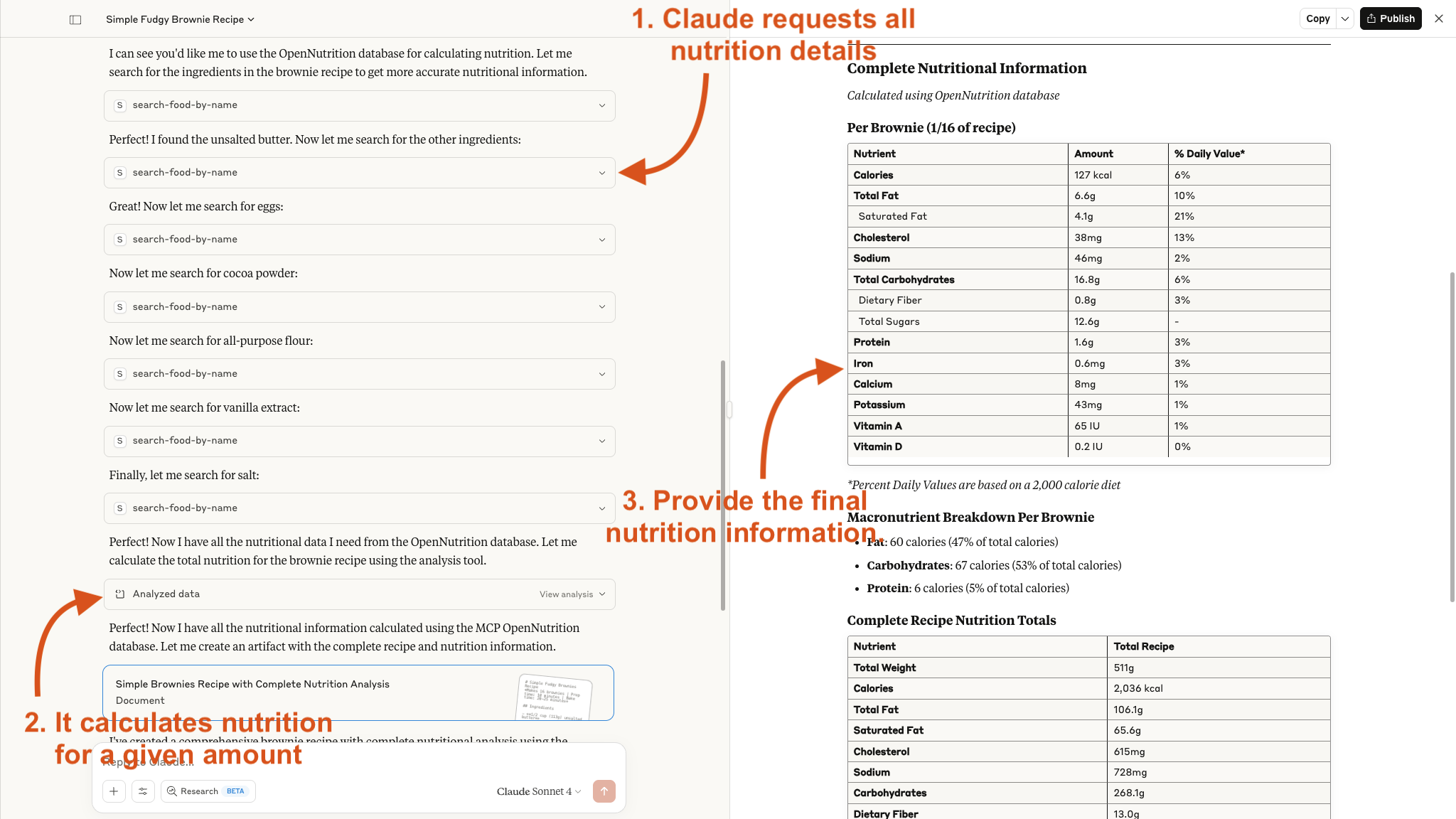
Here is an example of how Claude uses the tool for a brownie recipe:
Installing OpenNutrition
This server has no published package — it is built from source. Open the repository and follow its README.
▸ github.com/deadletterq/mcp-opennutritionFAQ
Is OpenNutrition MCP free?
Yes, OpenNutrition MCP is free — one-click install via Unyly at no cost.
Does OpenNutrition need an API key?
No, OpenNutrition runs without API keys or environment variables.
Is OpenNutrition hosted or self-hosted?
Self-hosted: the server runs locally on your machine via the install command above.
How do I install OpenNutrition in Claude Desktop, Claude Code or Cursor?
Open OpenNutrition on unyly.org, pick your client tab (Claude Desktop, Claude Code, Cursor) and press Install — the config is generated automatically, no JSON editing.
Related MCPs
Postgres
Query your database in natural language
 by Anthropic
wenb1n-dev/SmartDB_MCP
Connect to multiple databases at once (MySQL, PostgreSQL, SQL Server, MariaDB, Dameng, Oracle) for operations, health analysis and SQL optimization.
 by wenb1n-dev
Postgres Server
This server enables interaction with PostgreSQL databases through the Model Context Protocol, optimized for the AWS Bedrock AgentCore Runtime. It provides tools
 by madhurprash
PostgreSQL
Read-only database access with schema inspection.
by modelcontextprotocolRedis
Interact with Redis key-value stores.
by modelcontextprotocolSQLite
Database interaction and business intelligence capabilities.
by modelcontextprotocolmxcp
Open-source framework for building enterprise-grade MCP servers using just YAML, SQL, and Python, with built-in auth, monitoring, ETL and policy enforcement.
 by raw-labs
julien040/anyquery
Query apps with SQL from a single local-first binary; also connects to PostgreSQL, MySQL and SQLite-compatible databases.
 by julien040
drakonkat/wizzy-mcp-tmdb
Search and retrieve movie, TV show and person information from The Movie Database (TMDB) API.
 by drakonkat
longevity-genie/opengenes-mcp
Query the OpenGenes database for aging and longevity research.
 by longevity-genie
Compare OpenNutrition with
Not sure what to pick?
Find your stack in 60 seconds
Author?
Embed badge for your README
Browse similar
All data MCPs