
openlink/mcp-server-jdbc
FreeNot checkedGeneric database (DBMS) connectivity via JDBC.

About
Generic database (DBMS) connectivity via JDBC.
README
OpenLink MCP Server for JDBC
A lightweight Java-based MCP (Model Context Protocol) server for JDBC built with Quakrus. This server is compatible with Virtuoso DBMS and any other DBMS backend that has a JDBC driver.
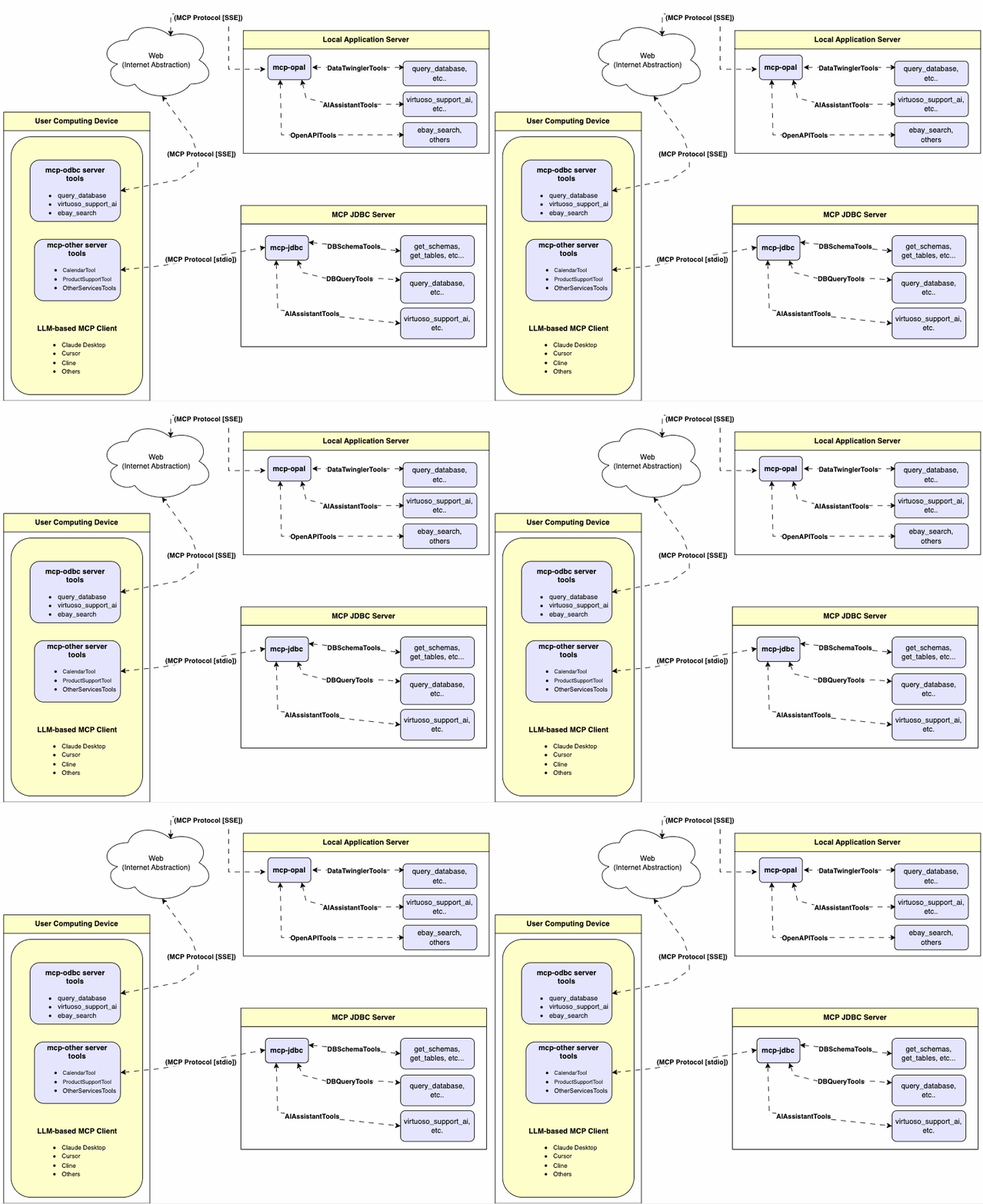
Features
- Get Schemas: Fetch and list all schema names from the connected database.
- Get Tables: Retrieve table information for specific schemas or all schemas.
- Describe Table: Generate a detailed description of table structures, including:
- Column names and data types
- Nullable attributes
- Primary and foreign keys
- Search Tables: Filter and retrieve tables based on name substrings.
- Execute Stored Procedures: A Virtuoso-specific feature! Execute stored procedures and retrieve results.
- Execute Queries:
- JSONL result format: Optimized for structured responses.
- Markdown table format: Ideal for reporting and visualization.
Prerequisites
MCP server requires Java 21 or above.
Installation
Clone this repository:
git clone https://github.com/OpenLinkSoftware/mcp-jdbc-server.git
cd mcp-jdbc-server
Environment Variables
Update your .env by overriding these defaults to match your preferences:
jdbc.url=jdbc:virtuoso://localhost:1111
jdbc.user=dba
jdbc.password=dba
jdbc.api_key=xxx
Configuration
For Claude Desktop users using Virtuoso and its JDBC driver:
Add the following to claude_desktop_config.json:
{
  "mcpServers": {
    "my_database": {
      "command": "java",
      "args": ["-jar", "/path/to/mcp-jdbc-server/MCPServer-1.0.0-runner.jar"],
      "env": {
        "jdbc.url": "jdbc:virtuoso://localhost:1111",
        "jdbc.user": "username",
        "jdbc.password": "password",
        "jdbc.api_key": "sk-xxx"
      }
    }
  }
}
For Claude Desktop users using another JDBC driver or a combination of drivers:
Add the following, edited to suit your local environment, to claude_desktop_config.json:
    "jdbc": {
      "command": "java",
      "args": [
        "-cp",
        "/path/to/mcp-jdbc-server/MCPServer-1.0.0-runner.jar:/path/to/jdbc_driver1.jar:/path/to/jdbc_driverN.jar",
        "io.quarkus.runner.GeneratedMain"
      ],
      "env": {
        "jdbc.url": "jdbc:virtuoso://localhost:1111",
        "jdbc.user": "dba",
        "jdbc.password": "dba"
      }
    }
Use
Tools Provided
After successful installation, the following tools will be available to MCP client applications.
Overview
| name | description |
|---|---|
jdbc_get_schemas |
List database schemas accessible to connected database management system (DBMS). |
jdbc_get_tables |
List tables associated with a selected database schema. |
jdbc_describe_table |
Provide the description of a table associated with a designated database schema. This includes information about column names, data types, nulls handling, autoincrement, primary key, and foreign keys. |
jdbc_filter_table_names |
List tables, based on a substring pattern from the q input field, associated with a selected database schema. |
jdbc_query_database |
Execute a SQL query and return results in JSONL format. |
jdbc_execute_query |
Execute a SQL query and return results in JSONL format. |
jdbc_execute_query_md |
Execute a SQL query and return results in Markdown table format. |
jdbc_spasql_query |
A Virtuoso-specific feature! Execute a SPASQL query and return results. |
jdbc_sparql_query |
A Virtuoso-specific feature! Execute a SPARQL query and return results. |
jdbc_virtuoso_support_ai |
A Virtuoso-specific feature! Interact with LLMs through the Virtuoso Support Assistant/Agent. |
Detailed Description
jdbc_get_schemas- Retrieve and return a list of all schema names from the connected database.
- Input parameters:
user(string, optional): Database username. Defaults to"demo".password(string, optional): Database password. Defaults to"demo".url(string, optional): JDBC URL connection string.
- Returns a JSON string array of schema names.
jdbc_get_tables- Retrieve and return a list containing information about tables in a specified schema. If no schema is provided, uses the connection's default schema.
- Input parameters:
schema(string, optional): Database schema to filter tables. Defaults to connection default.user(string, optional): Database username. Defaults to"demo".password(string, optional): Database password. Defaults to"demo".url(string, optional): JDBC URL connection string.
- Returns a JSON string containing table information (e.g.,
TABLE_CAT,TABLE_SCHEM,TABLE_NAME,TABLE_TYPE).
jdbc_filter_table_names- Filters and returns information about tables whose names contain a specific substring.
- Input parameters:
q(string, required): The substring to search for within table names.schema(string, optional): Database schema to filter tables. Defaults to connection default.user(string, optional): Database username. Defaults to"demo".password(string, optional): Database password. Defaults to"demo".url(string, optional): JDBC URL connection string.
- Returns a JSON string containing information for matching tables.
jdbc_describe_table- Retrieve and return detailed information about the columns of a specific table.
- Input parameters:
schema(string, required): The database schema name containing the table.table(string, required): The name of the table to describe.user(string, optional): Database username. Defaults to"demo".password(string, optional): Database password. Defaults to"demo".url(string, optional): JDBC URL connection string.
- Returns a JSON string describing the table's columns (e.g.,
COLUMN_NAME,TYPE_NAME,COLUMN_SIZE,IS_NULLABLE).
jdbc_query_database- Execute a standard SQL query and return the results in JSON format.
- Input parameters:
query(string, required): The SQL query string to execute.user(string, optional): Database username. Defaults to"demo".password(string, optional): Database password. Defaults to"demo".url(string, optional): JDBC URL connection string.
- Returns query results as a JSON string.
jdbc_query_database_md- Execute a standard SQL query and return the results formatted as a Markdown table.
- Input parameters:
query(string, required): The SQL query string to execute.user(string, optional): Database username. Defaults to"demo".password(string, optional): Database password. Defaults to"demo".url(string, optional): JDBC URL connection string.
- Returns query results as a Markdown table string.
jdbc_query_database_jsonl- Execute a standard SQL query and return the results in JSON Lines (JSONL) format (one JSON object per line).
- Input parameters:
query(string, required): The SQL query string to execute.user(string, optional): Database username. Defaults to"demo".password(string, optional): Database password. Defaults to"demo".url(string, optional): JDBC URL connection string.
- Returns query results as a JSONL string.
jdbc_spasql_query- A Virtuoso-specific feature!
- Execute a SPASQL (SQL/SPARQL hybrid) query return results.
- Input parameters:
query(string, required): The SPASQL query string.max_rows(number, optional): Maximum number of rows to return. Defaults to20.timeout(number, optional): Query timeout in milliseconds. Defaults to30000(i.e., 30 seconds).user(string, optional): Database username. Defaults to"demo".password(string, optional): Database password. Defaults to"demo".url(string, optional): JDBC URL connection string.
- Returns the result from the underlying stored procedure call (e.g.,
Demo.demo.execute_spasql_query).
jdbc_sparql_query- A Virtuoso-specific feature!
- Execute a SPARQL query and return results.
- Input parameters:
query(string, required): The SPARQL query string.format(string, optional): Desired result format. Defaults to'json'.timeout(number, optional): Query timeout in milliseconds. Defaults to30000(i.e., 30 seconds).user(string, optional): Database username. Defaults to"demo".password(string, optional): Database password. Defaults to"demo".url(string, optional): JDBC URL connection string.
- Returns the result from the underlying function call (e.g.,
"UB".dba."sparqlQuery").
jdbc_virtuoso_support_ai- A Virtuoso-specific feature!
- Utilizes a Virtuoso-specific AI Assistant function, passing a prompt and optional API key.
- Input parameters:
prompt(string, required): The prompt text for the AI function.api_key(string, optional): API key for the AI service. Defaults to"none".user(string, optional): Database username. Defaults to"demo".password(string, optional): Database password. Defaults to"demo".url(string, optional): JDBC URL connection string.
- Returns the result from the AI Support Assistant function call (e.g.,
DEMO.DBA.OAI_VIRTUOSO_SUPPORT_AI).
Basic Use & Troubleshooting
MCP Inspector Connecting to Virtuoso's ODBC Driver
For basic MCP client use and troubleshooting, use the MCP Inspector as follows:
Install the MCP Inspector:
npm install -g @modelcontextprotocol/inspectorStart the inspector:
npx @modelcontextprotocol/inspector java -jar /path/to/mcp-jdbc-server/MCPServer-1.0.0-runner.jar
Access the URL returned by the inspector to troubleshoot MCP server interactions.
MCP Inspector Connecting to additional Drivers
For basic MCP client use and troubleshooting, use the MCP Inspector as follows:
Install the JDBC Driver(s), ensuring their JAR files are registered with the host operating system's Java Virtual Machine (JVM) via
$CLASSPATH. For instance:export CLASSPATH=$CLASSPATH:/path/to/driver1.jar:/path/to/driver2.jar:/path/to/driverN.jarStart the inspector using the following command-line arguments:
npx @modelcontextprotocol/inspector java -cp MCPServer-1.0.0-runner.jar:/path/to/driver1.jar:/path/to/driver2.jar:/path/to/driverN.jar io.quarkus.runner.GeneratedMain
Use Example based on Oracle and Informix Drivers
Assuming the following JDBC Driver information:
Oracle JDBC Driver URL Template
jdbc:oracle:thin:@<hostname>:[port]:<SERVICEID>Informix JDBC Driver URL Template
jdbc:informix-sqli://<hostname>:<port>/<database></database>:<INFORMIXSERVER>=<SERVICEID>
Install the Oracle (
ojdbc17.jar) and/or Informix (jdbc-15.0.0.1.1.jar) JDBC Drivers, and ensure their JAR files are registered with the host operating system's Java Virtual Machine (JVM) via$CLASSPATH. For instance:export CLASSPATH=$CLASSPATH:/path/to/Java/Extensions/jdbc-15.0.0.1.1.jar export CLASSPATH=$CLASSPATH:/path/to/Java/Extensions/ojdbc17.jarStart the inspector using the following command-line arguments:
npx @modelcontextprotocol/inspector java -cp MCPServer-1.0.0-runner.jar:/path/to/Java/Extensions/ojdbc17.jar:/path/to/Java/Extensions/jdbc-15.0.0.1.1.jar io.quarkus.runner.GeneratedMainAccess the URL returned by the inspector and then use the
jdbc_execute_queryoperation to query the target database, by providing actual values for the following input field templates:- JDBC URL
- User
- Password
- Query
Installing openlink/mcp-server-jdbc
This server has no published package — it is built from source. Open the repository and follow its README.
▸ github.com/OpenLinkSoftware/mcp-jdbc-serverFAQ
Is openlink/mcp-server-jdbc MCP free?
Yes, openlink/mcp-server-jdbc MCP is free — one-click install via Unyly at no cost.
Does openlink/mcp-server-jdbc need an API key?
No, openlink/mcp-server-jdbc runs without API keys or environment variables.
Is openlink/mcp-server-jdbc hosted or self-hosted?
Self-hosted: the server runs locally on your machine via the install command above.
How do I install openlink/mcp-server-jdbc in Claude Desktop, Claude Code or Cursor?
Open openlink/mcp-server-jdbc on unyly.org, pick your client tab (Claude Desktop, Claude Code, Cursor) and press Install — the config is generated automatically, no JSON editing.
Related MCPs
Postgres
Query your database in natural language
 by Anthropic
wenb1n-dev/SmartDB_MCP
Connect to multiple databases at once (MySQL, PostgreSQL, SQL Server, MariaDB, Dameng, Oracle) for operations, health analysis and SQL optimization.
 by wenb1n-dev
Postgres Server
This server enables interaction with PostgreSQL databases through the Model Context Protocol, optimized for the AWS Bedrock AgentCore Runtime. It provides tools
 by madhurprash
PostgreSQL
Read-only database access with schema inspection.
by modelcontextprotocolRedis
Interact with Redis key-value stores.
by modelcontextprotocolSQLite
Database interaction and business intelligence capabilities.
by modelcontextprotocolmxcp
Open-source framework for building enterprise-grade MCP servers using just YAML, SQL, and Python, with built-in auth, monitoring, ETL and policy enforcement.
 by raw-labs
julien040/anyquery
Query apps with SQL from a single local-first binary; also connects to PostgreSQL, MySQL and SQLite-compatible databases.
 by julien040
drakonkat/wizzy-mcp-tmdb
Search and retrieve movie, TV show and person information from The Movie Database (TMDB) API.
 by drakonkat
longevity-genie/opengenes-mcp
Query the OpenGenes database for aging and longevity research.
 by longevity-genie
Compare openlink/mcp-server-jdbc with
Not sure what to pick?
Find your stack in 60 seconds
Author?
Embed badge for your README
Browse similar
All data MCPs