
ni-c/osm-mcp
FreeNot checkedOpenStreetMap travel planning: geocoding, walking, driving and cycling routes, travel-time matrices, route optimization, isochrones and POI search.

About
OpenStreetMap travel planning: geocoding, walking, driving and cycling routes, travel-time matrices, route optimization, isochrones and POI search.
README
CI
OpenSSF Scorecard
Socket Badge
Glama score
npm version
container image
HTTP via mcp-hub
docs
sponsor
A Model Context Protocol (MCP) server for OpenStreetMap, built for travel planning.
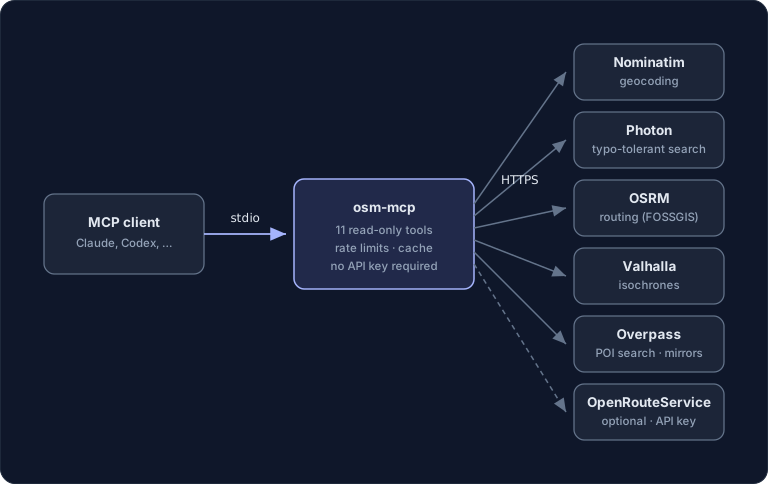
Lets MCP clients like Claude Code, Claude Desktop or Codex answer questions about places: geocoding, walking, driving and cycling distances and durations, multi-stop route optimization, isochrones and POI search — 11 tools, all read-only.
Eleven tools is the ceiling, not the floor: OSM_ALLOW_TOOLS=essential
registers a curated six instead, and a model picks the right tool far more
reliably from six than from eleven — see
choosing which tools load.
All backends are free public OpenStreetMap services, so no API key is required. An OpenRouteService key can be supplied optionally to switch the routing engine.
What makes it different
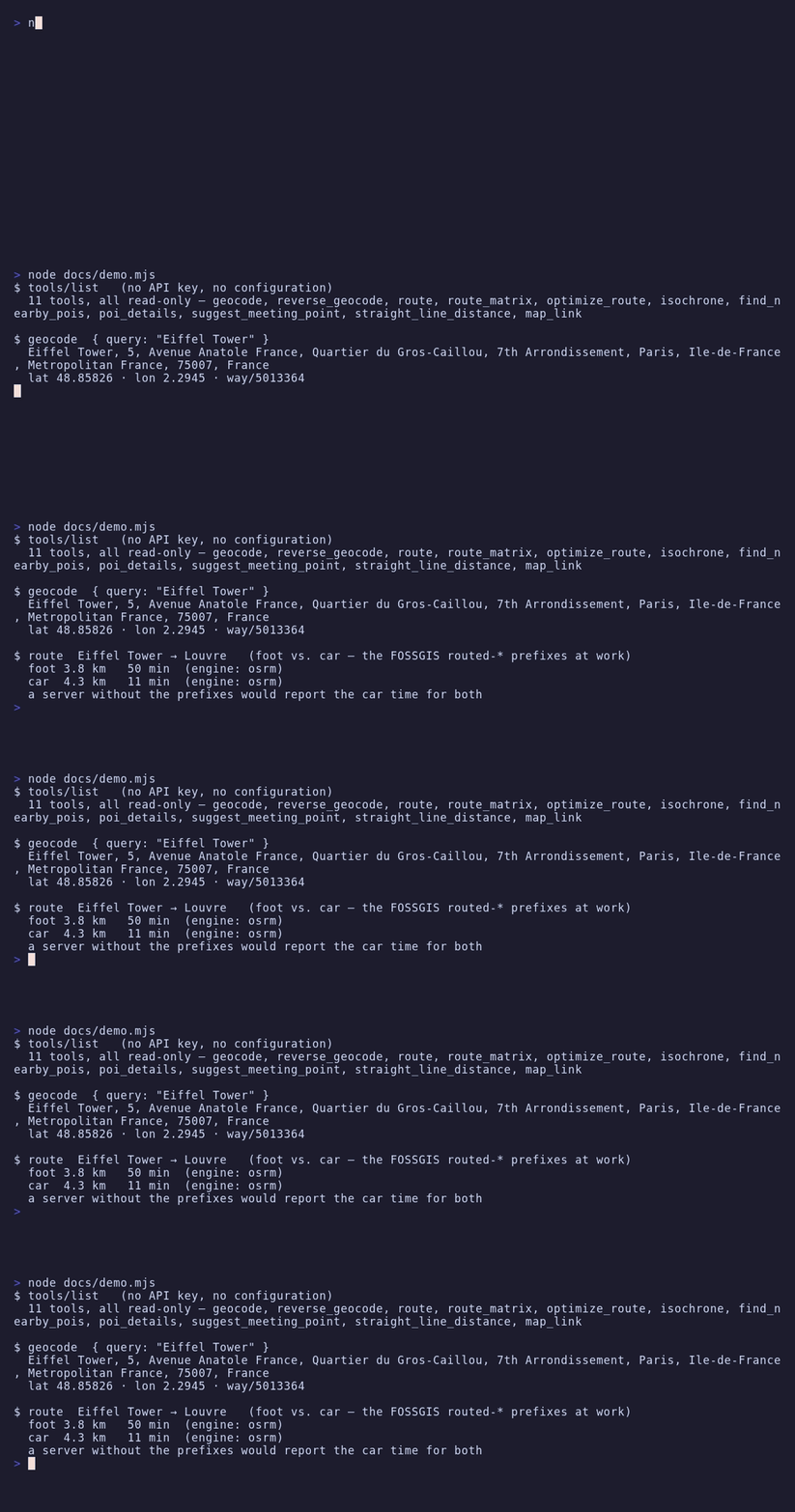
- Correct walking/cycling routes. The public OSRM demo servers ignore the
profile segment inside the OSRM URL path and always return car routes
unless the FOSSGIS
routed-foot/routed-bike/routed-carpath prefixes are used. Most existing OSM MCP servers get this wrong and silently return driving times for walking queries. This server uses the prefixes and its live smoke test asserts that foot routes are much slower than car routes. - Policy-compliant by construction. Per-service rate limiting (Nominatim and OSRM: 1 request/second), an identifying User-Agent on every request (required by the Nominatim usage policy), response caching, capped Overpass concurrency (2 slots) and automatic failover to the next Overpass endpoint on anything but a malformed query, within one 50-second budget per call.
- Photon support. Optional typo-tolerant geocoding via komoot's Photon, which is designed for interactive use — a better fit for LLM-driven lookups than hammering Nominatim.
Requirements
- Node.js ≥ 24
- Internet access to the public OpenStreetMap services (see table below)
Configuration
Every variable is optional — the server works out of the box.
| Variable | Default | Description |
|---|---|---|
OSM_USER_AGENT |
osm-mcp/<version> (+https://github.com/ni-c/osm-mcp) |
User-Agent sent to every service. Nominatim requires a real, identifying one. |
NOMINATIM_BASE_URL |
https://nominatim.openstreetmap.org |
Geocoding / reverse geocoding |
PHOTON_BASE_URL |
https://photon.komoot.io |
Typo-tolerant geocoding |
OSRM_BASE_URL |
https://routing.openstreetmap.de |
Routing, matrices, trip optimization. Must serve the routed-{car,bike,foot} path prefixes (the FOSSGIS layout). |
OVERPASS_BASE_URL |
https://z.overpass-api.de/api/interpreter,https://lz4.overpass-api.de/api/interpreter |
Comma-separated Overpass endpoints, tried in order until one answers (a malformed query stops the walk) |
VALHALLA_BASE_URL |
https://valhalla1.openstreetmap.de |
Isochrones |
ORS_API_KEY |
– | Optional OpenRouteService key (secret). When set, routes, matrices and isochrones use ORS instead of OSRM/Valhalla. Free tier: 2000 directions/day, 40/minute. |
ORS_BASE_URL |
https://api.openrouteservice.org |
OpenRouteService endpoint |
OSM_CACHE_TTL |
3600 |
Seconds identical upstream responses are served from the in-memory cache (0 disables caching) |
OSM_ALLOW_TOOLS |
no | Comma-separated tool names, list_* prefixes, or essential for a curated preset |
OSM_DENY_TOOLS |
no | Same syntax; removed from whatever OSM_ALLOW_TOOLS left |
Choosing which tools load
OSM_ALLOW_TOOLS and OSM_DENY_TOOLS take comma-separated tool names;
a trailing * matches a whole family. essential is a curated preset of
six: geocode, reverse_geocode, find_nearby_pois, poi_details, route, map_link.
OSM_ALLOW_TOOLS=essential
OSM_ALLOW_TOOLS=geocode,route,find_nearby_pois
OSM_DENY_TOOLS=isochrone,optimize_route
An entry that matches no tool aborts startup and names it, so a typo cannot
silently hide a tool — an absent tool is not something anyone traces back to an
environment variable. A filtered tool is never registered, so it is absent from
tools/list and unknown to tools/call alike.
If you run several of these servers at once, mcp-hub
is the other answer — its /hub endpoint replaces every server's tools with six
meta-tools.
Installation
Claude Code
claude mcp add osm -- npx -y osm-mcp
Claude Desktop
claude_desktop_config.json:
{
  "mcpServers": {
    "osm": {
      "command": "npx",
      "args": ["-y", "osm-mcp"]
    }
  }
}
Codex
~/.codex/config.toml:
[mcp_servers.osm]
command = "npx"
args = ["-y", "osm-mcp"]
Docker
Multi-arch, with SBOM and build provenance:
docker run -i --rm ghcr.io/ni-c/osm-mcp
-i is required — the protocol runs over stdin and stdout. There is no port to
publish. More client recipes are in the
client guide.
Through mcp-hub
A client that cannot spawn a local process — ChatGPT connectors, Claude on the web,
Cursor, LibreChat — reaches osm-mcp through mcp-hub: one
container serves many stdio MCP servers over Streamable HTTP, with an OAuth 2.1 login
behind a single password and long-lived tokens for the clients that cannot do OAuth. Its
/hub endpoint puts every server behind six meta-tools, so one connector reaches all of
them without N×tool schemas in the model's context, and it speaks both protocol revisions
— a question this server asks travels through it to the person at the far end.
Its /config/mcp.json uses Claude Code's format, so the entry is the one you already
have:
{
  "mcpServers": {
    "osm": {
      "command": "npx",
      "args": ["-y", "osm-mcp"],
      "env": { "OSM_ALLOW_TOOLS": "essential" },
      "denyTools": ["isochrone"]
    }
  }
}
allowTools and denyTools there are the hub's own per-server filter, which is not
the same thing as *_ALLOW_TOOLS in env — the difference, and the mistake it invites,
are in the client guide.
Tools
| Tool | Description |
|---|---|
geocode |
Place name/address → coordinates (Nominatim or Photon) |
reverse_geocode |
Coordinates → nearest address |
route |
Distance and duration between 2+ waypoints, foot/car/bike; optional turn-by-turn summary |
route_matrix |
Travel time/distance from every origin to every destination in one call |
optimize_route |
Best visiting order for a set of stops (traveling-salesman, OSRM trip) |
isochrone |
Reachable area within a time or distance budget (Valhalla, or ORS with key) |
find_nearby_pois |
POIs around a location by category or raw OSM tag, sorted by distance (Overpass) |
poi_details |
Full OSM record of one element: opening hours, website, phone, … |
suggest_meeting_point |
Fair meeting venue for 2–8 people (balanced travel times) |
straight_line_distance |
Great-circle distance, computed offline |
map_link |
openstreetmap.org marker / directions links, computed offline |
Every place input accepts either a name/address (geocoded automatically) or
literal coordinates as "lat,lon".
Structured output
Every tool declares an outputSchema and answers with structuredContent
alongside the text block, so a client can use the result without parsing prose:
{
  "untrusted": true,
  "source": "openstreetmap",
  "profile": "foot",
  "engine": "osrm",
  "waypoints": ["Berlin Hauptbahnhof", "Brandenburger Tor"],
  "distance": "2.3 km",
  "distance_m": 2317,
  "duration": "29 min",
  "duration_s": 1740,
}
Every tool carries untrusted: true and source: "openstreetmap" — there
is no exception list, because OpenStreetMap is editable by anyone on earth and
no tool here answers with anything else. A client that reads only the structured
half would otherwise get a mapper's free text with no framing at all.
What this server computes — distances, durations, coordinates, which routing
engine ran — is described exactly. What comes out of OSM is described but left
open: the tag namespace has no schema, and a mapper adding payment:bitcoin
must not take poi_details out of service. The SDK validates every result
against its schema before it goes out, so a stricter shape would do exactly
that.
The control-character and BiDi stripping this server has always done to its text now runs over the structured value too, key by key. It used to happen on the serialized JSON, which reached every string in it for free.
Usage policies & attribution
This server talks to shared community infrastructure. It enforces the published limits client-side, but the operator asks users to keep overall usage light and non-commercial:
- Data: © OpenStreetMap contributors, licensed under ODbL 1.0.
- Nominatim: max 1 request/second, identifying User-Agent mandatory, results cached (policy).
- OSRM / Valhalla (FOSSGIS): reasonable, non-commercial use; max 1 request/second (about).
- Overpass: ~2 concurrent slots per IP, <10 000 queries/day (wiki).
- Photon: fair use (photon.komoot.io).
For heavy or commercial use, self-host the services and point the
*_BASE_URL variables at your instances.
Not exposed, on purpose
No editing. All eleven tools are read-only against OpenStreetMap; the editing API is not wired up at all, so there is no write mode to switch off.
No rendering and no tracking. Results are structured data plus links rather
than images — map_link hands you a URL to look at the map yourself — and there
is no state between calls.
No offline mode. Every answer comes from the public OpenStreetMap services, under their usage policies.
Safety
- All tools are read-only; the server never writes to OpenStreetMap.
- No credentials are required; the optional
ORS_API_KEYis removed from the process environment after loading and redacted from error messages. - OSM-sourced content (names, addresses, tags) is marked as untrusted data in tool results so the model treats it as data, not instructions.
- Upstream error bodies are truncated and HTML error pages dropped before they reach the model context; the HTTP status is decided before a body is read.
- Every value a service answers is shaped before it reaches a result: finite numbers, bounded strings, one malformed element dropped rather than the whole listing.
- Redirects are never followed; all requests time out.
Documentation
The full guide, tool reference and security notes live at osm-mcp.ni-c.de (source in docs/).
Development
npm install
npm run lint          # oxlint + prettier
npm test              # unit tests (all upstream APIs mocked)
npm run test:coverage
npm run build
npm run smoke         # opt-in LIVE test against the real public services
Releasing
Tag-driven, no manual publish step:
- Move the
[Unreleased]entries into a new## [x.y.z] - YYYY-MM-DDsection inCHANGELOG.mdand bumppackage.json. npm run lint && npm run build && npm run test:coverage.- Commit, then a signed annotated tag:
git tag -s vx.y.z -m "vx.y.z". git push origin main vx.y.z.
release.yml then runs the tests, publishes to npm with provenance via Trusted
Publishing (no token secret involved), creates the GitHub release from the
CHANGELOG section, and publishes to the
MCP registry as
io.github.ni-c/osm-mcp. ci.yml pushes the multi-arch image to GHCR on the
same tag.
If the registry step fails, fix it on main and dispatch the
Publish to MCP Registry workflow — do not re-run the tag job, which would
check out the old tree.
Contributing
Issues, discussions and pull requests are welcome — see CONTRIBUTING.md. For vulnerabilities please use private reporting rather than a public issue; the policy is in SECURITY.md.
License
MIT © Willi Thiel
Installing ni-c/osm-mcp
This server has no published package — it is built from source. Open the repository and follow its README.
▸ github.com/ni-c/osm-mcpFAQ
Is ni-c/osm-mcp MCP free?
Yes, ni-c/osm-mcp MCP is free — one-click install via Unyly at no cost.
Does ni-c/osm-mcp need an API key?
Yes, it requires environment variables: OSM_ALLOW_TOOLS, OSM_DENY_TOOLS. Unyly injects them into the config during install.
Is ni-c/osm-mcp hosted or self-hosted?
Self-hosted: the server runs locally on your machine via the install command above.
How do I install ni-c/osm-mcp in Claude Desktop, Claude Code or Cursor?
Open ni-c/osm-mcp on unyly.org, pick your client tab (Claude Desktop, Claude Code, Cursor) and press Install — the config is generated automatically, no JSON editing.
Related MCPs
GitHub
PRs, issues, code search, CI status
 by GitHub
Filesystem
Secure file operations with configurable access controls.
Memory
Knowledge graph-based persistent memory system.

Unyly Deploy
Deploy sites and MCP servers to Unyly straight from your AI agent
 by Unyly
Amap Maps Mcp Server
MCP server for using the AMap Maps API
 by duxiaohui
PayMCP
Lightweight payments layer for MCP servers: turn tools into paid endpoints with a two-line decorator. [PyPI](https://pypi.org/project/paymcp/) · [npm](https://w
 by blustAI
Server For Power BI
Enables exploring Microsoft Fabric / Power BI workspaces and semantic models, and executing ad-hoc DAX queries.
 by Mitsubishi-Fuso
Gpt Image 2 Mcp
RunAPI GPT Image 2 MCP server for image generation: create tasks, poll results, and check pricing across 1 model from Claude Code, Codex, Cursor, and VS Code.
 by runapi-ai
Template MCP Server
A CLI tool to create a new Model Context Protocol server project with TypeScript support, dual transport options, and an extensible structure
 by mcpdotdirect
Supabase
Database, auth and storage
 by Supabase
Compare ni-c/osm-mcp with
Not sure what to pick?
Find your stack in 60 seconds
Author?
Embed badge for your README
Browse similar
All development MCPs