
Platform Framework
FreeNot checkedA framework for building MCP servers with built-in enterprise capabilities such as authentication, authorization, telemetry, audit logging, and data classificat

About
A framework for building MCP servers with built-in enterprise capabilities such as authentication, authorization, telemetry, audit logging, and data classification, allowing domain developers to focus on business logic while maintaining governance and compliance.
README
Azure Functions Python 3.11+ MCP Protocol License: MIT
A production-ready template for deploying MCP (Model Context Protocol) servers on Azure Functions, fully compatible with Microsoft Copilot and Copilot Studio.
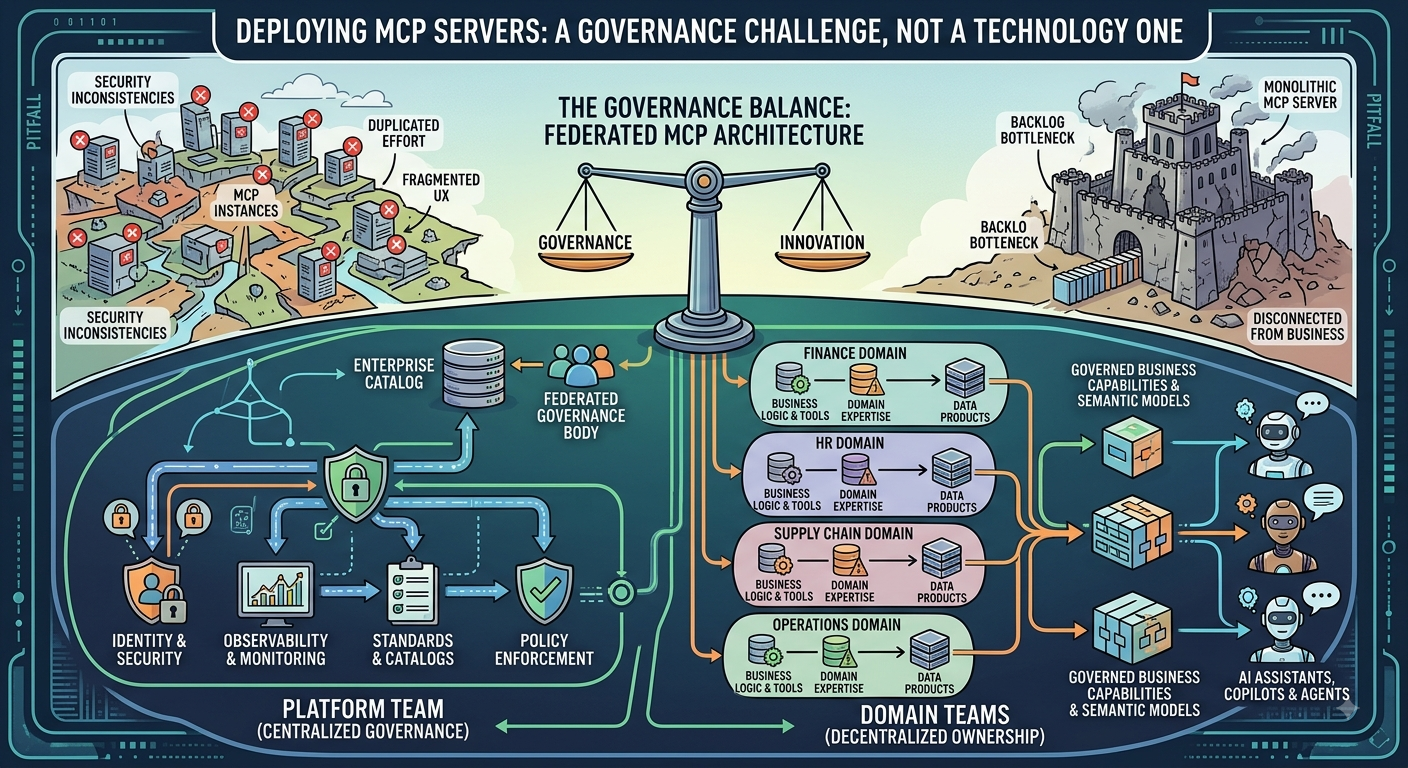
🎯 Choose Your Path
This repository serves two distinct audiences. Please select your path:
🚀 I want to BUILD an MCP Server (Most Users)
→ USER_GUIDE.md - Complete guide for MCP server developers
You want to create your own MCP server using this framework as a template. You'll focus on implementing your business logic (tools, resources, prompts) while the framework handles all infrastructure concerns.
🏗️ I want to CONTRIBUTE to the Framework (Framework Developers)
→ FRAMEWORK_DOCUMENTATION.md - Internal framework documentation
You want to contribute to, extend, or maintain the MCP Framework itself. You'll work on the core infrastructure, platform services, and connectivity layers.
📚 Documentation Overview
For MCP Server Developers (Users of this Framework)
| Document | Purpose | Audience |
|---|---|---|
| USER_GUIDE.md | Complete guide for building MCP servers | 🎯 MCP Server Developers |
| TEMPLATE_GUIDE.md | Quick start template with examples | 🎯 MCP Server Developers |
deploy/scripts/deploy.sh |
Automated deployment script | 🎯 MCP Server Developers |
src/azure/requirements.txt |
Production dependencies | 🎯 MCP Server Developers |
What you'll implement:
- ✅ Your business tools (functions)
- ✅ Your data resources
- ✅ Your prompt templates for Copilot Studio
- ✅ Your domain-specific configuration
What the framework provides:
- ✅ Authentication & Authorization (Entra ID, JWT, RBAC)
- ✅ Telemetry & Monitoring (Application Insights, OpenTelemetry)
- ✅ Error Handling & Logging
- ✅ Configuration Management (Environment variables, Key Vault)
- ✅ Data Connectivity (Fabric, Warehouse, Lakehouse)
- ✅ Audit Logging (Immutable audit trail)
- ✅ Data Classification & Governance
- ✅ MCP Protocol Compliance (All required endpoints)
For Framework Developers (Contributors)
| Document | Purpose | Audience |
|---|---|---|
| FRAMEWORK_DOCUMENTATION.md | Internal framework architecture & design | 🏗️ Framework Contributors |
docs/architecture/ |
Architecture diagrams and design decisions | 🏗️ Framework Contributors |
docs/modules/ |
Platform service documentation | 🏗️ Framework Contributors |
docs/api-reference/ |
Internal API documentation | 🏗️ Framework Contributors |
platform/ |
Core framework code | 🏗️ Framework Contributors |
What you'll work on:
- 🏗️ Authentication & Authorization infrastructure
- 🏗️ Telemetry and monitoring systems
- 🏗️ Error handling and logging frameworks
- 🏗️ Configuration management systems
- 🏗️ Data connectivity layers (Fabric, Warehouse, Lakehouse)
- 🏗️ Audit logging and data classification
🏗️ Framework Architecture
The Big Picture
┌─────────────────────────────────────────────────────────────────────────┐
│                         YOUR MCP SERVER ON AZURE                        │
├─────────────────────────────────────────────────────────────────────────┤
│                                                                         │
│  ┌─────────────────────────────────────────────────────────────────────┐│
│  │                         AZURE FUNCTIONS v4                          ││
│  │  ✅ HTTP Triggers, Function App, Storage, Application Insights      ││
│  └─────────────────────────────────────────────────────────────────────┘│
│                                                                         │
│  ┌─────────────────────────────────────────────────────────────────────┐│
│  │                      MCP FRAMEWORK LAYER                            ││
│  │  🏗️ Framework Contributors work here                                ││
│  │                                                                     ││
│  │  ┌──────────────┐  ┌──────────────┐  ┌──────────────┐               ││
│  │  │ Authentication│  │ Authorization│  │  Telemetry   │              ││
│  │  │  (Entra ID,  │  │   (RBAC,     │  │ (Auto-collect│               ││
│  │  │   JWT, etc.) │  │  Policies)   │  │  tool calls) │               ││
│  │  └──────────────┘  └──────────────┘  └──────────────┘               ││
│  │                                                                     ││
│  │  ┌──────────────┐  ┌──────────────┐  ┌──────────────┐               ││
│  │  │   Audit      │  │   Error      │  │Classification│               ││
│  │  │  (Immutable  │  │  Handling    │  │ (Data        │               ││
│  │  │   logs)      │  │ (Standardized│  │  controls)   │               ││
│  │  └──────────────┘  └──────────────┘  └──────────────┘               ││
│  │                                                                     ││
│  │  ┌─────────────────────────────────────────────────────────────────┐││
│  │  │                    CONNECTIVITY LAYER                           │││
│  │  │  ┌──────────────┐  ┌──────────────┐  ┌──────────────┐           │││
│  │  │  │ Semantic     │  │  Warehouse   │  │  Lakehouse   │           │││
│  │  │  │  Models      │  │  (SQL)       │  │  (Delta)     │           │││
│  │  │  └──────────────┘  └──────────────┘  └──────────────┘           │││
│  │  └─────────────────────────────────────────────────────────────────┘││
│  └─────────────────────────────────────────────────────────────────────┘│
│                                                                         │
│  ┌─────────────────────────────────────────────────────────────────────┐│
│  │                      YOUR DOMAIN LAYER                              ││
│  │  🎯 MCP Server Developers work here                                 ││
│  │                                                                     ││
│  │  ┌──────────────┐  ┌──────────────┐  ┌──────────────┐               ││
│  │  │    Tools     │  │  Resources    │  │   Prompts    │              ││
│  │  │ (Functions)  │  │ (Data Sources)│  │ (Templates)  │              ││
│  │  └──────────────┘  └──────────────┘  └──────────────┘               ││
│  │                                                                     ││
│  │  🎯 Your Business Logic, Domain Models, Ontologies                  ││
│  └─────────────────────────────────────────────────────────────────────┘│
│                                                                         │
└─────────────────────────────────────────────────────────────────────────┘
Clear Separation of Concerns
| Concern | Framework Handles | You Handle |
|---|---|---|
| Authentication | ✅ Entra ID, JWT validation, token management | ❌ |
| Authorization | ✅ RBAC, policy enforcement, permission checks | ❌ |
| Telemetry | ✅ Logging, metrics, tracing, Application Insights | ❌ |
| Error Handling | ✅ Standardized errors, recovery, retry logic | ❌ |
| Configuration | ✅ Environment variables, Key Vault, secrets | ❌ |
| Data Connectivity | ✅ Fabric, Warehouse, Lakehouse connectors | ❌ |
| Audit Logging | ✅ Immutable audit trail, compliance logging | ❌ |
| Data Classification | ✅ Governance controls, sensitivity labels | ❌ |
| MCP Protocol | ✅ All required endpoints, protocol compliance | ❌ |
| Business Logic | ❌ | ✅ Your tools, resources, prompts |
| Domain Models | ❌ | ✅ Your ontologies, schemas |
| Domain Data | ❌ | ✅ Your data sources, connections |
🚀 Quick Start for MCP Server Developers
If you just want to build an MCP server, here's the fastest path:
1. Read the User Guide
→ USER_GUIDE.md - Everything you need to know
2. Follow the Template Guide
→ TEMPLATE_GUIDE.md - Step-by-step examples
3. Key Files to Understand
# Your workspace (create these)
my_domain/
├── tools/              # Your tool implementations
│   └── my_tool.py     # Example: def greet_user(name: str) -> dict
├── resources/          # Your data resource definitions
│   └── my_resource.py # Example: Resource(name="donors", uri="/api/donors")
└── prompts/            # Your Copilot Studio prompt templates
    └── my_prompt.py   # Example: PromptTemplate(name="generate_report", template="...")

# Framework files (don't modify these unless contributing)
platform/
├── registration/       # Tool registration system
│   └── registry.py    # Register your tools here
├── catalog/            # Resource catalog system
│   └── client.py      # Access resources via framework
└── template/           # Prompt template system
    └── generator.py   # Generate prompts via framework

src/azure/
├── function_app.py     # Main entry point (v4)
├── host.json           # Azure Functions config
└── requirements.txt    # Production dependencies
4. Deployment
# Copy environment template
cp .env.example .env

# Edit .env with your configuration
nano .env

# Deploy (uses deploy.sh script)
./deploy/scripts/deploy.sh
🏗️ Quick Start for Framework Contributors
If you want to contribute to the framework itself:
1. Read the Framework Documentation
→ FRAMEWORK_DOCUMENTATION.md - Everything about the framework
2. Understand the Architecture
3. Key Areas to Contribute
platform/
├── auth/              # Authentication services (Entra ID, JWT)
├── authorization/     # Authorization services (RBAC, policies)
├── telemetry/         # Monitoring and observability
├── audit/             # Audit logging
├── errors/            # Error handling
├── config/            # Configuration management
├── classification/    # Data governance
└── connectivity/      # Data source connectors (Fabric, Warehouse, Lakehouse)

docs/
├── architecture/      # Architecture documentation
├── modules/          # Module documentation
├── api-reference/     # Internal API docs
└── best-practices/    # Development guidelines
📁 Repository Structure
mcp-framework/
├── README.md                          # This file - Choose your path
├── USER_GUIDE.md                      # 🎯 For MCP Server Developers
├── FRAMEWORK_DOCUMENTATION.md         # 🏗️ For Framework Contributors
├── TEMPLATE_GUIDE.md                  # Quick start template
├── .env.example                       # Environment variables template
├── .funcignore                        # Deployment ignore patterns
├── .gitignore                         # Git ignore patterns
├── local.settings.json.example        # Local development config
├── pyproject.toml                     # Python project configuration
│
├── deploy/                            # Deployment scripts
│   └── scripts/
│       └── deploy.sh                  # Automated deployment
│
├── src/                               # Azure Functions v4
│   └── azure/
│       ├── function_app.py           # Main entry point
│       ├── host.json                 # Azure Functions config
│       └── requirements.txt          # Production dependencies
│
├── platform/                          # 🏗️ Framework Core (Contributors)
│   ├── auth/                          # Authentication services
│   ├── authorization/                 # Authorization services
│   ├── telemetry/                     # Telemetry and monitoring
│   ├── audit/                         # Audit logging
│   ├── errors/                        # Error handling
│   ├── config/                        # Configuration management
│   ├── classification/                # Data classification
│   ├── connectivity/                  # Data connectivity
│   ├── catalog/                       # Resource catalog
│   ├── registration/                  # Tool registration
│   └── template/                      # Prompt templates
│
├── tools/                             # Example tools (for users)
│   ├── __init__.py
│   └── example_tool.py                # Example implementations
│
├── docs/                              # 🏗️ Framework Documentation
│   ├── architecture/                  # Architecture docs
│   ├── modules/                       # Module documentation
│   ├── api-reference/                 # API reference
│   ├── best-practices/                # Best practices
│   ├── deployment/                    # Deployment guides
│   └── examples/                      # Usage examples
│
└── my_domain/                         # 🎯 YOUR CODE (create this!)
    ├── tools/                         # Your tool implementations
    ├── resources/                     # Your resource definitions
    └── prompts/                        # Your prompt templates
🎯 Which Path Are You On?
If you're building an MCP Server:
✅ I want to create my own MCP server
✅ I want to implement business tools and logic
✅ I want to deploy to Azure Functions
✅ I want to integrate with Copilot and Copilot Studio

→ START HERE: [USER_GUIDE.md](USER_GUIDE.md)
If you're contributing to the Framework:
✅ I want to improve the framework infrastructure
✅ I want to add new platform services
✅ I want to fix bugs in the framework
✅ I want to extend framework capabilities

→ START HERE: [FRAMEWORK_DOCUMENTATION.md](FRAMEWORK_DOCUMENTATION.md)
📞 Getting Help
For MCP Server Developers
- 📖 USER_GUIDE.md - Complete user guide
- 📖 TEMPLATE_GUIDE.md - Quick start template
- 📖 FABRIC_INTEGRATION_GUIDE.md - Connect to Fabric Semantic Models
- 💬 Open an issue with your question
For Framework Contributors
- 📖 FRAMEWORK_DOCUMENTATION.md - Internal documentation
- 📖 CONTRIBUTING.md - Contribution guidelines
- 💬 Open an issue or pull request
🤝 Contributing
We welcome contributions! Please see:
- FRAMEWORK_DOCUMENTATION.md for framework contributions
- USER_GUIDE.md for using the framework
📄 License
This project is licensed under the MIT License - see the LICENSE file for details.
Built with ❤️ for MCP Server Developers and Framework Contributors
Need help? Check the appropriate guide for your use case!
Installing Platform Framework
This server has no published package — it is built from source. Open the repository and follow its README.
▸ github.com/Edouard-Legoupil/mcp-platform-frameworkFAQ
Is Platform Framework MCP free?
Yes, Platform Framework MCP is free — one-click install via Unyly at no cost.
Does Platform Framework need an API key?
No, Platform Framework runs without API keys or environment variables.
Is Platform Framework hosted or self-hosted?
A hosted option is available: Unyly runs the server in the cloud, no local setup required.
How do I install Platform Framework in Claude Desktop, Claude Code or Cursor?
Open Platform Framework on unyly.org, pick your client tab (Claude Desktop, Claude Code, Cursor) and press Install — the config is generated automatically, no JSON editing.
Related MCPs
GitHub
PRs, issues, code search, CI status
 by GitHub
Filesystem
Secure file operations with configurable access controls.
Memory
Knowledge graph-based persistent memory system.
Template MCP Server
A CLI tool to create a new Model Context Protocol server project with TypeScript support, dual transport options, and an extensible structure
 by mcpdotdirect
Amap Maps Mcp Server
MCP server for using the AMap Maps API
 by duxiaohui
Supabase
Database, auth and storage
 by Supabase
Everything
Reference / test server with prompts, resources, and tools.
Git
Tools to read, search, and manipulate Git repositories.
Sequential Thinking
Dynamic and reflective problem-solving through thought sequences.
Time
Time and timezone conversion capabilities.
Compare Platform Framework with
Not sure what to pick?
Find your stack in 60 seconds
Author?
Embed badge for your README
Browse similar
All development MCPs