
Onedrive Sharepoint
FreeNot checkedEnables file and site management across OneDrive and SharePoint via Microsoft Graph API, with support for 33 tools and a CLI.

About
Enables file and site management across OneDrive and SharePoint via Microsoft Graph API, with support for 33 tools and a CLI.
README
CI License: MIT Node.js MCP TypeScript
Give AI agents (over MCP) and shell scripts (through the ods CLI) access to OneDrive and SharePoint document libraries via Microsoft Graph, with app-only authentication and a small default tool set.
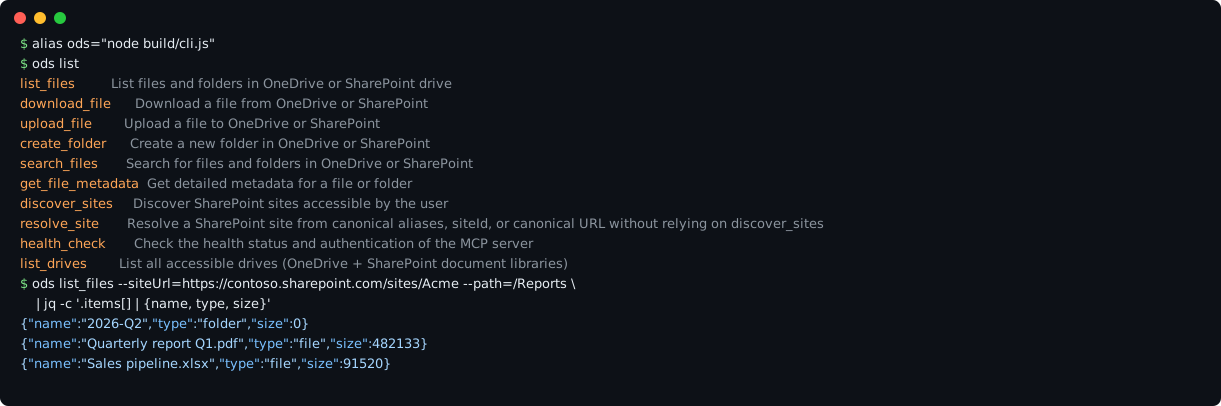
Real CLI output against a mocked Microsoft Graph with fictional data (the Acme site on contoso.sharepoint.com).
- One core, two front ends: the MCP server and the CLI share the same tools, auth and handlers.
- Small default surface: the
coreprofile has 10 everyday tools; delete, share, permission, list-item and raw Graph tools are opt-in. - Guarded requests: request URLs are checked against
https://graph.microsoft.combefore the token is attached, and local file access is confined to one root directory. - Script friendly: tool results are JSON, so
jqand friends just work.
Quickstart
You need Node.js 20+ and a Microsoft Entra ID app registration with the Files.ReadWrite.All and Sites.ReadWrite.All Application permissions and admin consent (see Requirements).
git clone https://github.com/ftaricano/mcp-onedrive-sharepoint.git
cd mcp-onedrive-sharepoint
npm ci && npm run build
export MICROSOFT_GRAPH_TENANT_ID=<tenant-uuid>
export MICROSOFT_GRAPH_CLIENT_ID=<application-client-id>
export MICROSOFT_GRAPH_CLIENT_SECRET=<client-secret>
node build/cli.js list
node build/cli.js list_files --siteUrl=https://contoso.sharepoint.com/sites/Docs --path=/
Prefer injecting the secret from your secret manager over typing it into the shell. To use the MCP server, point your MCP client at node /absolute/path/to/mcp-onedrive-sharepoint/build/index.js with the same three variables in its environment (see MCP stdio snippet).
Example
List a folder of a SharePoint site and keep only the fields you need:
node build/cli.js list_files --siteUrl=https://contoso.sharepoint.com/sites/Acme --path=/Reports \
  | jq -c '.items[] | {name, type, size}'
{"name":"2026-Q2","type":"folder","size":0}
{"name":"Quarterly report Q1.pdf","type":"file","size":482133}
{"name":"Sales pipeline.xlsx","type":"file","size":91520}
The same call from an MCP client is the list_files tool with {"siteUrl": "https://contoso.sharepoint.com/sites/Acme", "path": "/Reports"}. More inputs are in Example tool inputs.
Architecture
MCP client ──stdio──▶ build/index.js ─┐
                                      ├─▶ tool registry ─▶ handlers ─▶ Graph client ─▶ graph.microsoft.com
shell, scripts ─────▶ build/cli.js ───┘   (core | full)               │  URL guard, retries, paging
                                                                      └─ MSAL client credentials (token in memory)
src/tools/registry.tspicks the tools for the active profile; both entry points use it.src/graph/client.tsis the only HTTP path to Graph. It rejects request URLs outsidehttps://graph.microsoft.com/{v1.0,beta}before fetching or attaching the token.src/auth/gets app-only tokens with MSAL and keeps them in memory; nothing is written to disk.src/sharepoint/site-resolver.tsturns site aliases from a local, untracked registry into Graph ids.
Tools
The default profile, MCP_TOOL_PROFILE=core, exposes these tools to both the MCP server and the ods CLI:
| Tool | What it does | Writes |
|---|---|---|
health_check |
Check authentication and Graph connectivity | no |
list_drives |
List accessible drives (OneDrive and SharePoint document libraries) | no |
discover_sites |
Search SharePoint sites visible to the app | no |
resolve_site |
Resolve a site from an alias, siteId or site URL |
no |
list_files |
List files and folders in a drive path, with pagination | no |
search_files |
Search files and folders in a drive, with pagination | no |
get_file_metadata |
Get metadata (and optionally versions) for a file or folder | no |
download_file |
Download a file; with outputPath it writes (and overwrites) a local file |
local disk |
upload_file |
Upload a local file to a drive path (conflictBehavior: fail, replace, rename) |
yes |
create_folder |
Create a folder in a drive | yes |
Tool profiles
The server defaults to MCP_TOOL_PROFILE=core, a smaller public surface intended for day-to-day document workflows (the table above).
Set MCP_TOOL_PROFILE=full to expose advanced and destructive tools for trusted environments:
- Files:
list_files,download_file,upload_file,create_folder,move_item,delete_item,search_files,get_file_metadata,share_item,copy_item - SharePoint:
discover_sites,resolve_site,list_site_lists,get_list_schema,list_items,get_list_item,create_list_item,update_list_item,delete_list_item - Utilities:
health_check,get_user_profile,list_drives,global_search - Advanced:
advanced_share,manage_permissions,check_user_access,sync_folder,batch_file_operations,storage_analytics,version_management,excel_operations,excel_analysis
batch_operations is intentionally not part of either profile by default because it is a raw Microsoft Graph escape hatch. Enable it only for admin/debug workflows with MCP_ENABLE_EXPERIMENTAL_GRAPH_BATCH=true.
You can also remove individual tools with MCP_DISABLED_TOOLS=delete_item,manage_permissions.
Why this repo
- one MCP server for both OneDrive and SharePoint document libraries
- matching
odsCLI for shell scripting and one-shot automation - app-only client credentials from the process environment; no
.envloading and no token cache on disk - site aliases loaded from a local registry so tenant IDs stay out of git
- pagination/resource helpers for
driveId,siteId,itemIdand path targeting
Requirements
- Node.js 20+
- A Microsoft Entra ID / Azure AD confidential app registration with Application permissions (
Files.ReadWrite.All,Sites.ReadWrite.All) and admin consent. The app's tenant ID, client ID and client secret are passed asMICROSOFT_GRAPH_TENANT_ID,MICROSOFT_GRAPH_CLIENT_IDandMICROSOFT_GRAPH_CLIENT_SECRET; the tenant must be a specific UUID, notcommon.
Installation
git clone https://github.com/ftaricano/mcp-onedrive-sharepoint.git
cd mcp-onedrive-sharepoint
npm install
Operational wrappers
Operational guidance:
- use this MCP on demand
- do not keep it permanently loaded in your MCP client when not needed
- prefer one-shot
spcall/mcporter --stdioexecution so the process exits right after the call and does not accumulate zombie or idle MCP processes - the
spcallwrapper includes post-call cleanup for stray repo-local MCP child processes
The scripts/ directory has legacy launchers for one specific local setup: they read the three MICROSOFT_GRAPH_* values from a password manager through a helper that is not part of this repository, and inject them only into the child process. Outside that setup they fail, so run node build/index.js or node build/cli.js with the variables already in the environment instead. The launchers will be removed in a future major version.
./scripts/run-stdio.sh: start the MCP stdio server after injecting the credentials./scripts/spcall.sh: run ad-hocmcportercalls against the local MCP servernpm run stdio: same as./scripts/run-stdio.shnpm run spcall -- <tool> ...: same as./scripts/spcall.sh <tool> ...
Quick examples:
npm run build
./scripts/spcall.sh health_check
./scripts/spcall.sh list_drives
./scripts/spcall.sh list_files driveId=b!abc123 path=/Shared%20Documents
Tenant-specific site aliases and drive ids are loaded from a local file — see Site registry below.
CLI (ods)
Every MCP tool is also exposed as a plain subcommand through the ods CLI. It shares the same auth, config and handlers as the MCP server, so anything the MCP does is one-shot runnable from a terminal or a shell script.
npm run build
# `npm install` does NOT put `ods` on your PATH. Link it once, e.g.:
#   npm link            # or: ln -s "$PWD/scripts/ods.sh" ~/bin/ods
ods list                                  # list all tools with descriptions
ods schema list_files                     # print JSON schema for a tool
ods auth                                  # exits: delegated token persistence is intentionally disabled
ods <tool> --key=value [--key value]      # invoke a tool with CLI flags
ods <tool> --json '{"k":"v"}'             # pass the full payload as JSON
During development, rebuild before npm run cli -- <tool> ...; the command uses
the same launcher as the packaged ods bin. node build/cli.js <tool> ... runs the
CLI directly with the credentials from the environment.
Examples
ods health_check
ods list_files --site=primary --path=/
ods list_files --driveId=b!abc --path=/Shared%20Documents --limit=50
ods upload_file --localPath=./report.txt --remotePath=Documents/report.txt --driveId=acme-drive --retryPolicy=single-attempt
Upload retry policy
upload_file accepts retryPolicy through both CLI flags/JSON and MCP arguments:
default (also when omitted) retains the existing retries, redirects, folder
preparation and large-file upload sessions.
single-attempt supports only simple uploads smaller than 4 MiB (4,194,304 bytes).
The destination folder must already exist: paths are sanitized as usual, but this
mode never creates folders or upload sessions. It sends at most one upload PUT,
with redirects disabled, and returns any HTTP/network error without replay or
fallback. Invalid policies (including non-string values) and files at or above
the limit are rejected before any Graph write. Programmatic callers can pass the
same policy in UploadOptions.
An error, timeout, reset or lost response can still mean the write took effect. This policy does not provide rollback, CAS or exactly-once delivery. Stop and reconcile uncertainty externally; do not automatically query and retry the upload. A missing destination folder also returns an error without creating it or retrying.
Rules for flags
--key=valueand--key valueare both accepted.true/false/nulland numeric strings are coerced automatically; anything else stays a string.- Bare flags (no value, or followed by another flag) become
true. --json '<payload>'takes a JSON object; individual--key=valueflags layered on top override fields from the payload. Use this for tools with nested objects/arrays (e.g. advanced Excel tools).- Output is the raw tool payload (usually pretty-printed JSON). If the handler returns an error envelope, the process exits with code
2.
Configuration
The server reads the following environment variables:
# Required, from your secret manager (never from a committed file):
# MICROSOFT_GRAPH_CLIENT_ID
# MICROSOFT_GRAPH_TENANT_ID (specific UUID)
# MICROSOFT_GRAPH_CLIENT_SECRET
MICROSOFT_GRAPH_SCOPES=Files.ReadWrite.All,Sites.ReadWrite.All,Directory.Read.All,User.Read,offline_access
MICROSOFT_GRAPH_BASE_URL=https://graph.microsoft.com/v1.0
MICROSOFT_GRAPH_TIMEOUT=30000
MICROSOFT_GRAPH_MAX_RETRIES=3
MICROSOFT_GRAPH_CACHE_ENABLED=true
MICROSOFT_GRAPH_CACHE_TTL=3600
MCP_TOOL_PROFILE=core
MCP_DISABLED_TOOLS=
MCP_ENABLE_EXPERIMENTAL_GRAPH_BATCH=false
Notes:
- the credentials come from the process environment alone;
.envis never loaded npm start,npm run stdio,npm run cli,npm run spcalland the packaged bins go through the legacy launchers inscripts/(see Operational wrappers);node build/index.jsandnode build/cli.jsread the environment directly- set
MCP_LOCAL_FILE_ROOTto constrain local upload/download/sync file access; if unset, local paths are constrained to the process working directory
Authentication modes
Client credentials (app-only)
The server authenticates as the app registration with the client-credentials flow, using
MICROSOFT_GRAPH_TENANT_ID, MICROSOFT_GRAPH_CLIENT_ID and
MICROSOFT_GRAPH_CLIENT_SECRET from the environment. There is no .env, Keychain, file
cache, or delegated token fallback. npm run setup-auth and ods auth fail
intentionally because delegated token persistence is disabled; provision the app
credentials instead.
Development commands
npm run build
npm run lint
npm test
npm run ci
npm start
npm run stdio
npm run spcall -- health_check
npm run ci is the local verification entrypoint and is also what GitHub Actions runs on every PR/push.
MCP behavior notes
Root site inclusion
discover_sites.includePersonalSite=true currently attempts to append the tenant root SharePoint site (/sites/root) when it is available to the authenticated user.
It does not discover or synthesize a personal OneDrive site.
Pagination
The following tools now expose consistent pagination metadata in their JSON payloads:
list_filessearch_filesdiscover_siteslist_site_listslist_items
When Microsoft Graph returns @odata.nextLink, the response includes:
pagination.returnedpagination.limitpagination.totalCountwhen availablepagination.nextPageTokenpagination.hasMore
Pass pageToken back to the same tool to continue paging.
Drive/site targeting
Core file listing/search/download flows now accept:
siteIdfor a SharePoint site's default drivedriveIdfor a specific document library or drive- path-based addressing where supported
This is the current foundation for moving beyond a /me/drive-only model.
Site registry
The resolver can target named SharePoint sites by alias (e.g. site=primary). The registry is loaded from an external JSON file so no tenant-specific ids are committed:
- Copy
config/sites.example.jsontoconfig/sites.local.json(gitignored) and fill in your values. - Or set
MCP_SITES_CONFIG_PATHto point at a different JSON file. - If the file is missing, the registry stays empty and the tools only accept explicit
siteId,siteUrl, ordriveId.
Each site entry looks like:
{
  "key": "primary",
  "name": "Primary",
  "siteId": "yourtenant.sharepoint.com,<guid>,<guid>",
  "siteUrl": "https://yourtenant.sharepoint.com/sites/Primary",
  "driveId": "b!<drive-id>",
  "aliases": ["primary", "/sites/Primary"]
}
MCP stdio snippet
Run the built server with Node and pass the credentials in the environment (from your secret manager or your MCP client's secret store):
{
  "mcpServers": {
    "sharepoint": {
      "command": "node",
      "args": ["/absolute/path/to/mcp-onedrive-sharepoint/build/index.js"],
      "env": {
        "MICROSOFT_GRAPH_TENANT_ID": "<tenant-uuid>",
        "MICROSOFT_GRAPH_CLIENT_ID": "<application-client-id>",
        "MICROSOFT_GRAPH_CLIENT_SECRET": "<client-secret>"
      }
    }
  }
}
Example tool inputs
List files from a specific drive
{
  "driveId": "b!abc123",
  "path": "/Shared Documents",
  "limit": 50
}
Continue a paginated file listing
{
  "driveId": "b!abc123",
  "pageToken": "https://graph.microsoft.com/v1.0/drives/b!abc123/root/children?$skiptoken=..."
}
Search files in a site drive
{
  "siteId": "contoso.sharepoint.com,123,456",
  "query": "quarterly report",
  "limit": 25
}
List SharePoint list items with pagination
{
  "siteId": "contoso.sharepoint.com,123,456",
  "listId": "00000000-0000-0000-0000-000000000000",
  "orderBy": "Created desc",
  "limit": 100
}
Troubleshooting
403 Forbiddenon SharePoint lists/drives: the app registration lacks permission to the target site. Check the application permissions and admin consent.404on adriveIdorsiteId: the identifier is stale or the resource was deleted. Uselist_drives/discover_sitesto re-discover.- Build fails on a clean clone: make sure Node.js is 20+ and run
npm installbeforenpm run build. AADSTS700016or401: make sureMICROSOFT_GRAPH_TENANT_IDis a specific tenant UUID (notcommon) and the Application permissions have admin consent in Microsoft Entra ID.AADSTS7000215(invalid client secret): create a new secret in the app registration and updateMICROSOFT_GRAPH_CLIENT_SECRETwherever you store it.
Security
This server handles Microsoft Graph client credentials and access to corporate file storage. Treat it accordingly:
.env,tokens.json,credentials.json, and secret-store exports are never committed — see .gitignore.- tenant-specific
siteId,driveId, SharePoint URLs and internal operational paths should stay in local/private docs, not in this public repo. - Report security issues privately via GitHub security advisories — do not open a public issue.
- If a client secret leaks, revoke it in Microsoft Entra ID, create a new one and update your secret store.
Contributing
Issues and PRs welcome; see CONTRIBUTING.md. Before opening a PR:
npm run cipasses (build + lint + tests)- one focused change per PR
- no credentials, tenant-specific ids, or internal paths in commits or README
License and credits
MIT.
Built on the Model Context Protocol TypeScript SDK, MSAL Node and axios. Microsoft, OneDrive and SharePoint are trademarks of Microsoft Corporation; this project is not affiliated with or endorsed by Microsoft.
Current limitations
- client credentials require Application permissions and admin consent; delegated (per-user) sign-in is not supported
- advanced/destructive tools require
MCP_TOOL_PROFILE=full - raw Graph batch calls require
MCP_ENABLE_EXPERIMENTAL_GRAPH_BATCH=true
Installing Onedrive Sharepoint
This server has no published package — it is built from source. Open the repository and follow its README.
▸ github.com/ftaricano/mcp-onedrive-sharepointFAQ
Is Onedrive Sharepoint MCP free?
Yes, Onedrive Sharepoint MCP is free — one-click install via Unyly at no cost.
Does Onedrive Sharepoint need an API key?
No, Onedrive Sharepoint runs without API keys or environment variables.
Is Onedrive Sharepoint hosted or self-hosted?
A hosted option is available: Unyly runs the server in the cloud, no local setup required.
How do I install Onedrive Sharepoint in Claude Desktop, Claude Code or Cursor?
Open Onedrive Sharepoint on unyly.org, pick your client tab (Claude Desktop, Claude Code, Cursor) and press Install — the config is generated automatically, no JSON editing.
Related MCPs
GitHub
PRs, issues, code search, CI status
 by GitHub
Filesystem
Secure file operations with configurable access controls.
Memory
Knowledge graph-based persistent memory system.

Unyly Deploy
Deploy sites and MCP servers to Unyly straight from your AI agent
 by Unyly
Amap Maps Mcp Server
MCP server for using the AMap Maps API
 by duxiaohui
PayMCP
Lightweight payments layer for MCP servers: turn tools into paid endpoints with a two-line decorator. [PyPI](https://pypi.org/project/paymcp/) · [npm](https://w
 by blustAI
Server For Power BI
Enables exploring Microsoft Fabric / Power BI workspaces and semantic models, and executing ad-hoc DAX queries.
 by Mitsubishi-Fuso
Gpt Image 2 Mcp
RunAPI GPT Image 2 MCP server for image generation: create tasks, poll results, and check pricing across 1 model from Claude Code, Codex, Cursor, and VS Code.
 by runapi-ai
Template MCP Server
A CLI tool to create a new Model Context Protocol server project with TypeScript support, dual transport options, and an extensible structure
 by mcpdotdirect
Supabase
Database, auth and storage
 by Supabase
Compare Onedrive Sharepoint with
Not sure what to pick?
Find your stack in 60 seconds
Author?
Embed badge for your README
Browse similar
All development MCPs