
Mariana Outlook
FreeNot checkedGives Claude Code access to Outlook Mail, Calendar, and Contacts via Microsoft Graph, with safety-first defaults (no sending, no hard deletes, every mutation lo

About
Gives Claude Code access to Outlook Mail, Calendar, and Contacts via Microsoft Graph, with safety-first defaults (no sending, no hard deletes, every mutation logged). Supports multiple Microsoft accounts through a PKCE OAuth flow.
README
Let Claude Code read, organize and draft in your Outlook mailbox, calendar and contacts. It can't send email: the Mail.Send permission is never requested. It doesn't delete: mail moves to a To Be Deleted folder and events get a DELETE prefix. Mail-rule forwarding and calendar invites are opt-in actions you ask for.
Who this is for: people who want AI help in Outlook (work M365 or personal Outlook/Hotmail) with safety-first defaults and a log of every change.
License: MIT Built with Claude Code Last commit
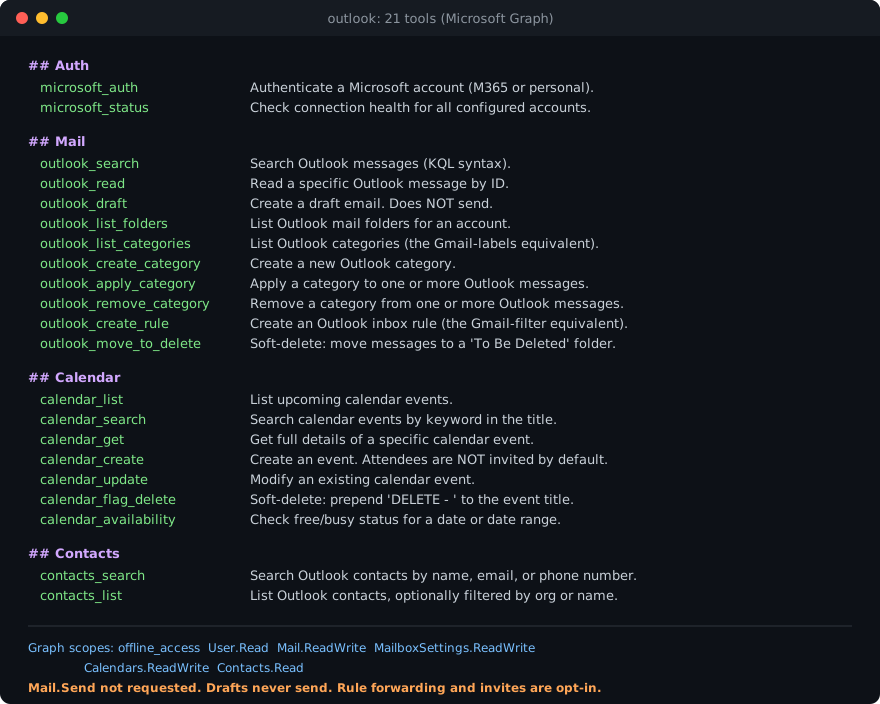
The 22 tools Claude Code sees once the server is connected, plus the exact Microsoft Graph permissions it asks for.
Quick start (you need an Azure Application ID first; see Setup step 1):
git clone https://github.com/marianasmall/mariana-outlook-mcp.git
cd mariana-outlook-mcp && npm install && npm run build
claude mcp add outlook --scope user -e MS_CLIENT_ID="<application-client-id>" -- node "$PWD/dist/index.js"
Then restart Claude Code and run the sign-in tool (Setup step 4).
What This Is
A custom MCP (Model Context Protocol) server that connects Claude Code to Outlook Mail, Calendar, and Contacts through Microsoft Graph. Sibling of mariana-google-mcp, same architecture pointed at Microsoft accounts (M365 work/school and personal Outlook/Hotmail).
Design Philosophy
Built for an operator who wants AI help managing their mailbox without risk of accidental damage:
- No sending email, enforced by Microsoft, not just this code. The server never requests the
Mail.Sendpermission, so its tokens cannot send a message. You draft (and can revise or soft-delete drafts); you send from Outlook. Two opt-in actions can still make mail go out, and only when you ask: an inbox rule with a forwarding address (outlook_create_rule), and a calendar event created withsend_invites=true. - No deleting anything. Mail moves to a "To Be Deleted" folder (reversible); drafts move to Deleted Items. Calendar events get "DELETE - " prepended to the title. You review and confirm in the Outlook UI.
- Every mutation is logged. An append-only JSONL action log records every write with timestamps, tool name, account, and summary.
- Multi-account support. Work and personal Microsoft accounts under named aliases.
- No client secret. Desktop PKCE flow: the only credential is a public Application ID.
Setup
Easiest path: paste this one line into Claude Code and it runs the entire setup for you, including guiding you through the Azure clicks:
Fetch https://raw.githubusercontent.com/marianasmall/mariana-outlook-mcp/main/SETUP-PROMPT.md and follow the instructions in it.
The manual steps below cover the same ground.
1. Azure App Registration
- Go to portal.azure.com → search "App registrations" → New registration
- Name: "Claude Code". Supported account types: Accounts in any organizational directory and personal Microsoft accounts (the option that includes personal accounts)
- Redirect URI: platform Public client/native (mobile & desktop), value
http://localhost - Register, then copy the Application (client) ID from the Overview page
- Under Authentication, set "Allow public client flows" to Yes
No client secret is created. This is a PKCE public client.
2. Install and Build
git clone https://github.com/marianasmall/mariana-outlook-mcp.git
cd mariana-outlook-mcp
npm install
npm run build
3. Add to Claude Code
claude mcp add outlook --scope user \
  -e MS_CLIENT_ID="<application-client-id>" \
  -- node /FULL/PATH/TO/mariana-outlook-mcp/dist/index.js
Optional: set MS_TENANT to a specific tenant ID (defaults to common, which accepts both work and personal accounts). Restart Claude Code after adding.
4. Authenticate
Run the microsoft_auth tool with a friendly account name (e.g. consulting, personal). A browser window opens for consent; approve as the matching Microsoft account. Repeat per account. Verify with microsoft_status.
Available Tools (22)
Authentication & Status
| Tool | Description |
|---|---|
microsoft_auth |
Authenticate a Microsoft account via OAuth browser flow (PKCE) |
microsoft_status |
Live connection health for all configured accounts |
Mail (14 tools)
| Tool | Description |
|---|---|
outlook_search |
Search messages (KQL: from:, subject:, or keywords) |
outlook_read |
Read a specific message by ID (plain-text body + attachment names) |
outlook_download_attachment |
Save a message's file attachment(s) to an absolute folder. Allowlist: save_dir must resolve (symlinks followed, case/Unicode-insensitive) inside a top-level ~/Projects/_intake* folder (e.g. ~/Projects/_intake, ~/Projects/_intake-client), no dot-folders; never overwrites; skips risky types (.app .command .sh .zsh .bash .plist .pkg .dmg .scpt .applescript .workflow .terminal .webloc .js .py) and item/reference attachments |
outlook_draft |
Create a draft: plain text or rich HTML body, attachments (≤3MB/file), optional reply-in-thread (does NOT send) |
outlook_list_drafts |
List drafts (id, subject, to, cc, lastModified, conversationId, isReply). Read-only |
outlook_update_draft |
Edit a draft in place (PATCH only the fields passed; reply threading preserved). Refuses non-drafts. Does NOT send |
outlook_delete_draft |
Soft-delete a draft: move to Deleted Items (never a permanent delete). Refuses non-drafts |
outlook_list_folders |
List mail folders with unread counts |
outlook_list_categories |
List categories (the Gmail-labels equivalent) |
outlook_create_category |
Create a category |
outlook_apply_category |
Apply a category to messages |
outlook_remove_category |
Remove a category from messages |
outlook_create_rule |
Create an inbox rule (the Gmail-filter equivalent) |
outlook_move_to_delete |
Soft-delete: move messages to a "To Be Deleted" folder |
Calendar (7 tools)
| Tool | Description |
|---|---|
calendar_list |
List upcoming events |
calendar_search |
Search events by title keyword |
calendar_get |
Full details of one event |
calendar_create |
Create an event (attendees NOT invited by default) |
calendar_update |
Modify an event (attendee-notification caveat in tool description) |
calendar_flag_delete |
Soft-delete: prepend "DELETE - " to the title |
calendar_availability |
Free/busy blocks for a date range |
Contacts (2 tools)
| Tool | Description |
|---|---|
contacts_search |
Search contacts by name, email, or phone |
contacts_list |
List contacts, optionally filtered |
Multi-Account Support
microsoft_auth account_name: "consulting"
microsoft_auth account_name: "personal"
Most tools accept an optional account parameter; omitted, they use the default (first-connected) account. microsoft_status shows all accounts and their health.
Configuration Files
All state lives in ~/.config/mariana-outlook-mcp/:
| File | Purpose |
|---|---|
config.json |
Account registry (aliases, email hashes, default) |
tokens/<hash>.json |
OAuth tokens per account (never leave this machine) |
action-log.jsonl |
Append-only log of every write operation |
Graph-vs-Gmail Differences Worth Knowing
- Categories ≈ labels; folders ≈ folders. Outlook has both. Categories apply like Gmail labels; soft-delete uses a folder because that's the native Outlook idiom.
- Reply drafts take a
reply_to_message_id(Graph threads replies from a message, not a thread ID). - Moved messages get new IDs. Graph reassigns message IDs on folder moves.
- Attendee invitations: Outlook sends invitation/update emails itself when an event has attendees;
calendar_createtherefore defaults to NOT attaching attendees (names go in the description) unlesssend_invites=true. - Refresh tokens last ~90 days sliding for personal accounts. Regular use keeps them alive indefinitely; a long-unused account may need re-auth.
License
MIT
Installing Mariana Outlook
This server has no published package — it is built from source. Open the repository and follow its README.
▸ github.com/marianasmall/mariana-outlook-mcpFAQ
Is Mariana Outlook MCP free?
Yes, Mariana Outlook MCP is free — one-click install via Unyly at no cost.
Does Mariana Outlook need an API key?
No, Mariana Outlook runs without API keys or environment variables.
Is Mariana Outlook hosted or self-hosted?
Self-hosted: the server runs locally on your machine via the install command above.
How do I install Mariana Outlook in Claude Desktop, Claude Code or Cursor?
Open Mariana Outlook on unyly.org, pick your client tab (Claude Desktop, Claude Code, Cursor) and press Install — the config is generated automatically, no JSON editing.
Related MCPs
Gmail
Read, send and search emails from Claude
 by Google
Slack
Send, search and summarize Slack messages
 by Slack
Runbear
No-code MCP client for team chat platforms, such as Slack, Microsoft Teams, and Discord.
Discord Server
A community discord server dedicated to MCP by [Frank Fiegel](https://github.com/punkpeye)
Klavis AI
Open Source MCP Infra. Hosted MCP servers and MCP clients on Slack and Discord.
Work90210/APIFold
Turn any REST API into a hosted MCP server, with ready-made public servers for GitHub, Stripe, Slack, OpenAI, Notion and more.
 by Work90210
arikusi/deepseek-mcp-server
DeepSeek AI chat and reasoning with multi-turn sessions, function calling, thinking mode and cost tracking.
 by arikusi
hashgraph-online/hashnet-mcp-js
Discover, register and chat with AI agents on the Hashgraph network via the Registry Broker.
 by hashgraph-online
profullstack/mcp-server
Developer utilities: SEO optimization, document conversion, domain lookup, email validation, QR codes, weather data, social media posting and security scanning.
 by profullstack
WayStation-ai/mcp
Connect MCP hosts to apps such as Notion, Slack, Monday and Airtable.
 by waystation-ai
Compare Mariana Outlook with
Not sure what to pick?
Find your stack in 60 seconds
Author?
Embed badge for your README
Browse similar
All communication MCPs