
Keyshot
FreeNot checkedPrototype MCP server: control KeyShot Studio from Claude Code (scene, cameras, materials from a CMF sheet, renders)

About
Prototype MCP server: control KeyShot Studio from Claude Code (scene, cameras, materials from a CMF sheet, renders)
README
English | 简体中文 | 日本語 | 한국어 | Deutsch
Control an open KeyShot Studio 2026 window from Claude Code with the Model Context Protocol (MCP).
License: MIT Status: prototype Tests Release PyPI
Status: prototype. The tools work and have tests, but the project depends on the scripting API of KeyShot, which can change. Tell us what you use and what fails: open an issue or a discussion.
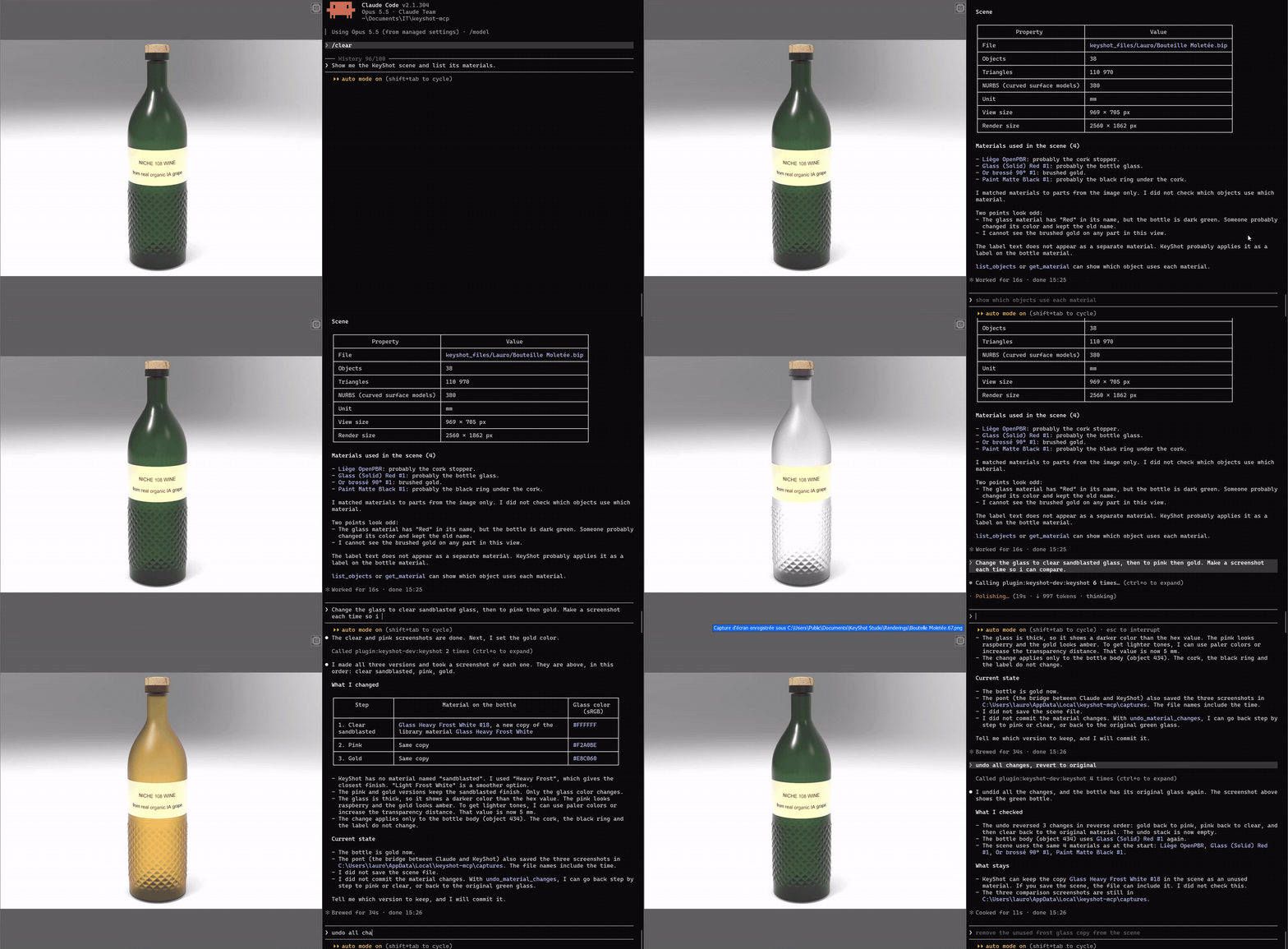
The demo plays 3 times faster than real time.
Claude Code ⇄ MCP server keyshotmcp (Python 3.12, stdio)
            ⇄ TCP 127.0.0.1:1998, 4-byte length + JSON, token
            ⇄ MCP start.py (in KeyShot, timer on the UI thread)
The bridge runs inside KeyShot. The server runs in Claude Code. They speak only on the local computer.
Requirements
| Item | Version |
|---|---|
| KeyShot Studio | 15.1 (2026) or later. Tested with 2026.2 Pro (15.1.2.7). |
| Python | 3.12 or later, Windows |
mcp |
1.30.0 |
| Claude Code | any recent version |
Install
From PyPI
From version 1.1.0, keyshot-mcp is a Python package. With uv:
uvx keyshot-mcp install-addin
claude mcp add keyshot -- uvx keyshot-mcp
install-addin copies the two bridge scripts into %PUBLIC%\Documents\KeyShot Studio\Scripts (or the folder of --dir). Then restart KeyShot.
As a Claude Code plugin
From version 1.1.0, this repository is also a Claude Code marketplace. The plugin keyshot starts the server with uvx, so uv must be installed.
/plugin marketplace add lfoletti/keyshot-mcp
/plugin install keyshot@keyshot-mcp
Then run /keyshot-install-addin once, and restart KeyShot.
From the release zip or the repository
Each release has keyshot-mcp-<version>-windows.zip, with libs/ already filled. Unzip it, then go to step 3. Without the zip, start at step 1.
- Clone the repository:
git clone https://github.com/lfoletti/keyshot-mcp.git - Install
mcpin thelibsfolder.run.pyloads it from there.py -3.12 -m pip install --target libs mcp==1.30.0 - Copy
addin\Scripts\MCP start.pyandMCP stop.pytoC:\Users\Public\Documents\KeyShot Studio\Scripts\. - Restart KeyShot. KeyShot reads the Scripts folder only when it starts.
- Add the server to Claude Code:
claude mcp add keyshot -- py -3.12 -I -S C:\path\to\keyshot-mcp\run.py - Make sure the imports are correct:
The output showspy -3.12 -I -S run.py --checkkeyshot : imports okand 33 tools.
Use
- In KeyShot, open Window > Scripting Console > Scripts.
- Select
MCP start, then click Run. The console showsPont KeyShot actif sur 127.0.0.1:1998. - In Claude Code, type
/mcp. Make sure thatkeyshotis connected. - Ask Claude, for example:
- "Show me the scene and list the materials."
- "Apply brushed aluminium to the cap, then make a 1920 × 1080 render."
To stop the bridge, run the script MCP stop, or close KeyShot.
To update the bridge, copy the new file, then use the tool reload_bridge.
Tools
| Group | Tools |
|---|---|
| Scene | keyshot_status, get_scene_info, get_scene_tree, list_objects, set_visibility, screenshot, save_scene |
| Cameras and environment | list_cameras, set_camera, fit_camera, list_environments, set_environment, set_realtime |
| Materials | list_materials, get_material, list_library_materials, assign_material, set_material_parameter, rename_material, undo_material_changes, commit_material_changes, save_material_to_library |
| Material graph | add_material_node, connect_material_nodes, disconnect_material_input, remove_material_node |
| Render | render_image, render_status, wait_for_render, view_image |
| Bridge | lux_functions, reload_bridge, execute_python (off by default) |
Two MCP prompts give Claude the method:
| Prompt | Use |
|---|---|
keyshot_strategy |
How to work in KeyShot without damage to the scene. |
keyshot_materiaux |
How to make materials from a CMF sheet (color, material, finish) or a description: physical values, colors, node recipes. |
Colors: [r, g, b] is linear (0-1). #RRGGBB is sRGB: the bridge changes it to linear.
Settings
Optional file: %LOCALAPPDATA%\keyshot-mcp\pont-config.json.
{"execute_python": false, "dossier_sorties": "C:\\path\\to\\outputs"}
| Setting | Effect |
|---|---|
execute_python |
true enables the tool execute_python. The default is false. |
dossier_sorties |
Folder for screenshots, renders and scene backups. |
dossiers_textures |
List of more folders where the bridge can read texture images. KeyShot's texture library and dossier_sorties are always allowed. |
KEYSHOT_MCP_PORT |
Environment variable. Bridge port. The default is 1998. |
KEYSHOT_MCP_TIMEOUT |
Environment variable. Server timeout in seconds. The default is 60. |
KEYSHOT_MCP_EXECUTE_PYTHON |
Environment variable. 1 enables execute_python. |
The bridge writes pont-actif.json (port, token, KeyShot PID) and pont.log in the same folder.
Safety
- The bridge listens only on 127.0.0.1. Each request must have the token from
pont-actif.json. execute_pythonis off. Only a local setting can enable it.- The tools edit a material graph only on copies that the bridge made.
set_cameradoes not discard a camera view that is not saved.save_scenekeeps a copy of the old.bipfile.
Tests
The tests use a fake lux module. KeyShot is not necessary.
cd tests
py -3.13 test_pont.py
py -3.13 test_serveur_mcp.py
py -3.13 test_cli.py
py -3.13 test_publication.py
py -3.13 test_plugin.py
py -3.13 test_dev_version.py
test_pont.py has 87 tests for the bridge. test_serveur_mcp.py has 9 end-to-end tests. test_cli.py tests the command keyshot-mcp. test_publication.py and test_plugin.py check the PyPI, MCP registry and plugin files, and that this README follows the code. test_dev_version.py tests the TestPyPI version tool. The essai_*.py files need an open KeyShot.
test_serveur_mcp.py starts the server with the Python that runs the test. If the packages in libs are for a different Python version, set KEYSHOT_MCP_PYTHON to the applicable python.exe.
Contribute
Read CONTRIBUTING.md and CODE_OF_CONDUCT.md.
Status
keyshot-mcp is a working prototype. It is tested with KeyShot Studio 2026.2 Pro on Windows.
- The bridge uses the KeyShot scripting API (
lux). A new KeyShot version can change this API. - KeyShot can add its own integration with Claude in a future version. This project can then stop.
- Feedback has priority over new features. Use the issue templates Bug and Feedback.
Disclaimer
keyshot-mcp is an independent project. It is not affiliated with Luxion or KeyShot, and so far Luxion does not endorse or sponsor it. KeyShot is a trademark of Luxion.
License
MIT
Installing Keyshot
This server has no published package — it is built from source. Open the repository and follow its README.
▸ github.com/lfoletti/keyshot-mcpFAQ
Is Keyshot MCP free?
Yes, Keyshot MCP is free — one-click install via Unyly at no cost.
Does Keyshot need an API key?
No, Keyshot runs without API keys or environment variables.
Is Keyshot hosted or self-hosted?
Self-hosted: the server runs locally on your machine via the install command above.
How do I install Keyshot in Claude Desktop, Claude Code or Cursor?
Open Keyshot on unyly.org, pick your client tab (Claude Desktop, Claude Code, Cursor) and press Install — the config is generated automatically, no JSON editing.
Related MCPs
GitHub
PRs, issues, code search, CI status
 by GitHub
Filesystem
Secure file operations with configurable access controls.
Memory
Knowledge graph-based persistent memory system.

Unyly Deploy
Deploy sites and MCP servers to Unyly straight from your AI agent
 by Unyly
Amap Maps Mcp Server
MCP server for using the AMap Maps API
 by duxiaohui
PayMCP
Lightweight payments layer for MCP servers: turn tools into paid endpoints with a two-line decorator. [PyPI](https://pypi.org/project/paymcp/) · [npm](https://w
 by blustAI
Server For Power BI
Enables exploring Microsoft Fabric / Power BI workspaces and semantic models, and executing ad-hoc DAX queries.
 by Mitsubishi-Fuso
Gpt Image 2 Mcp
RunAPI GPT Image 2 MCP server for image generation: create tasks, poll results, and check pricing across 1 model from Claude Code, Codex, Cursor, and VS Code.
 by runapi-ai
Template MCP Server
A CLI tool to create a new Model Context Protocol server project with TypeScript support, dual transport options, and an extensible structure
 by mcpdotdirect
Supabase
Database, auth and storage
 by Supabase
Compare Keyshot with
Not sure what to pick?
Find your stack in 60 seconds
Author?
Embed badge for your README
Browse similar
All development MCPs