
jagan-shanmugam/mattermost-mcp-host
FreeNot checkedAccess Mattermost teams, channels and messages, plus an MCP host running as a Mattermost bot that can use configured MCP servers.

About
Access Mattermost teams, channels and messages, plus an MCP host running as a Mattermost bot that can use configured MCP servers.
README
A Mattermost integration that connects to Model Context Protocol (MCP) servers, leveraging a LangGraph-based AI agent to provide an intelligent interface for interacting with users and executing tools directly within Mattermost.




Demo
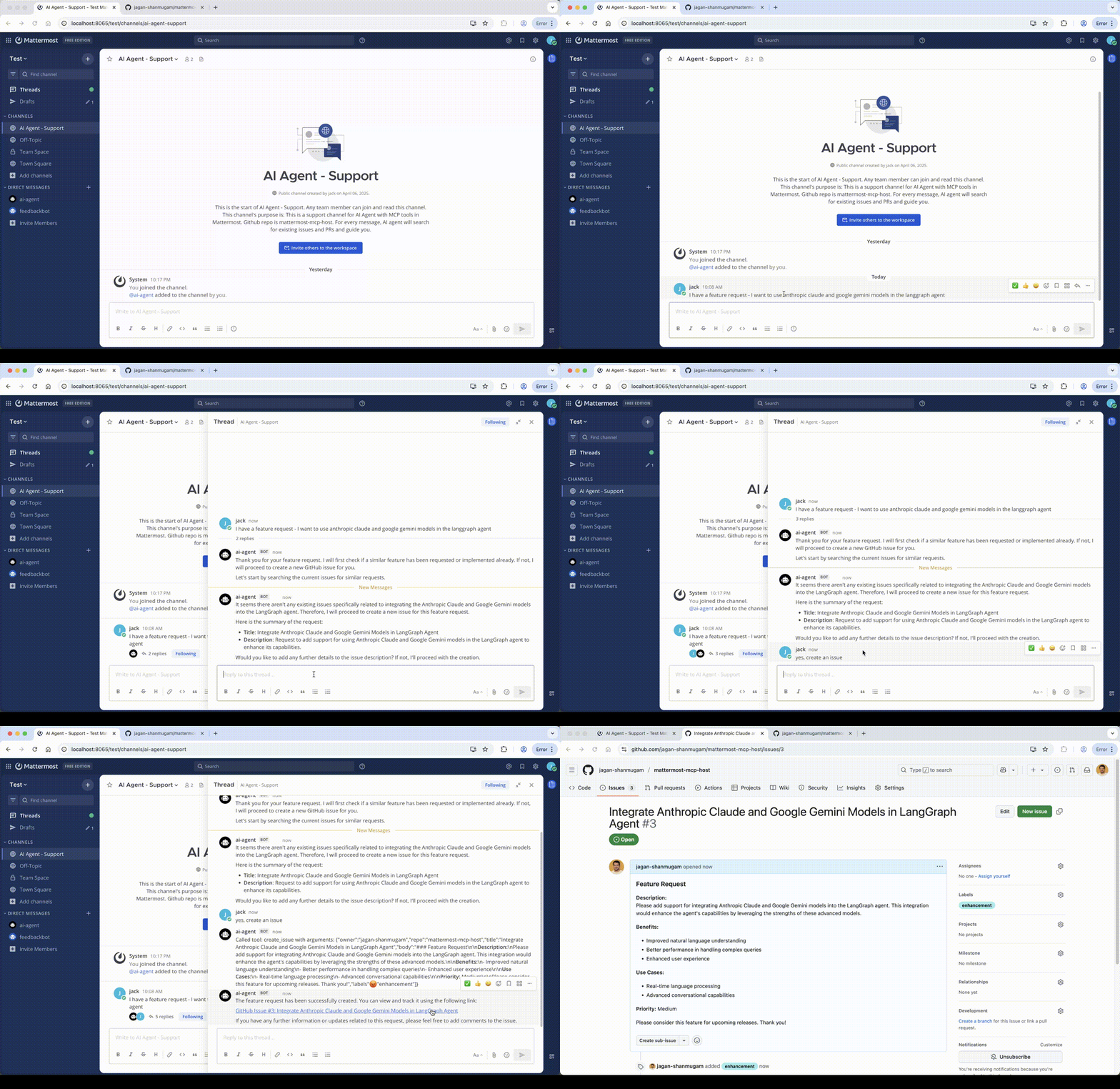
1. Github Agent in support channel - searches the existing issues and PRs and creates a new issue if not found
2. Search internet and post to a channel using Mattermost-MCP-server
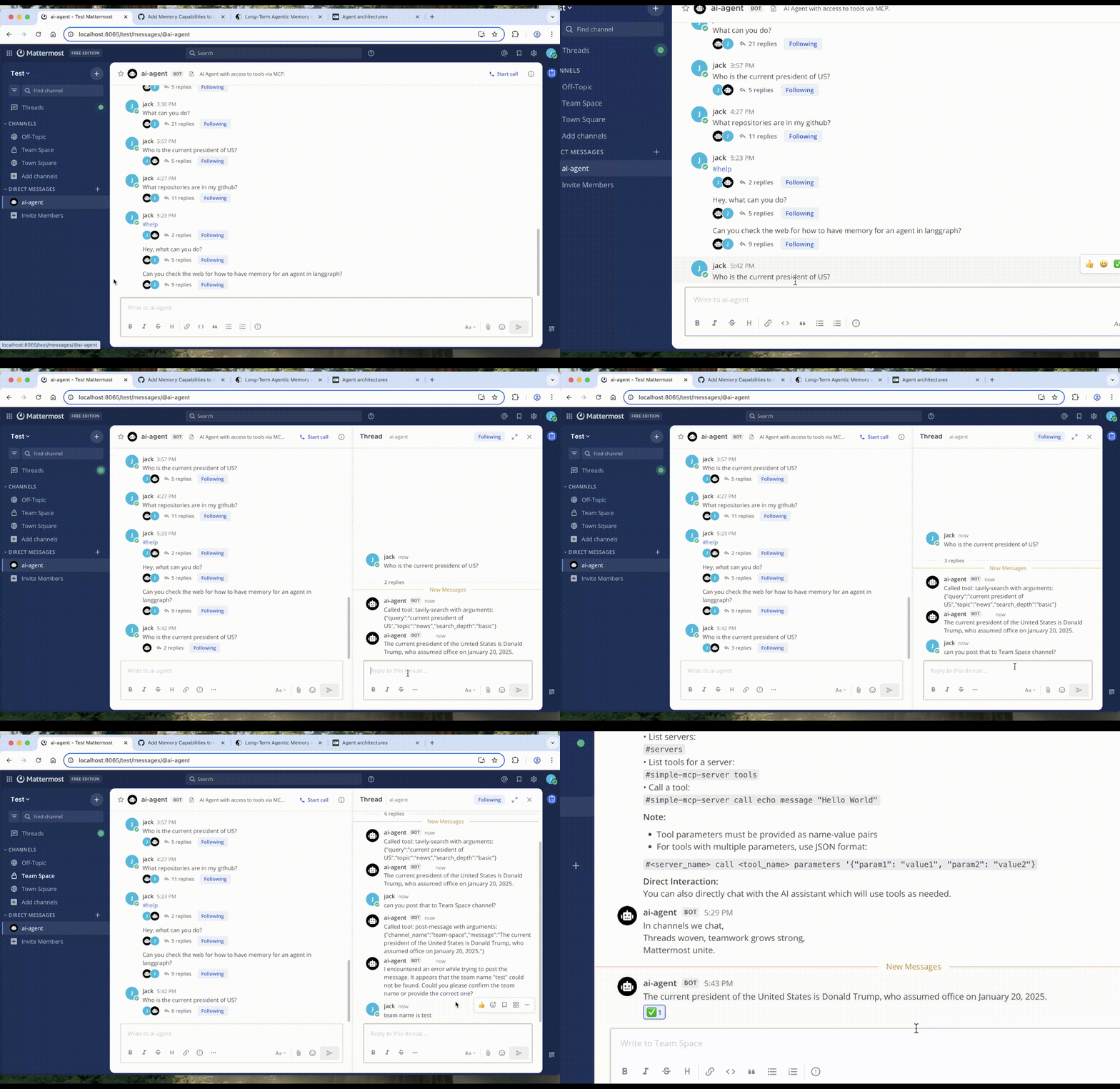
Scroll below for full demo in YouTube
Features
- 🤖 Langgraph Agent Integration: Uses a LangGraph agent to understand user requests and orchestrate responses.
- 🔌 MCP Server Integration: Connects to multiple MCP servers defined in
mcp-servers.json. - 🛠️ Dynamic Tool Loading: Automatically discovers tools from connected MCP servers and makes them available to the AI agent. Converts MCP tools to langchain structured tools.
- 💬 Thread-Aware Conversations: Maintains conversational context within Mattermost threads for coherent interactions.
- 🔄 Intelligent Tool Use: The AI agent can decide when to use available tools (including chaining multiple calls) to fulfill user requests.
- 🔍 MCP Capability Discovery: Allows users to list available servers, tools, resources, and prompts via direct commands.
- #️⃣ Direct Command Interface: Interact directly with MCP servers using a command prefix (default:
#).
Overview
The integration works as follows:
- Mattermost Connection (
mattermost_client.py): Connects to the Mattermost server via API and WebSocket to listen for messages in a specified channel. - MCP Connections (
mcp_client.py): Establishes connections (primarilystdio) to each MCP server defined insrc/mattermost_mcp_host/mcp-servers.json. It discovers available tools on each server. - Agent Initialization (
agent/llm_agent.py): ALangGraphAgentis created, configured with the chosen LLM provider and the dynamically loaded tools from all connected MCP servers. - Message Handling (
main.py):- If a message starts with the command prefix (
#), it's parsed as a direct command to list servers/tools or call a specific tool via the correspondingMCPClient. - Otherwise, the message (along with thread history) is passed to the
LangGraphAgent.
- If a message starts with the command prefix (
- Agent Execution: The agent processes the request, potentially calling one or more MCP tools via the
MCPClientinstances, and generates a response. - Response Delivery: The final response from the agent or command execution is posted back to the appropriate Mattermost channel/thread.
Setup
Clone the repository:
git clone <repository-url>
cd mattermost-mcp-host
Install:
- Using uv (recommended):
# Install uv if you don't have it yet
# curl -LsSf https://astral.sh/uv/install.sh | sh

# Activate venv
source .venv/bin/activate

# Install the package with uv
uv sync

# To install dev dependencies
uv sync --dev --all-extras
- Using uv (recommended):
Configure Environment (
.envfile): Copy the.env.exampleand fill in the values or Create a.envfile in the project root (or set environment variables):# Mattermost Details MATTERMOST_URL=http://your-mattermost-url MATTERMOST_TOKEN=your-bot-token # Needs permissions to post, read channel, etc. MATTERMOST_TEAM_NAME=your-team-name MATTERMOST_CHANNEL_NAME=your-channel-name # Channel for the bot to listen in # MATTERMOST_CHANNEL_ID= # Optional: Auto-detected if name is provided # LLM Configuration (Azure OpenAI is default) DEFAULT_PROVIDER=azure AZURE_OPENAI_ENDPOINT=your-azure-endpoint AZURE_OPENAI_API_KEY=your-azure-api-key AZURE_OPENAI_DEPLOYMENT=your-deployment-name # e.g., gpt-4o # AZURE_OPENAI_API_VERSION= # Optional, defaults provided # Optional: Other providers (install with `[all]` extra) # OPENAI_API_KEY=... # ANTHROPIC_API_KEY=... # GOOGLE_API_KEY=... # Command Prefix COMMAND_PREFIX=#See
.env.examplefor more options.Configure MCP Servers: Edit
src/mattermost_mcp_host/mcp-servers.jsonto define the MCP servers you want to connect to. Seesrc/mattermost_mcp_host/mcp-servers-example.json. Depending on the server configuration, you mightnpx,uvx,dockerinstalled in your system and in path.Start the Integration:
mattermost-mcp-host
Prerequisites
- Python 3.13.1+
- uv package manager
- Mattermost server instance
- Mattermost Bot Account with API token
- Access to a LLM API (Azure OpenAI)
Optional
- One or more MCP servers configured in
mcp-servers.json - Tavily web search requires
TAVILY_API_KEYin.envfile
Usage in Mattermost
Once the integration is running and connected:
- Direct Chat: Simply chat in the configured channel or with the bot. The AI agent will respond, using tools as needed. It maintains context within message threads.
- Direct Commands: Use the command prefix (default
#) for specific actions:#help- Display help information.#servers- List configured and connected MCP servers.#<server_name> tools- List available tools for<server_name>.#<server_name> call <tool_name> <json_arguments>- Call<tool_name>on<server_name>with arguments provided as a JSON string.- Example:
#my-server call echo '{"message": "Hello MCP!"}'
- Example:
#<server_name> resources- List available resources for<server_name>.#<server_name> prompts- List available prompts for<server_name>.
Next Steps
- ⚙️ Configurable LLM Backend: Supports multiple AI providers (Azure OpenAI default, OpenAI, Anthropic Claude, Google Gemini) via environment variables.
Mattermost Setup
- Create a Bot Account
- Go to Integrations > Bot Accounts > Add Bot Account
- Give it a name and description
- Save the access token in the .env file
- Required Bot Permissions
- post_all
- create_post
- read_channel
- create_direct_channel
- read_user
- Add Bot to Team/Channel
- Invite the bot to your team
- Add bot to desired channels
Troubleshooting
- Connection Issues
- Verify Mattermost server is running
- Check bot token permissions
- Ensure correct team/channel names
- AI Provider Issues
- Validate API keys
- Check API quotas and limits
- Verify network access to API endpoints
- MCP Server Issues
- Check server logs
- Verify server configurations
- Ensure required dependencies are installed and env variables are defined
Demos
Create issue via chat using Github MCP server
(in YouTube)
AI Agent in Action in Mattermost
Contributing
Please feel free to open a PR.
License
This project is licensed under the MIT License - see the LICENSE file for details.
Installing jagan-shanmugam/mattermost-mcp-host
This server has no published package — it is built from source. Open the repository and follow its README.
▸ github.com/jagan-shanmugam/mattermost-mcp-hostFAQ
Is jagan-shanmugam/mattermost-mcp-host MCP free?
Yes, jagan-shanmugam/mattermost-mcp-host MCP is free — one-click install via Unyly at no cost.
Does jagan-shanmugam/mattermost-mcp-host need an API key?
No, jagan-shanmugam/mattermost-mcp-host runs without API keys or environment variables.
Is jagan-shanmugam/mattermost-mcp-host hosted or self-hosted?
Self-hosted: the server runs locally on your machine via the install command above.
How do I install jagan-shanmugam/mattermost-mcp-host in Claude Desktop, Claude Code or Cursor?
Open jagan-shanmugam/mattermost-mcp-host on unyly.org, pick your client tab (Claude Desktop, Claude Code, Cursor) and press Install — the config is generated automatically, no JSON editing.
Related MCPs
Gmail
Read, send and search emails from Claude
 by Google
Slack
Send, search and summarize Slack messages
 by Slack
Runbear
No-code MCP client for team chat platforms, such as Slack, Microsoft Teams, and Discord.
Discord Server
A community discord server dedicated to MCP by [Frank Fiegel](https://github.com/punkpeye)
Klavis AI
Open Source MCP Infra. Hosted MCP servers and MCP clients on Slack and Discord.
Work90210/APIFold
Turn any REST API into a hosted MCP server, with ready-made public servers for GitHub, Stripe, Slack, OpenAI, Notion and more.
 by Work90210
arikusi/deepseek-mcp-server
DeepSeek AI chat and reasoning with multi-turn sessions, function calling, thinking mode and cost tracking.
 by arikusi
hashgraph-online/hashnet-mcp-js
Discover, register and chat with AI agents on the Hashgraph network via the Registry Broker.
 by hashgraph-online
profullstack/mcp-server
Developer utilities: SEO optimization, document conversion, domain lookup, email validation, QR codes, weather data, social media posting and security scanning.
 by profullstack
WayStation-ai/mcp
Connect MCP hosts to apps such as Notion, Slack, Monday and Airtable.
 by waystation-ai
Compare jagan-shanmugam/mattermost-mcp-host with
Not sure what to pick?
Find your stack in 60 seconds
Author?
Embed badge for your README
Browse similar
All communication MCPs