
Houdini DCC
FreeNot checkedMCP server for automating SideFX Houdini scenes, rendering, and simulation via Streamable HTTP.

About
MCP server for automating SideFX Houdini scenes, rendering, and simulation via Streamable HTTP.
README

Use Houdini with AI agents
Install the official DCC-MCP Agent Skill. Codex users can use the native plugin marketplace:
codex plugin marketplace add dcc-mcp/dcc-mcp-agent-plugins
codex plugin add dcc-mcp@dcc-mcp
For Claude Code, CodeBuddy, Cursor, Gemini CLI, and other supported agents, use the official installation guide. Start Houdini, enable this adapter, and verify that the running instance is registered:
dcc-mcp-cli list
Then ask your agent:
Use dcc-mcp to inspect the current Houdini scene.
The list must include dcc_type=houdini. If it does not, follow the
connection troubleshooting guide.
Part of the DCC-MCP host matrix
dcc-mcp-houdini — Core Houdini adapter for DCC-MCP — Houdini tools exposed through MCP.
It is one of 48 host adapters in the DCC-MCP catalog. Every adapter speaks the same MCP protocol and builds on the same core runtime contract; each one exposes the tools its own host needs on top of that.
This block is generated from the catalog entry in dcc-mcp-catalog.yml. Re-run the generator after changing the catalog.
Agent workflow
AI agents should use the shared gateway through dcc-mcp-cli; IDE users may
continue to use the MCP endpoint. Prefer typed skills and tools over raw scripts.
Install or update the CLI
dcc-mcp-cli is the preferred control path for every shell-capable agent. If
it is missing, ask the user before installing the latest official release:
# Linux/macOS
curl -fsSL https://raw.githubusercontent.com/dcc-mcp/dcc-mcp-core/main/scripts/install-cli.sh | sh

# Windows PowerShell
powershell -ExecutionPolicy Bypass -c "irm https://raw.githubusercontent.com/dcc-mcp/dcc-mcp-core/main/scripts/install-cli.ps1 | iex"
Keep an official build current through the release manifest:
dcc-mcp-cli update check
dcc-mcp-cli update apply
update apply downloads and stages the latest CLI for the next launch. It
does not update a running dcc-mcp-server; update that server in its own
environment.
dcc-mcp-cli dcc-types
dcc-mcp-cli list
dcc-mcp-cli search --query "<task>" --dcc-type houdini
dcc-mcp-cli describe <tool-slug>
dcc-mcp-cli call <tool-slug> --json '{"key":"value"}'
dcc-types reports release-catalog support; list reports live sessions. If a
tool belongs to an inactive progressive skill, call dcc-mcp-cli load-skill <skill-name> --dcc-type houdini before retrying. For post-task improvement,
attach a stable session id with --meta-json, query dcc-mcp-cli stats --range 24h --session-id <task-id>, then pass the bounded evidence to the
review_skill_improvement prompt from dcc-mcp-skills-creator.
CI E2E Release PyPI Python Downloads License Release Assets
SideFX Houdini adapter for the DCC Model Context Protocol (MCP) ecosystem. It embeds a Streamable HTTP MCP server inside Houdini/hython and exposes skills-first Houdini automation tools to agents.
Houdini 22 captured GSplat engineering validation
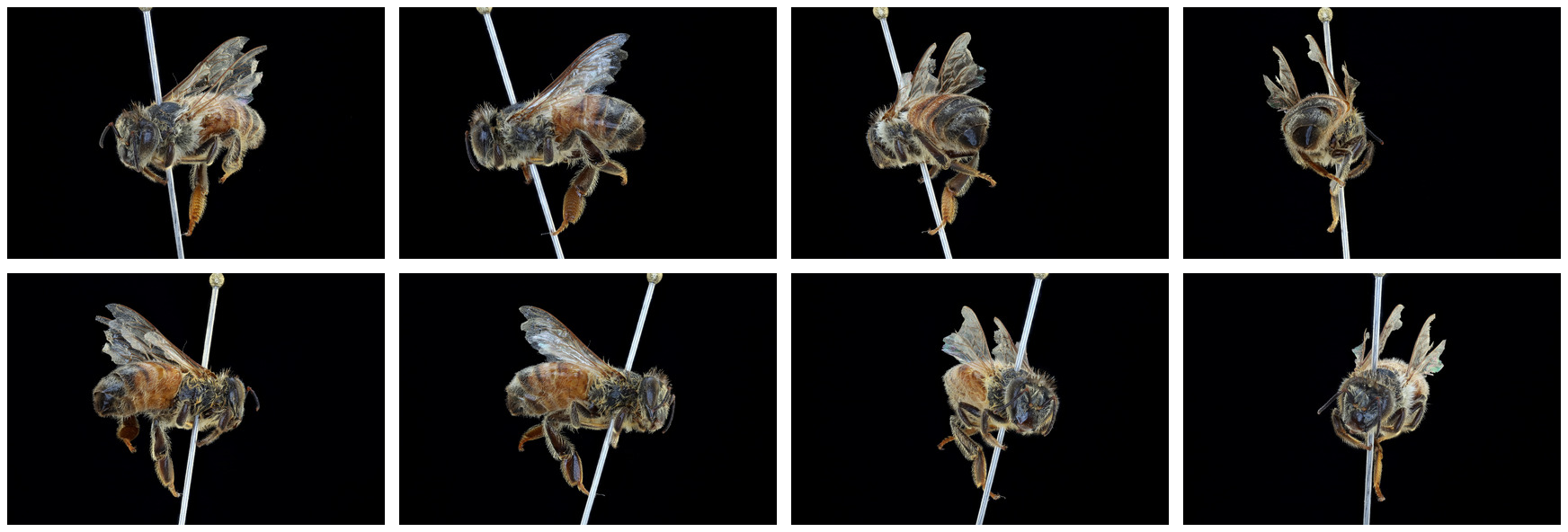
This validation starts from the University of California, Santa Barbara
specimen UCSB-IZC00037044, published under CC BY 4.0 in
Honey Bee Heat Budget Images and Models.
It is our own reconstruction and Houdini scene, not the SideFX sample. The
source is a pinned specimen photographed from multiple views; it is not a live
bee performance capture.
The COLMAP/Nerfstudio reconstruction contains 70,269 retained Gaussians after deterministic pin-region removal. Its held-out preview metrics pass the recorded engineering thresholds: PSNR 21.91, SSIM 0.849, and LPIPS 0.145. The complete machine-readable provenance, hashes, coordinate contract, thresholds, and limitations are in honeybee-gsplat-validation.json.
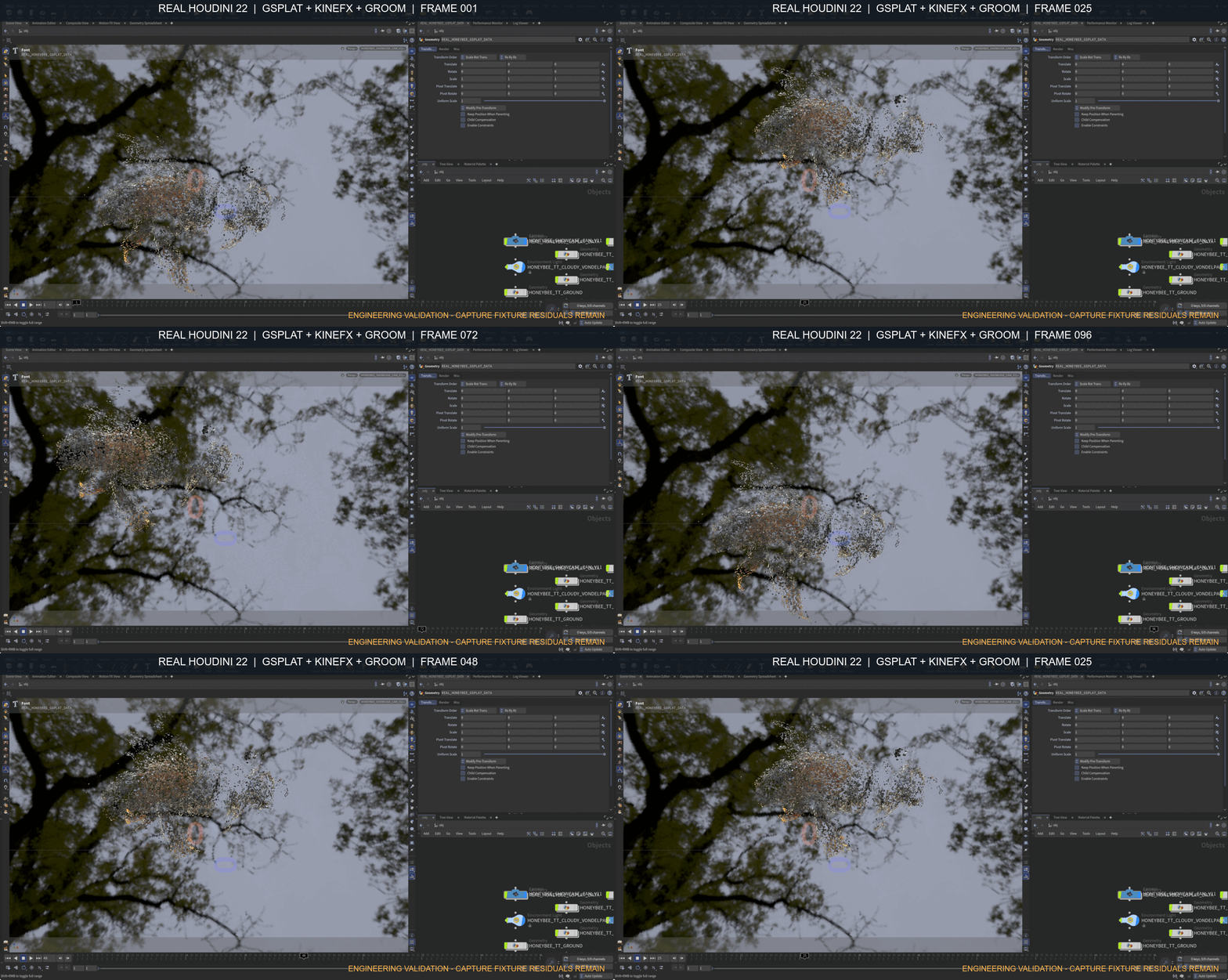
The Houdini 22 scene exercises GSplat-aware KineFX deformation, articulated wing/body/leg controls, a deformation-synchronized short-fur Groom, and a fixed camera flipbook under a neutral outdoor HDR environment. The five-frame contact sheet verifies that one splat instance remains in frame through the 96-frame takeoff/flight/landing cycle; the legacy camera object was hidden so its viewport frustum cannot be mistaken for model ghosting.
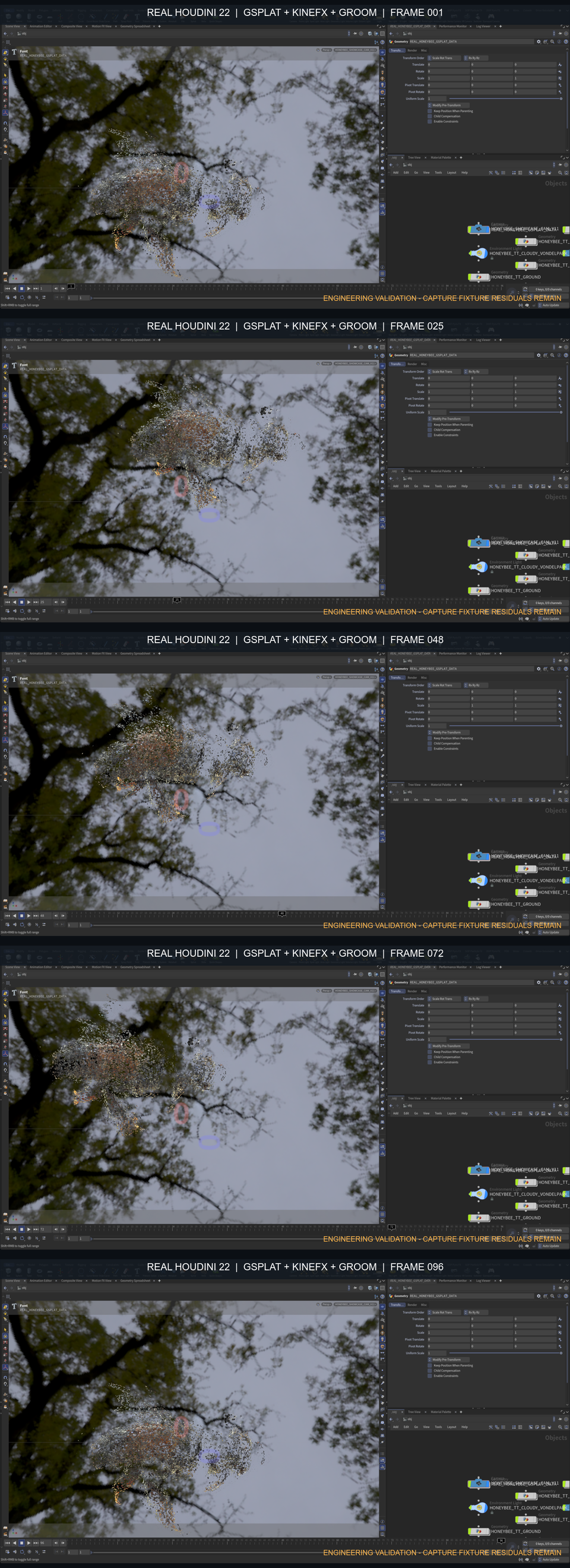
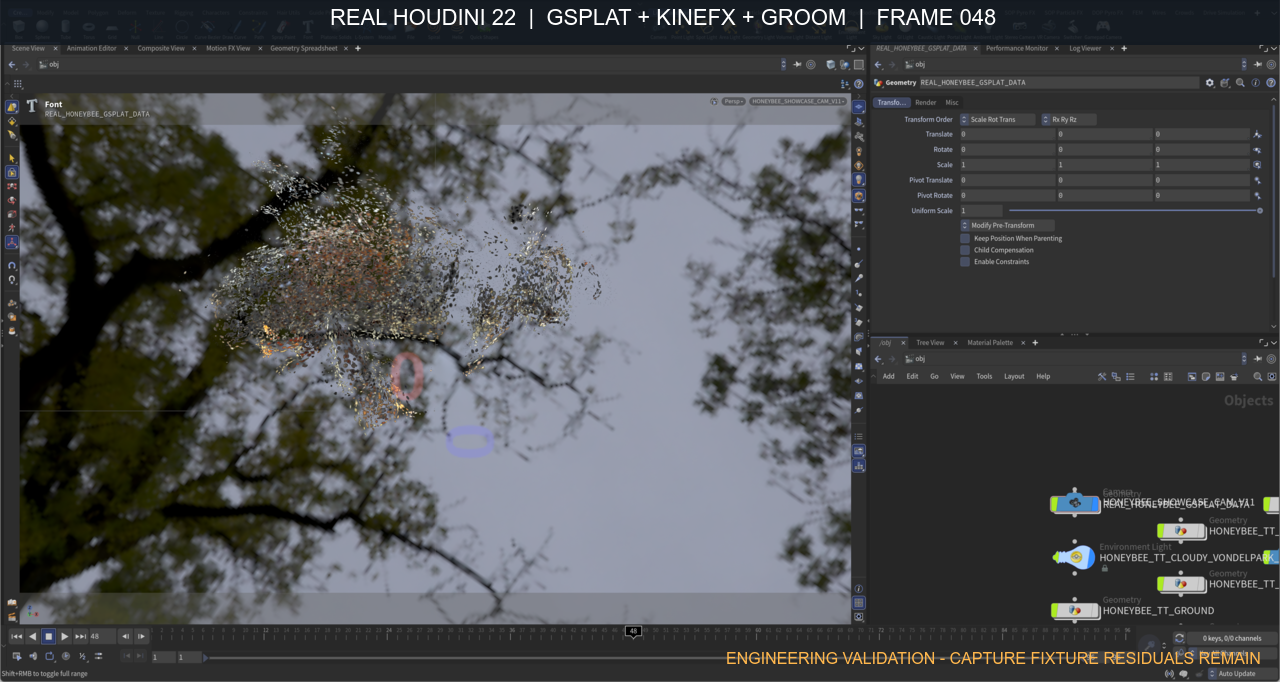
The UI capture is from the real Houdini process. DCC-MCP set each audited frame and DCC-CUA captured the same exact Houdini PID/window through Windows Graphics Capture. Only the title bar was cropped to remove a local path; the Scene View, parameter editor, timeline, and node graph were not recreated. This remains engineering evidence rather than final beauty approval: pin removal cannot synthesize occluded anatomy, residual capture-support Gaussians remain visible, and the pinned specimen cannot supply biological flight or foot-contact motion. A final living-bee showcase still requires a cleaner licensed capture and dedicated contact/occlusion review.
Source attribution and the separation between captured evidence and authored animation are documented in docs/showcase/honeybee-reference-license.md.
Photogrammetry high-poly quality gate
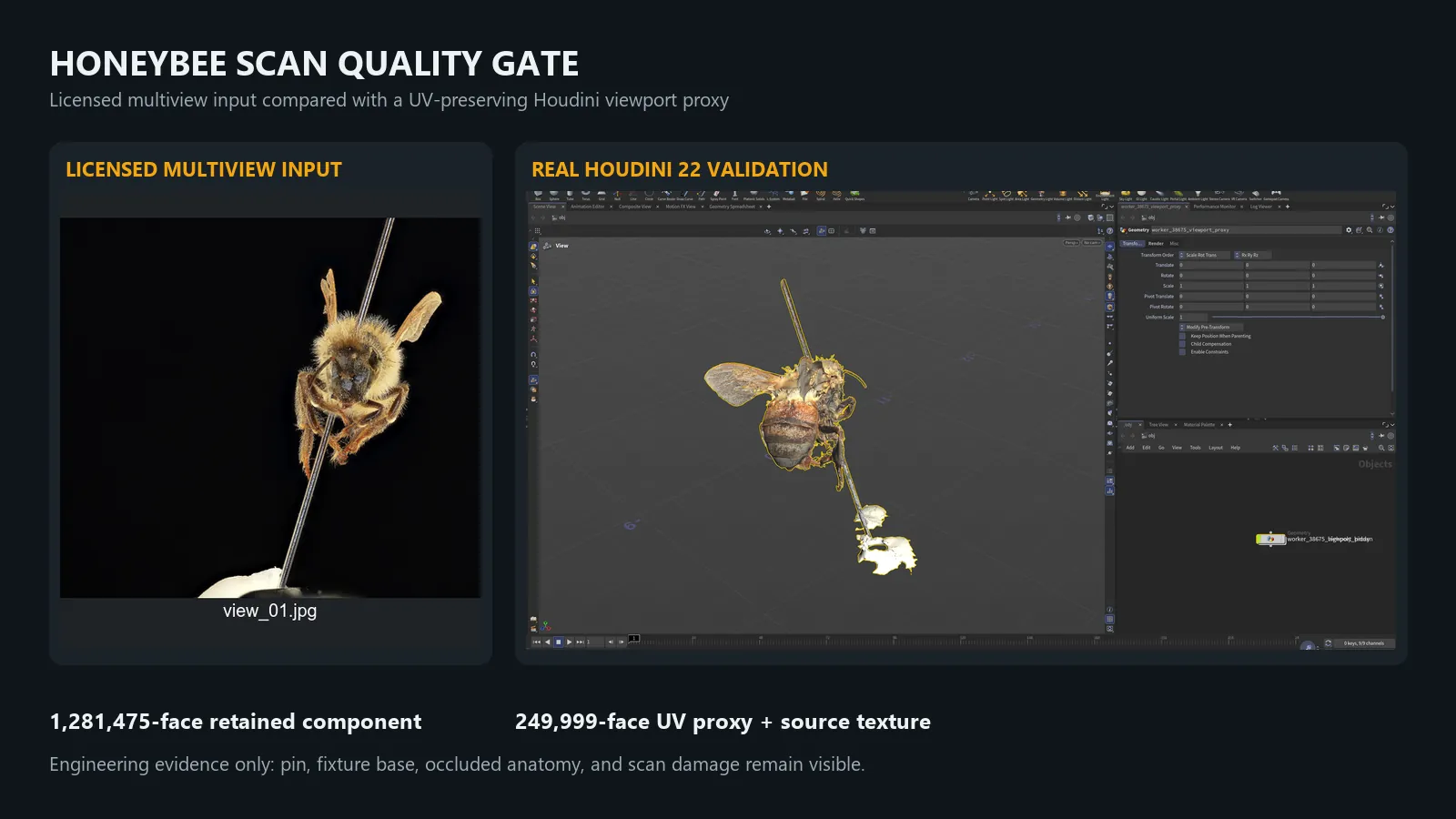
Increasing polygon count alone does not correct the captured specimen. A
second licensed UCSB scan, UCSB-IZC00038675, contains 1,606,745 source faces.
Keeping its largest connected component retains 1,281,475 faces; a
UV-preserving 249,999-face proxy carries the source texture into a real
Houdini 22 viewport for bounded interactive review.
This audit intentionally fails final-asset acceptance. The pin intersects the body, the fixture base remains connected, and occluded legs, claws, antennae, and wing regions are incomplete. Those errors cannot be repaired by subdivision, decimation, Groom density, relighting, or denoising. The machine-readable counts, hashes, and acceptance result are in honeybee-highpoly-validation.json.
The next visual-quality stage must therefore use a clean licensed living-bee multiview capture (or another source with complete anatomy), retrain the GSplat, and pass source-view plus novel-view silhouette checks before KineFX and Groom are treated as final presentation layers.
Archived procedural rig validation (pre-GSplat)
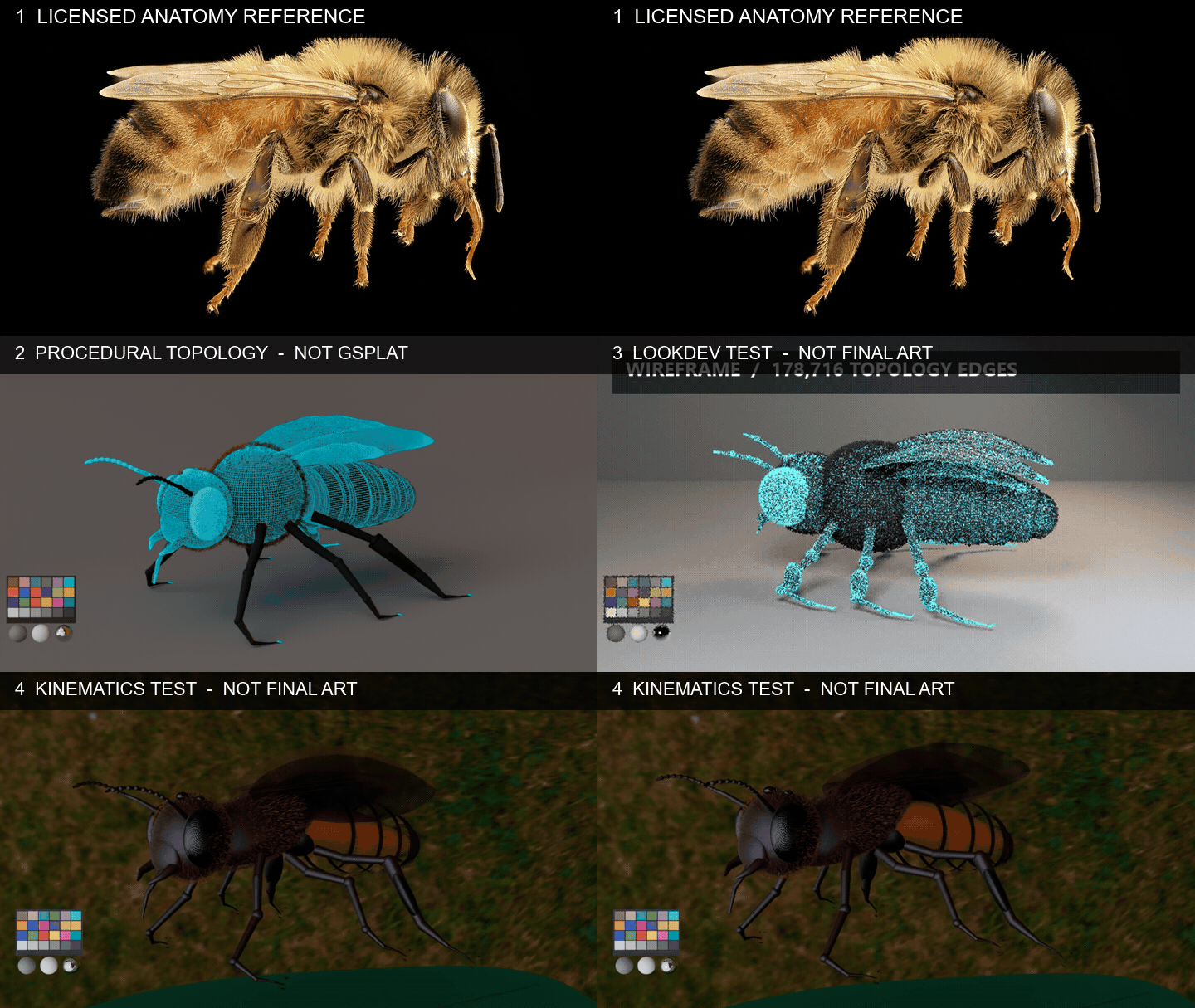
This archived validation uses an original DCC-MCP procedural insect prototype, not the SideFX sample. It is not a captured or trained Gaussian Splat, and its ant-like silhouette is not the visual-quality target for the honeybee showcase. The opening reference photograph makes that anatomical gap explicit.
The Houdini 22 scene remains useful as technical evidence for MaterialX/Solaris LookDev, KineFX-driven motion, wing beats, head and antenna controls, articulated legs, and phase-delayed body motion. Karma uses one CC0 Poly Haven Residential Garden HDRI, ACES display conversion, neutral calibration spheres, and no duplicate sun or stylized green rim light.
Watch the 1280×720, 24 fps MP4
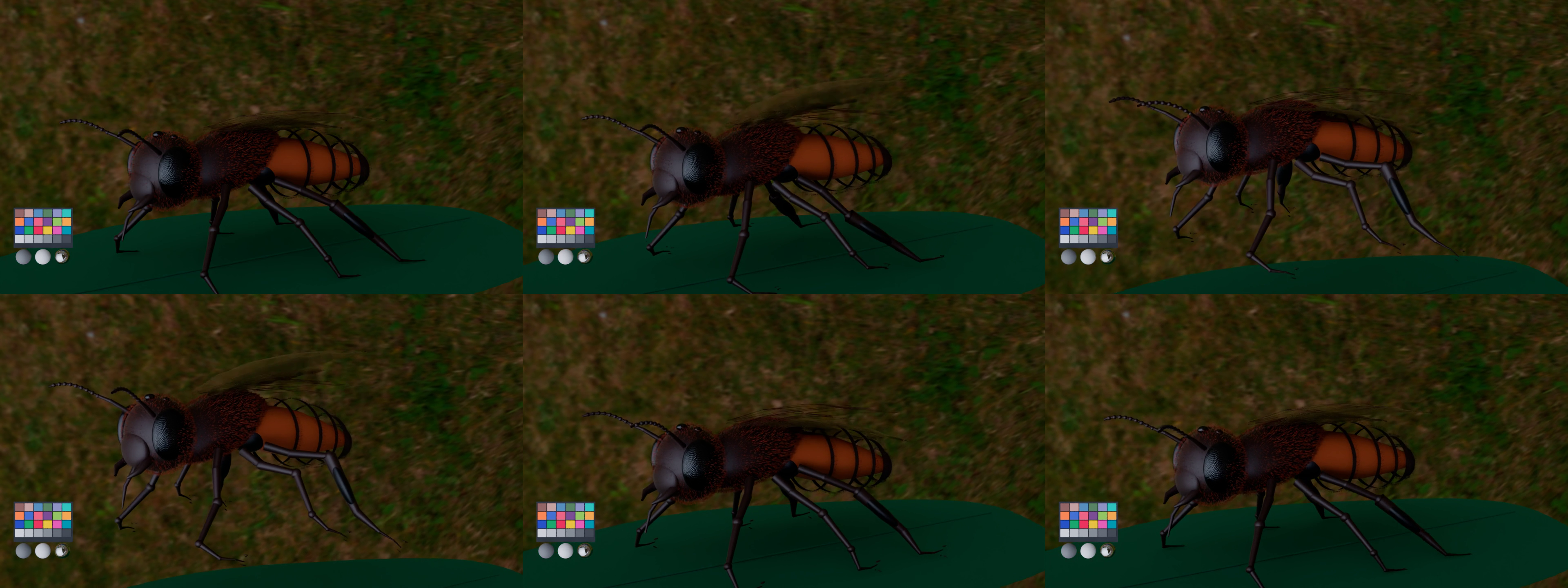
The 96 rendered frames contain one animated insect: body motion blur is disabled, so takeoff silhouettes do not become a second model. The procedural leg controls were checked against a -0.003 floor tolerance. This numerical check does not replace collision/contact solving and the result is not accepted as final honeybee anatomy or grounded motion.
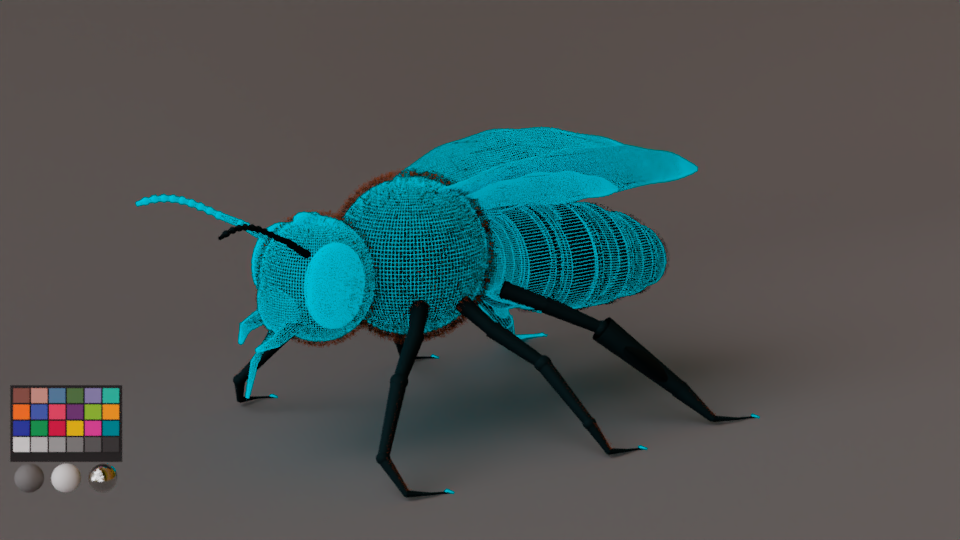
The older calibration turntable remains useful for inspecting the prototype's materials and topology, but should not be read as scan evidence or final art:
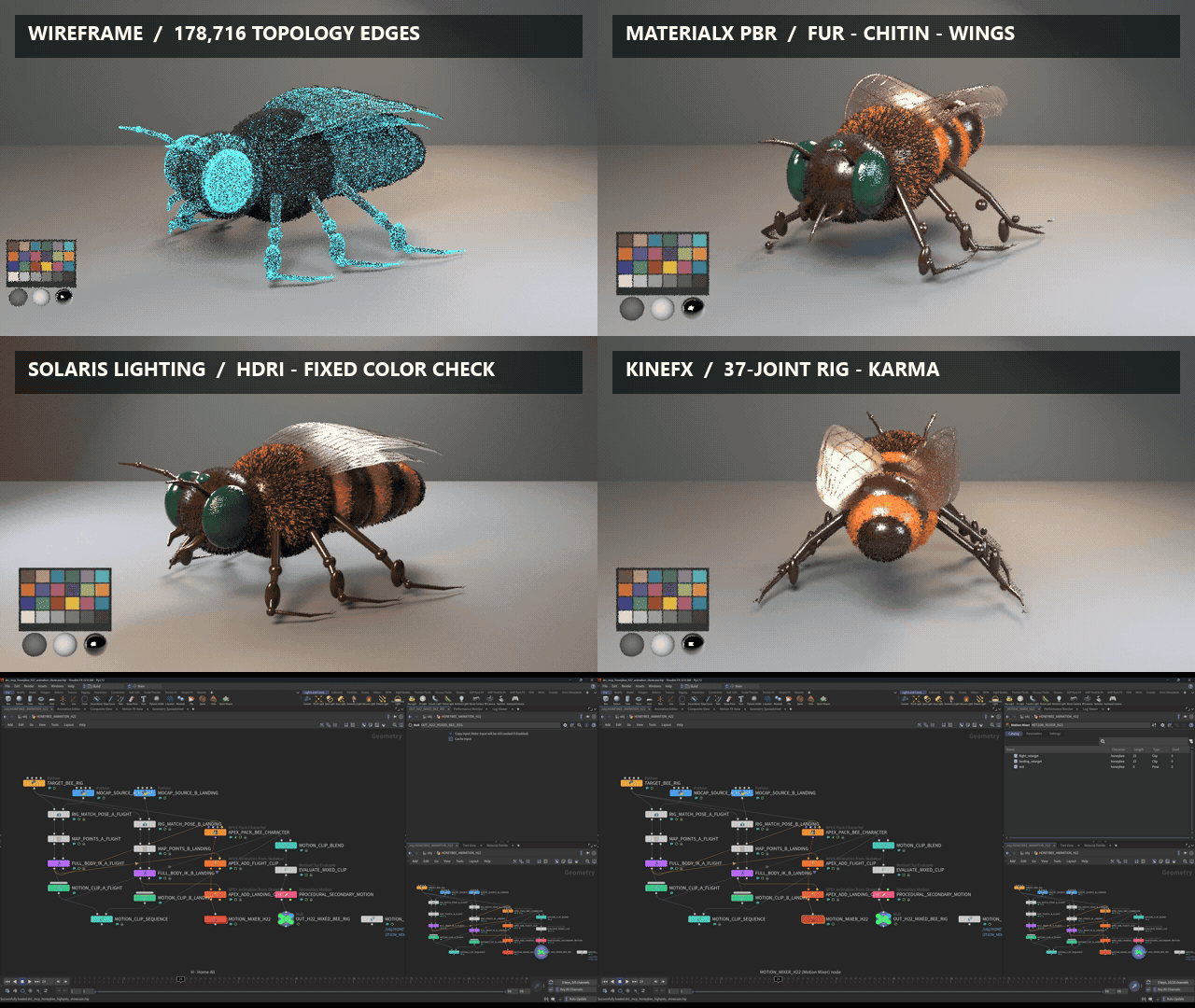
Reference provenance, license terms, technical evidence, and known limitations are recorded in docs/showcase/honeybee-reference-license.md. The archived procedural model remains useful for topology and control-rig comparison, but it is superseded as GSplat provenance evidence by the captured specimen validation above.
Features
- Embedded MCP Streamable HTTP server inside Houdini (OS-assigned instance port)
- Auto-gateway with first-wins election (gateway port 9765)
- Progressive skill loading (discover → load → unload)
- Houdini Python (
hython) and interactive UI-thread dispatch - Python 3.7+ package metadata for older Houdini runtimes
- Bundled skills for scripting, scene inspection, node authoring, HDA execution, and automation
- Wheel, sdist, and Houdini quickinstall ZIP release assets
- Prometheus metrics endpoint (
/metrics), job persistence, and workflow engine support - Optional licensed Houdini Docker E2E workflow
Agent install (recommended)
Let your AI agent do the setup. In an MCP-capable agent (Cursor, Claude, etc.), just say:
帮我参考 dcc-mcp/dcc-mcp-houdini/install.md 去安装
The agent reads install.md, runs the
dcc-mcp-houdini-setup skill to install dependencies into Houdini's hython,
generates an MCP host config, guides the Houdini package startup hooks
step, and runs a smoke prompt to confirm the connection.
Installation
Release Wheel
pip install dcc-mcp-houdini
For an unreleased GitHub asset, install a release wheel directly:
pip install https://github.com/dcc-mcp/dcc-mcp-houdini/releases/download/v0.9.1/dcc_mcp_houdini-0.9.1-py3-none-any.whl
Houdini Quickinstall ZIP
Download dcc_mcp_houdini_quickinstall_<platform>_v<version>.zip from
GitHub Releases, extract
it to a stable folder, then run:
powershell -ExecutionPolicy Bypass -File install.ps1 -HoudiniVersion 20.5
For an isolated or custom package location, pass -PackagesDir explicitly:
powershell -ExecutionPolicy Bypass -File install.ps1 -HoudiniVersion 20.5 -PackagesDir C:\temp\houdini-packages
DCC_MCP_HOUDINI_PACKAGES_DIR provides the same override on every platform;
on Windows, the explicit -PackagesDir argument takes precedence. Changing the
HOME environment variable inside PowerShell does not redirect its automatic
$HOME variable, so use this override for deterministic isolated installs.
On Linux/macOS:
chmod +x install.sh
./install.sh 20.5
The package writes a Houdini package JSON into the user preferences folder.
pythonX.Ylibs/uiready.py starts after the GUI is available. Houdini runs all
matching uiready.py files, so a studio's first-match 123.py cannot shadow
this hook; it also covers Houdini Core and startup with a HIP file.
Houdini only executes uiready.py on builds that implement the UI-ready hook.
SideFX documents the hook without a minimum version, so this adapter states the
evidence it has for each build instead of one minimum version. Real GUI sessions
were confirmed on Houdini 22.0.368 only. Houdini 20.5.550 and 21.0.440 ship the
hook at the binary level: their libOPUI.dll contains the execUiReadyFiles,
uiready.py, and UI Ready Files symbols, but no GUI session was run on those
two builds, so treat them as unverified rather than confirmed. Builds without
the hook never execute the file, and autostart keeps falling back to the legacy
123.py / 456.py hooks that the installer still deploys.
Legacy scripts/123.py and scripts/456.py hooks reuse the same bootstrap that extracts bundled wheels into vendor/ and
starts the MCP server unless DCC_MCP_HOUDINI_AUTOSTART=0.
Headless interpreters skip GUI autostart and use hython -m dcc_mcp_houdini.
See SideFX startup script locations.
For Core 0.20.14, quickinstall supports Python 3.7+ on Windows/Linux and Python
3.8+ on macOS. The macOS archive fails closed before extraction on Python 3.7
because that Core release has no native cp37 macOS wheel. Default macOS
registration is ~/Library/Preferences/houdini/<version>/packages; the
environment override remains authoritative.
Isolated background ROP workers receive DCC_MCP_BACKGROUND_RENDER=1 in their
child environment. Package and custom 123.py/456.py startup hooks must skip
MCP adapter autostart when that marker is present; the parent Houdini environment
is not modified. Background render cancellation uses only live child-process
handles owned by the current adapter process; status-file PIDs are never used
as process ownership evidence.
Usage
import dcc_mcp_houdini

server = dcc_mcp_houdini.start_server()
print(server.mcp_url)  # Exact direct endpoint selected by the OS
start_server() is the interactive Houdini API and uses Houdini's budgeted
event-loop pump. Headless Hython must keep its owning thread available for HOM
work; launch the foreground pump instead:
hython -m dcc_mcp_houdini
or call dcc_mcp_houdini.serve_headless(...) from a dedicated Hython
entrypoint. A plain headless start_server() fails before tools are registered
instead of silently executing HOM on an HTTP worker.
Hython cannot report a reliable HIP dirty state: context snapshots omit
scene_saved, while validate_scene returns dirty: null; GUI sessions report
the real boolean state. Destructive open_scene and new_scene calls fail
closed when that state is unknown unless the caller explicitly passes
force=true.
Default minimal mode (DCC_MCP_MINIMAL=1) loads only:
houdini-scriptinghoudini-scene
Use progressive discovery for heavier tools:
search_skills(query="hda")
load_skill("houdini-hda")
call houdini_hda__execute_hda
Local MCP debug (Cursor / Claude)
See docs/guide/local-mcp-debug.md and copy examples/mcp/cursor-houdini-streamable-http.json into your MCP host config.
Development
# Install dependencies
just dev

# Run tests
just test

# Lint
just lint-all

# Windows: build dcc-mcp-core with Houdini's Python and symlink
just houdini-version=20.5 houdini-dev-build-link-core-win

# Windows: start Houdini with debugpy
just houdini-version=20.5 houdini-dev-debug-win

# Build wheel + platform quickinstall package
just build-houdini-package platform=win64
Release Publishing
The Release workflow publishes to PyPI when release-please creates a new
release. To backfill an existing GitHub release tag, run the Release workflow
manually with tag_name=vX.Y.Z and publish_to_pypi=true. Publishing uses
PyPI trusted publishing when configured, or PYPI_API_TOKEN when that secret is
available.
release-please runs on a daily batch window (05:37 UTC) rather than on
every push to main, so one version carries every feat / fix merged since
the previous tag instead of cutting a version per merge. Merging the release
pull request does not tag immediately: the tag, GitHub Release, PyPI upload and
quickinstall assets are produced on the next daily window after the merge
(typically within 24 hours, plus any GitHub scheduling delay — GitHub queues
and can drop scheduled runs under load). To ship sooner, trigger the Release
workflow manually with workflow_dispatch after merging the release PR.
Bundled Skills (43 packages, 296 tools)
See domain coverage and acceptance for implemented behavior, real-host evidence, and remaining domain work.
Full authoritative index with ready-made task chains: src/dcc_mcp_houdini/skills/SKILLS_INDEX.md
bootstrap (default loaded)
| Skill | Tools |
|---|---|
houdini-scripting |
execute_python, get_session_info |
scene (partial default — houdini-scene only)
| Skill | Tools | Load |
|---|---|---|
houdini-scene |
inspect_selection, get_scene_info, list_obj_nodes, list_child_nodes, get_node_info |
default |
houdini-scene-edit |
new_scene, open_scene, save_scene, get_selection, set_selection, find_nodes, list_cameras, get_bounding_box |
on demand |
authoring (load on demand)
| Skill | Tools |
|---|---|
houdini-nodes |
create_node, set_node_parms, connect_nodes, cook_node, layout_children, delete_node |
houdini-object-ops |
set_pivot, rename_node, duplicate_node, parent_node, set_node_flags, set_node_lock, get_transform, set_transform |
houdini-parameters |
list_parms, get_parms, get_parm_templates, get_expression, set_parms, add_spare_parm, remove_spare_parm, set_expression, clear_expression |
houdini-node-graph |
get_connections, connect_input, disconnect_input |
houdini-geometry |
create_primitive, create_curve_guides, get_geometry_info, list_attributes, get_attribute_values, get_primitive_intrinsics, list_groups, get_cook_status |
houdini-groom |
build_short_fur_groom, add_groom_step |
houdini-mesh-ops |
loft_sections, lathe_profile, extrude_faces, bevel_edges, inset, bridge_edges, boolean_op, add_edge_loop, array_instances, mirror, auto_uv, uv_project, transform_geometry, merge_geometry, blast_geometry, group_geometry, add_normals, triangulate_geometry, convert_geometry |
houdini-vex |
create_wrangle, update_vex_snippet, validate_vex_syntax, cook_wrangle, diagnose_wrangle, get_vex_info, list_wrangles |
houdini-camera-light |
list_cameras, create_camera, update_camera, frame_view, get_view_state, create_light, update_light |
houdini-materials |
create_material, assign_material, build_materialx_pbr, validate_materialx_pbr, create_materialx_node, inspect_materialx_graph |
houdini-lookdev |
list_materials, list_assignments, get_material_parms, set_material_parms, get_shader_connections, connect_shader, disconnect_shader, reset_material, save_preset, list_presets, load_preset, delete_preset |
houdini-hda |
install_hda_file, list_hda_definitions, execute_hda, save_node_as_hda, promote_hda_parameters, author_hda_interface, publish_hda_library, validate_hda_contract, update_hda_definition, sync_hda_instance |
houdini-chops |
create_chop_network, create_motionclip, create_audio_driven, apply_filter, export_to_keyframes, get_channel_info |
houdini-constraints |
create_parent_constraint, create_blend_constraint, create_position_constraint, create_orient_constraint, list_constraints, delete_constraint |
houdini-export-preset |
list_export_presets, save_export_preset, load_export_preset, delete_export_preset |
houdini-kinefx |
create_rig, set_rig_pose, capture_joints, deform_gsplat_with_rig, apply_mocap |
houdini-light-rig |
create_three_point_light_rig, create_area_softbox, create_hdri_world, list_light_rigs, set_light_rig_intensity, aim_light_at_object, group_lights, set_render_view_transform, get_lighting_summary, configure_light_shadow, configure_light_bank, set_light_ies |
houdini-material-library |
save_material_preset, list_material_presets, load_material_preset, delete_material_preset, get_shader_assignment, get_material_connections, set_material_attribute, assign_texture, list_images, reload_image, list_color_spaces, set_color_management |
houdini-texture-bake |
list_bake_targets, bake_textures, bake_ambient_occlusion, bake_lighting, transfer_maps, configure_udim_bake, inspect_bake_output |
houdini-copernicus |
create_cop_network, create_cop_node, build_composite_chain, cook_cop_node, inspect_cop_output, inspect_cop_network, validate_cop_network |
houdini-vdb |
create_vdb_node, combine_vdbs, inspect_vdb |
houdini-uv |
unwrap_uv, transform_uv, inspect_uv |
houdini-terrain |
create_heightfield, add_terrain_layer, inspect_heightfield |
interchange (load on demand)
| Skill | Tools |
|---|---|
houdini-interchange |
probe_file, import_geometry, export_geometry, export_alembic, export_fbx, export_usd |
houdini-asset-sync |
publish_usd_revision, read_asset_head, reference_usd_revision |
houdini-import-to-scene |
import_to_scene |
pipeline (load on demand)
| Skill | Tools |
|---|---|
houdini-render |
capture_viewport, flipbook, get_render_settings, set_render_settings, validate_karma_stage, render_rop, get_render_job, finalize_render_outputs, denoise_image, cancel_render_job, create_render_layer, configure_aovs, manage_takes, get_render_stats |
houdini-karma |
configure_karma, set_material_override, configure_light_mixer, set_image_output |
houdini-husk |
render_with_husk, get_husk_job, cancel_husk_job, create_checkpoint, create_snapshot, set_husk_options |
houdini-animation |
get_timeline, set_timeline, set_keyframe, get_keyframes, delete_keyframes, list_animated_parms, validate_loop_contract, get_channel_info, export_channels, import_channels, bake_channels, cache_simulation |
houdini-hda-automation |
scan_hda_libraries, inspect_hda_definition, instantiate_hda, validate_hda, cook_top_network, execute_rop_chain |
houdini-crowds |
create_crowd_network, add_crowd_behavior, inspect_crowd |
houdini-pdg |
create_pdg_network, create_pdg_node, connect_pdg_nodes, inspect_pdg_graph, cook_pdg_graph |
houdini-simulation |
create_simulation_network, configure_simulation_solver, inspect_simulation_network, validate_simulation_setup, create_fracture, create_constraint_network, create_collision_source, create_pyro_source, add_pyro_post_process, add_gas_field |
houdini-particles |
create_pop_network, configure_pop_source, add_particle_force, add_particle_behavior, inspect_particles |
houdini-pipeline |
set_project, get_project, tag_asset_metadata, get_asset_metadata, validate_scene, collect_dependencies, export_shot_package |
houdini-dev |
attach_project, reload_modules, run_entrypoint, run_script, start_debugpy, introspect_hom, ui_snapshot, ui_action |
houdini-automation |
run_python_file, set_frame_range, save_hip_file, load_hip_file, build_node_chain |
houdini-gsplat-relighting |
inspect_gsplat_relighting_input, prepare_gsplat_sop_chain, create_gsplat_relight_lop, create_gsplat_copernicus_raster |
CI and Houdini Docker
Normal CI runs without Houdini installed: unit tests, skill validation, Python 3.7 syntax checks, wheel/sdist build, and quickinstall ZIP assembly.
Live Houdini E2E is in .github/workflows/e2e.yml. It defaults to
sabjorn/hbuild-worker:21.0.559-base and runs only when SideFX licensing
secrets are configured. See docs/ci/houdini-docker.md.
Project Structure
dcc-mcp-houdini/
├── src/dcc_mcp_houdini/        # Python package and bundled skills
├── packaging/                  # Quickinstall ZIP assembly
├── tests/                      # Unit and packaging tests
├── tools/                      # Dev, lint, and syntax scripts
├── examples/                   # Usage examples
├── docs/                       # Guides and CI notes
├── justfile                    # Task runner
└── pyproject.toml              # Build config
Requirements
- Houdini with Python 3.7+ (
hythonor interactive Houdini) - A Houdini build that implements the UI-ready startup hook
(
pythonX.Ylibs/uiready.py) for GUI autostart. Real GUI sessions were verified on 22.0.368; 20.5.550 and 21.0.440 ship the hook in their binaries but have no GUI-session verification. Older builds fall back to the legacy123.py/456.pyhooks. dcc-mcp-core >= 0.20.14,<0.21.0- Quickinstall bundles the latest non-prerelease
dcc-mcp-core >= 0.20.14,<0.21.0by default, or the validatedcore_versionpassed to a release backfill; no old-core pin is active. - Bundled Core wheel matrix: Python 3.7+ on Windows/Linux and Python 3.8+ on macOS; unsupported runtime/tag pairs fail before extraction.
- See
pyproject.tomlfor full dependencies
License
MIT
Installing Houdini DCC
This server has no published package — it is built from source. Open the repository and follow its README.
▸ github.com/dcc-mcp/dcc-mcp-houdiniFAQ
Is Houdini DCC MCP free?
Yes, Houdini DCC MCP is free — one-click install via Unyly at no cost.
Does Houdini DCC need an API key?
No, Houdini DCC runs without API keys or environment variables.
Is Houdini DCC hosted or self-hosted?
Self-hosted: the server runs locally on your machine via the install command above.
How do I install Houdini DCC in Claude Desktop, Claude Code or Cursor?
Open Houdini DCC on unyly.org, pick your client tab (Claude Desktop, Claude Code, Cursor) and press Install — the config is generated automatically, no JSON editing.
Related MCPs
GitHub
PRs, issues, code search, CI status
 by GitHub
Filesystem
Secure file operations with configurable access controls.
Memory
Knowledge graph-based persistent memory system.

Unyly Deploy
Deploy sites and MCP servers to Unyly straight from your AI agent
 by Unyly
Amap Maps Mcp Server
MCP server for using the AMap Maps API
 by duxiaohui
PayMCP
Lightweight payments layer for MCP servers: turn tools into paid endpoints with a two-line decorator. [PyPI](https://pypi.org/project/paymcp/) · [npm](https://w
 by blustAI
Server For Power BI
Enables exploring Microsoft Fabric / Power BI workspaces and semantic models, and executing ad-hoc DAX queries.
 by Mitsubishi-Fuso
Template MCP Server
A CLI tool to create a new Model Context Protocol server project with TypeScript support, dual transport options, and an extensible structure
 by mcpdotdirect
Supabase
Database, auth and storage
 by Supabase
Everything
Reference / test server with prompts, resources, and tools.
Compare Houdini DCC with
Not sure what to pick?
Find your stack in 60 seconds
Author?
Embed badge for your README
Browse similar
All development MCPs