
Godot AI
FreeNot checkedConnects MCP clients directly to a live Godot editor, enabling AI assistants to build scenes, edit nodes, and control the editor through over 120 operations.

About
Connects MCP clients directly to a live Godot editor, enabling AI assistants to build scenes, edit nodes, and control the editor through over 120 operations.
README

Godot AI
Godot AI connects Claude Code, Codex, Cursor, and other MCP clients to a live Godot editor. Its 46 tools and 120+ operations build scenes, edit nodes and scripts, wire signals, and configure UI, materials, animation, particles, cameras, and environments.
21,000+ monthly active installs · 30M+ tool calls in the last three months · 3,200+ GitHub stars
Install and tool-call counts come from anonymous telemetry and exclude opted-out installs: the 30 days, and July 27 onward, to October 25, 2026.

Built in ~2 hours with Godot AI, without hand-written code or image generation — source
Quick start
You need Godot 4.7+, uv (it runs the Python server), and an MCP client.
- Install uv (once):
- macOS/Linux:
curl -LsSf https://astral.sh/uv/install.sh | sh - Windows (PowerShell):
irm https://astral.sh/uv/install.ps1 | iex
- macOS/Linux:
- Install the add-on from the Asset Store (Godot's AssetLib tab), or
from a GitHub release into
your-project/addons/godot_ai/. - Enable it: Project → Project Settings → Plugins → Godot AI.
- Connect your client: in the Godot AI dock, press Configure next to your client, or Configure all. Restart the client if it doesn't notice the change.

Already installed? Click Update in the dock. Never extract a new
version over an existing addons/godot_ai/. From v3, the same button migrates
you to v4 (migration guide).
Supported clients and exceptions
The dock configures 26 clients, including Claude Code, Claude Desktop, Codex, Cursor, VS Code, Antigravity, Gemini CLI, and Hermes Agent, and shows a Run this manually command for the rest.
- Use the dock-generated command: it pins the matching version, ports, and
tool domains. v4 clients connect through
godot-ai attachover stdio; a barehttp://127.0.0.1:8000/mcpentry cannot authenticate. - Updates repin owned client entries automatically. The default scope is global, so this also redirects other projects still on an older version; update them too. Reconfigure after changing ports, telemetry preferences, or tool domains.
- Pi Coding Agent needs an MCP extension that reads
~/.pi/agent/mcp.json. Cherry Studio is not supported in v4; remove stale v3 entries in Cherry Studio itself.
Details: client configuration.
Per-project configuration
CLI-configured clients default to global user scope. Set Editor Settings →
Plugins → godot_ai/mcp_client_scope to project (or local, where supported),
then press Configure again.
Configure removes existing godot-ai entries from every scope before
writing the selected one. This can modify a checked-in .mcp.json, but does not
touch other server entries. Remove affects only the selected scope.
Launch Godot from the project directory so the client CLI writes configuration
in the right place. Claude Code also requires one-time approval from claude
run inside that project.
GDScript and C#
GDScript is fully supported: scripts are parse-validated, hot-reloaded,
attached, and outlined. C# is text-only: script_create / script_patch
write .cs files and script_manage(op="find_symbols") outlines them, but
Godot AI does not build .NET or report compiler errors. Attaching a .cs needs
a .NET-enabled editor build. C# support.
Try it
- "Show me the current scene hierarchy."
- "Create a Camera3D named MainCamera under /Main."
- "Run the scene test suite."
- "Build a voxel block-world game with a player, blocks to place and destroy, and save slots."

A block-world game with a save system, built from a handful of prompts — source
Security
Godot AI has prioritized security from the start. Today that includes:
- Signed releases. The in-editor updater verifies the signature and every file before it installs anything.
- Authenticated local connections. The server and the editor accept only connections that present rotating credentials, and the editor connection is loopback-only.
- Project confinement. Writes stay inside your project, and
project.godot,override.cfg, and.godot/are off-limits. - A guarded release pipeline. Pinned dependencies, qualification on Linux, macOS, and Windows, and a human approval before anything is published.
- Open disclosure. Vulnerabilities are fixed and published as security advisories.
Update promptly. 4.3.1, for example, removes the emSign root certificates compromised in October 2026.
That said, attacks on open-source supply chains are increasing, and more critical vulnerabilities will appear in Godot AI, its dependencies, and the tools around it. Following advisories and the wider security landscape is your responsibility. Godot AI is MIT-licensed open source, provided as is; you use it at your own risk.
How it works
MCP client
  → godot-ai attach (stdio)
  → Python server (authenticated HTTP, port 8000)
  → Godot editor plugin (authenticated WebSocket, port 9500)
Both local hops use independent rotating capabilities; neither falls back to unauthenticated access, and the editor WebSocket stays loopback-only. These controls do not protect against a compromised same-user process, and Windows does not claim isolation from other local accounts. See the security model, package trust boundaries, and agents on another machine or in a container.
Privacy
Anonymous telemetry records an installation UUID, event, outcome, duration,
platform, and version, never code, scene contents, or project or file names.
Opt out with GODOT_AI_DISABLE_TELEMETRY=true or DISABLE_TELEMETRY=true, or
in the editor. Details.
Docs and help
- Tools, operations, and resources · Write and run tests for your game · Community addons and custom tools
- Upgrading from v3 · Linux troubleshooting (Bazzite, Steam, Flatpak) · Changelog
- Contributing · Discord for questions and showcases · GitHub Issues for bugs
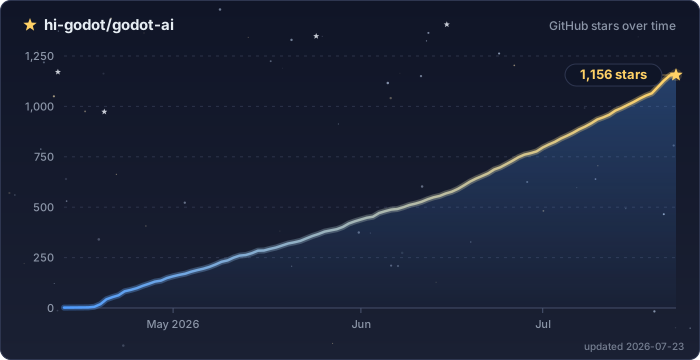
Star History
License: MIT
Install Godot AI in Claude Desktop, Claude Code & Cursor
unyly install godot-aiInstalls into Claude Desktop, Claude Code, Cursor & VS Code — handles npx, uvx and build-from-source repos for you.
First time? Get the CLI: curl -fsSL https://unyly.org/install | sh
Or configure manually
Run in your terminal:
claude mcp add godot-ai -- uvx godot-aiStep-by-step: how to install Godot AI
FAQ
Is Godot AI MCP free?
Yes, Godot AI MCP is free — one-click install via Unyly at no cost.
Does Godot AI need an API key?
No, Godot AI runs without API keys or environment variables.
Is Godot AI hosted or self-hosted?
Self-hosted: the server runs locally on your machine via the install command above.
How do I install Godot AI in Claude Desktop, Claude Code or Cursor?
Open Godot AI on unyly.org, pick your client tab (Claude Desktop, Claude Code, Cursor) and press Install — the config is generated automatically, no JSON editing.
Related MCPs
Opencode Omniroute Plugin
OpenCode plugin for the OmniRoute AI Gateway. Drives dynamic model discovery, /connect auth flow, and multi-instance OmniRoute providers via the official @openc
 by GitHub Actions
Roblox Studio
Enables AI coding tools to control Roblox Studio for workspace exploration, instance manipulation, and script management. It provides tools for playtesting, sce
 by paralov
Antigravity Drawio
MCP server that enables AI assistants to create, parse, render, and validate Draw.io diagrams programmatically.
 by S-SUJAN-S
Fetch
Web content fetching and conversion for efficient LLM usage.
AWS KB Retrieval
Retrieval from AWS Knowledge Base using Bedrock Agent Runtime.
 by modelcontextprotocol
Spring AI MCP Server
Provides auto-configuration for setting up an MCP server in Spring Boot applications.
llm-analysis-assistant
A very streamlined mcp client that supports calling and monitoring stdio/sse/streamableHttp, and can also view request responses through the /logs page. It also
 by xuzexin-hz
MCP-Agent
A simple, composable framework to build agents using Model Context Protocol by [LastMile AI](https://www.lastmileai.dev)
 by lastmile-ai
Spring AI MCP Client
Provides auto-configuration for MCP client functionality in Spring Boot applications.
mcp.natoma.ai
A Hosted MCP Platform to discover, install, manage and deploy MCP servers by [Natoma Labs](https://www.natoma.ai)
Compare Godot AI with
Not sure what to pick?
Find your stack in 60 seconds
Author?
Embed badge for your README
Browse similar
All ai MCPs