
Chatgpt Apps Sdk Examples
FreeNot checkedA ChatGPT App that brings high-quality, royalty-free photography from Pexels directly into your conversations. Built with the Model Context Protocol (MCP) and p

About
A ChatGPT App that brings high-quality, royalty-free photography from Pexels directly into your conversations. Built with the Model Context Protocol (MCP) and powered by Cloudflare Workers.
README
A ChatGPT App that brings high-quality, royalty-free photography from Pexels directly into your conversations. Built with the Model Context Protocol (MCP) and powered by Cloudflare Workers.




What is This?
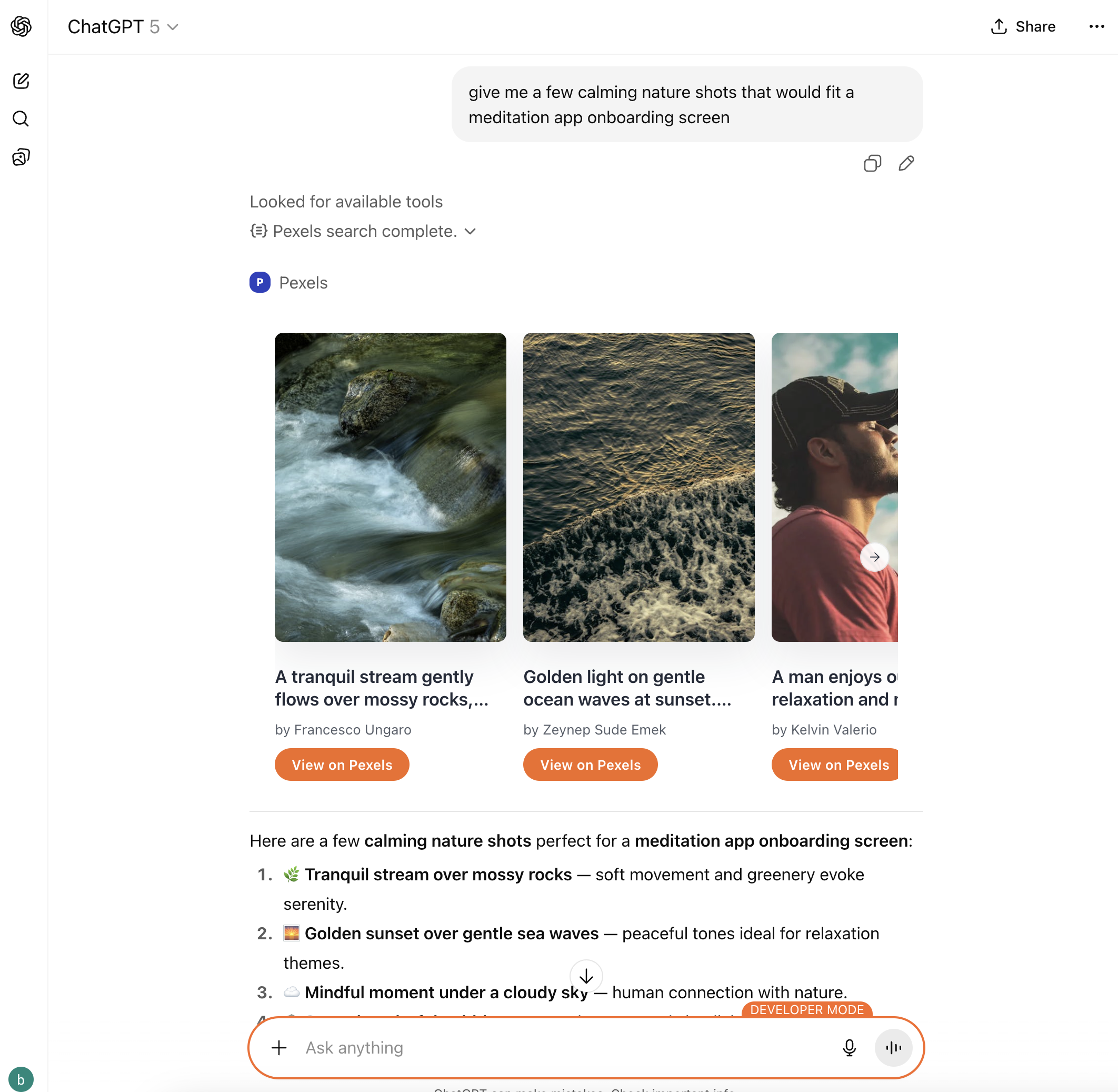
This project is a Model Context Protocol (MCP) server that integrates the Pexels API into ChatGPT. Users can search for professional stock photos directly in their chat conversations and view results in an interactive, responsive gallery widget.
Key Features
- 🔍 Advanced Photo Search - Search by keywords, orientation, color palette, size, and more
- 🎨 Interactive Gallery Widget - Beautiful carousel interface with photo cards
- 🌓 Theme Aware - Automatically adapts to light/dark mode
- ♿ Accessible - Full screen reader support and keyboard navigation
- ⚡ Serverless - Runs on Cloudflare Workers edge network for global performance
- 📱 Responsive - Works seamlessly across desktop, tablet, and mobile
Architecture
This project demonstrates a complete MCP application architecture:
┌─────────────────────────────────────────────────────────────┐
│                         ChatGPT UI                          │
├─────────────────────────────────────────────────────────────┤
│  React Widget (Embedded Gallery)                            │
│  ↓ Uses OpenAI SDK                                          │
├─────────────────────────────────────────────────────────────┤
│  MCP Protocol (SSE)                                          │
│  ↓ Tool Invocation                                          │
├─────────────────────────────────────────────────────────────┤
│  Cloudflare Worker (Durable Objects)                        │
│  ↓ HTTP Request                                             │
├─────────────────────────────────────────────────────────────┤
│  Pexels API (https://api.pexels.com)                        │
└─────────────────────────────────────────────────────────────┘
Tech Stack
Backend:
- Cloudflare Workers - Serverless edge computing
- Durable Objects - Stateful MCP server instances
- @modelcontextprotocol/sdk - MCP implementation
- TypeScript 5.9.3
Frontend:
- React 18.3.1 - UI framework
- embla-carousel-react - Carousel functionality
- lucide-react - Icon library
- esbuild - Fast bundler
External API:
- Pexels API - Free stock photography
Project Structure
pexels-app/
├── src/                              # Backend (Cloudflare Worker)
│   ├── index.ts                      # MCP Durable Object & worker entry
│   ├── types.ts                      # Shared TypeScript types
│   ├── tools/
│   │   └── pexels.ts                 # Pexels search tool implementation
│   └── components/
│       ├── react-widget-inline.ts    # Bundled React widget (auto-generated)
│       └── react-widget-resource.ts  # HTML wrapper for widget
│
├── web/                              # Frontend (React Widget)
│   ├── src/
│   │   ├── component.tsx             # React entry point
│   │   ├── theme.tsx                 # Theme tokens & context
│   │   ├── components/
│   │   │   ├── App.tsx               # Main gallery application
│   │   │   └── cards/                # Photo card components
│   │   └── hooks/
│   │       ├── use-openai-global.ts  # OpenAI SDK integration
│   │       └── use-widget-state.ts   # Persistent state management
│   └── dist/                         # Build output
│
├── scripts/
│   └── inline-react-widget.js        # Bundles React into Worker
│
├── docs/                             # Comprehensive documentation
│   ├── ARCHITECTURE.md               # System design
│   ├── DEPLOYMENT-GUIDE.md           # Deployment instructions
│   └── ...                           # More guides
│
├── wrangler.jsonc                    # Cloudflare Worker config
├── .dev.vars.example                 # Environment variable template
└── package.json                      # Dependencies & scripts
Getting Started
Prerequisites
- Node.js 18+ and npm
- Pexels API key (free)
- Cloudflare account (free tier available)
Installation
Clone the repository:
git clone https://github.com/yourusername/pexels-app.git
cd pexels-app
Install dependencies:
npm install
cd web && npm install && cd ..
Configure environment variables:
cp .dev.vars.example .dev.varsEdit
.dev.varsand add your Pexels API key:PEXELS_API_KEY=your_actual_api_key_hereBuild and run locally:
npm run devThe MCP server will be available at
http://localhost:8787
Deployment
Authenticate with Cloudflare:
npx wrangler loginSet production secrets:
npx wrangler secret put PEXELS_API_KEY
# Enter your API key when prompted
Deploy to Cloudflare:
npm run deployYour app will be live at
https://your-worker-name.workers.dev
Usage
MCP Tool: pexels.searchPhotos
Search the Pexels library with powerful filtering options:
Parameters:
| Parameter | Type | Required | Description |
|---|---|---|---|
query |
string | Yes | Search keywords (1-120 characters) |
page |
number | No | Page number (1-50, default: 1) |
perPage |
number | No | Results per page (1-30, default: 12) |
orientation |
string | No | landscape, portrait, or square |
size |
string | No | large, medium, or small |
color |
string | No | Hex code or color keyword |
locale |
string | No | ISO locale code (e.g., en-US) |
Example in ChatGPT:
User: Show me portrait photos of mountain landscapes

[ChatGPT invokes: pexels.searchPhotos({
  query: "mountain landscapes",
  orientation: "portrait",
  perPage: 15
})]

[Interactive gallery widget displays with 15 photos]
Output:
- Text summary: "Found X Pexels photos for 'query'"
- Interactive gallery widget with photo cards
- Each card shows:
- High-quality photo preview
- Photographer attribution
- "View on Pexels" button (opens in new tab)
Development
NPM Scripts
# Development
npm start                 # Start local dev server
npm run dev              # Same as start

# Building
npm run build:widget     # Build React widget only
npm run deploy           # Build everything and deploy

# React Development (in web/ directory)
cd web
npm run build            # Build React bundle
npm run watch            # Watch mode for React changes

# Type Checking
npm run type-check       # Check TypeScript types
Development Workflow
- Make changes to React widget (
web/src/) - Build widget:
cd web && npm run build - Inline bundle:
node scripts/inline-react-widget.js - Test locally:
npm run dev - Deploy:
npm run deploy
For faster iteration, use watch mode in a separate terminal:
cd web && npm run watch
Configuration
Environment Variables
Development (.dev.vars):
PEXELS_API_KEY=your_api_key_here
Production (Cloudflare Secrets):
npx wrangler secret put PEXELS_API_KEY
npx wrangler secret list  # View configured secrets
Wrangler Configuration
Key settings in wrangler.jsonc:
{
  "name": "pexels",
  "main": "src/index.ts",
  "compatibility_date": "2025-03-10",
  "durable_objects": {
    "bindings": [{
      "class_name": "MyMCP",
      "name": "MCP_OBJECT"
    }]
  },
  "vars": {
    "PEXELS_API_BASE_URL": "https://api.pexels.com/v1"
  }
}
Documentation
Comprehensive documentation is available in the docs/ directory:
- ARCHITECTURE.md - How frontend and backend connect
- DEPLOYMENT-GUIDE.md - Complete deployment instructions
- PROJECT-TOUR.md - File-by-file walkthrough
- APP_DESIGN_GUIDELINES.md - OpenAI design principles
- METADATA-OPTIMIZATION.md - MCP metadata tuning
- FUTURE-UI-UX-GUIDE.md - UI styling best practices
- WRANGLER-SECRET-COMMANDS.md - Secret management
Design Philosophy
This project follows OpenAI's ChatGPT App design guidelines:
- Conversational - Seamlessly integrated into chat flow
- Intelligent - Context-aware tool invocation
- Simple - Focused, single-purpose interactions
- Responsive - Fast, lightweight, edge-optimized
- Accessible - Screen reader support, keyboard navigation
UI/UX Principles
- System-First Design - Inherits ChatGPT's colors, fonts, and spacing
- Theme Tokens - Dynamic light/dark theme support
- Transparent Backgrounds - Blends naturally with host environment
- Component-Scoped Styles - No global CSS to avoid conflicts
- Minimal Branding - Only subtle accent colors on CTAs
API Reference
Pexels API Integration
The tool makes requests to the Pexels API v1:
Endpoint: GET https://api.pexels.com/v1/search
Authentication: Bearer token via Authorization header
Rate Limits: 200 requests/hour (free tier)
Response Format: Normalized from snake_case to camelCase for TypeScript
For full Pexels API documentation, visit: https://www.pexels.com/api/documentation/
Advanced Features
Custom React Hooks
useOpenAiGlobal(key) - Access OpenAI SDK globals
const theme = useOpenAiGlobal('theme'); // 'light' | 'dark'
const toolOutput = useOpenAiGlobal('toolOutput'); // Tool result data
useWidgetState(defaultState) - Persistent widget state
const [state, setState] = useWidgetState({ page: 1 });
// State survives widget remounts
useThemeTokens() - Access theme design tokens
const tokens = useThemeTokens();
// tokens.colors.background, tokens.fonts.body, etc.
Type Safety
- Full TypeScript coverage with strict mode
- Zod validation for all tool inputs
- Shared types between frontend and backend
- Automatic type inference from OpenAI SDK
Error Handling
Graceful handling of:
- API authentication failures
- Network errors
- Missing configuration
- Invalid parameters
- Empty search results
- User-friendly error messages in widget
Security
Content Security Policy
The widget enforces a strict CSP:
default-src 'none';
script-src 'self' 'unsafe-inline';
style-src 'self' 'unsafe-inline';
img-src 'self' data: https://images.pexels.com;
frame-ancestors 'none';
Best Practices
- API keys stored as Cloudflare secrets (never in code)
.dev.vars.exampleprovided as template- Input validation with Zod schemas
License
This project is licensed under the MIT License - see the LICENSE file for details.
Acknowledgments
- Pexels - For providing free, high-quality stock photography
- Cloudflare Workers - For serverless infrastructure
- OpenAI - For ChatGPT and the MCP specification
- Model Context Protocol - For the protocol specification
Learn More
MCP Resources
Cloudflare Resources
ChatGPT App Development
Built with ❤️ using the Model Context Protocol
Installing Chatgpt Apps Sdk Examples
This server has no published package — it is built from source. Open the repository and follow its README.
▸ github.com/bighadj22/chatgpt-apps-sdk-examplesFAQ
Is Chatgpt Apps Sdk Examples MCP free?
Yes, Chatgpt Apps Sdk Examples MCP is free — one-click install via Unyly at no cost.
Does Chatgpt Apps Sdk Examples need an API key?
No, Chatgpt Apps Sdk Examples runs without API keys or environment variables.
Is Chatgpt Apps Sdk Examples hosted or self-hosted?
Self-hosted: the server runs locally on your machine via the install command above.
How do I install Chatgpt Apps Sdk Examples in Claude Desktop, Claude Code or Cursor?
Open Chatgpt Apps Sdk Examples on unyly.org, pick your client tab (Claude Desktop, Claude Code, Cursor) and press Install — the config is generated automatically, no JSON editing.
Related MCPs
Opencode Omniroute Plugin
OpenCode plugin for the OmniRoute AI Gateway. Drives dynamic model discovery, /connect auth flow, and multi-instance OmniRoute providers via the official @openc
 by GitHub Actions
Roblox Studio
Enables AI coding tools to control Roblox Studio for workspace exploration, instance manipulation, and script management. It provides tools for playtesting, sce
 by paralov
Antigravity Drawio
MCP server that enables AI assistants to create, parse, render, and validate Draw.io diagrams programmatically.
 by S-SUJAN-S
Fetch
Web content fetching and conversion for efficient LLM usage.
AWS KB Retrieval
Retrieval from AWS Knowledge Base using Bedrock Agent Runtime.
 by modelcontextprotocol
Spring AI MCP Server
Provides auto-configuration for setting up an MCP server in Spring Boot applications.
llm-analysis-assistant
A very streamlined mcp client that supports calling and monitoring stdio/sse/streamableHttp, and can also view request responses through the /logs page. It also
 by xuzexin-hz
MCP-Agent
A simple, composable framework to build agents using Model Context Protocol by [LastMile AI](https://www.lastmileai.dev)
 by lastmile-ai
Spring AI MCP Client
Provides auto-configuration for MCP client functionality in Spring Boot applications.
mcp.natoma.ai
A Hosted MCP Platform to discover, install, manage and deploy MCP servers by [Natoma Labs](https://www.natoma.ai)
Compare Chatgpt Apps Sdk Examples with
Not sure what to pick?
Find your stack in 60 seconds
Author?
Embed badge for your README
Browse similar
All ai MCPs