
Burnish
FreeStale (189d)Swagger UI for MCP servers — explore, test, and visualize any MCP server

About
Swagger UI for MCP servers — explore, test, and visualize any MCP server
README

Burnish
Swagger UI for MCP servers.
Explore any MCP server in your browser. No LLM, no API key, no config.




Quickstart
npx burnish -- npx -y @burnishdev/example-server
That's it. Burnish spawns the example MCP server, reads its tool list, opens your browser, and renders every tool as an interactive form. The example server ships with a dozen tools — creating bug reports, listing team members, searching records — so you can click through, fill in forms, and see results rendered as cards, tables, and charts without writing a line of your own MCP code.

Want to try it against a different server? Point burnish at any stdio or SSE MCP server — see What you can point it at below.
Try the hosted demo: burnish-demo.fly.dev
Why Burnish?
- Zero LLM. No OpenAI key, no Anthropic key, no inference cost. Ever. Explorer mode is 100% deterministic — schemas in, forms out, results rendered.
- Zero config. Point
npx burnishat an MCP server command and it runs. No JSON files, no accounts, no Docker. - Zero data leaving your machine. The CLI runs locally and talks only to the MCP server you pointed it at. No analytics pixels, no telemetry by default.
Compared to the alternatives
| Burnish | MCP Inspector | Composio / Rube | Smithery | n8n | |
|---|---|---|---|---|---|
| Works without LLM | ✅ | ✅ | ❌ | ➖ | ❌ |
| Rich visualization | ✅ Cards, tables, charts | ❌ Raw JSON | ➖ Limited | ➖ Registry only | ➖ Node output |
| Any MCP server | ✅ | ✅ | ➖ 500 pre-wrapped | ➖ Browse only | ➖ Custom nodes |
| Auto-generated forms | ✅ From schema | ❌ Manual JSON | ➖ Pre-built only | ❌ | ➖ Node config UI |
| Local / private | ✅ Fully | ✅ | ❌ Cloud | ❌ Cloud | ➖ Self-host (heavy) |
| Zero setup | ✅ npx burnish |
✅ npx |
❌ Account required | ➖ Browse only | ❌ Docker required |
| Composable | ✅ Any server combo | ❌ Single server | ❌ Locked ecosystem | ➖ | ➖ Workflow builder |
✅ Full support · ➖ Partial / limited · ❌ Not supported
What you can point it at
# The Burnish example server — richest default demo
npx burnish -- npx -y @burnishdev/example-server

# Any published stdio MCP server
npx burnish -- npx -y @modelcontextprotocol/server-filesystem /tmp

# GitHub (needs a PAT)
GITHUB_PERSONAL_ACCESS_TOKEN=ghp_... \
  npx burnish -- npx -y @modelcontextprotocol/server-github

# An SSE / HTTP MCP server
npx burnish --sse https://your-mcp-server.example.com/sse

# A multi-server config file
npx burnish --config ./mcp-servers.json
All configured servers connect at startup. Their tools are available immediately — discoverable, documented, and executable from the browser.
For MCP server owners
Let your users explore your server without cloning anything. Drop this into your README:
[](https://github.com/danfking/burnish)
```bash
npx burnish -- npx @your-org/your-mcp-server
```
Want your tool results to render as cards, tables, and charts instead of raw JSON? See the Output Format Guide.
Links
- Hosted demo — burnish-demo.fly.dev
- Discussions — github.com/danfking/burnish/discussions
- Issues — github.com/danfking/burnish/issues
- Registries — Smithery, Glama, mcp.so (tracked in #383)
Features
Connect. Browse. Execute. Everything is driven by the server's tool schemas.
- Instant tool discovery — every tool listed with its description and input schema
- Auto-generated forms — JSON Schema in, interactive form out
- Rich results — responses rendered as cards, tables, charts, stat bars, not raw JSON
- Fully private — runs locally, no external calls, no telemetry by default
- Zero config —
npx burnishand you're running - Drill-down navigation — collapsible sections and session persistence
- Framework-agnostic — standard web components, no React/Vue/Angular lock-in
- Themeable —
--burnish-*CSS custom properties - No build step — import components from CDN as ES modules
Component reference
10 Lit 3 web components, each driven by JSON attributes. Every example below is live in the hosted demo — click "Try it" to open the tool directly.
| Component | Preview | Key Attributes | Purpose | Live example |
|---|---|---|---|---|
<burnish-card> |
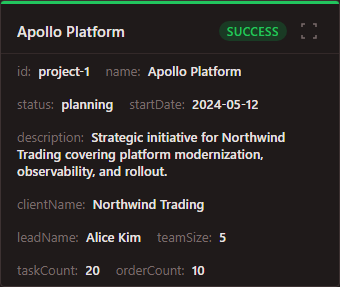 |
title, status, body, meta (JSON), item-id |
Individual items with drill-down | Try it |
<burnish-stat-bar> |
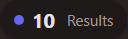 |
items (JSON: [{label, value, color?}]) |
Summary metrics / filter pills | Try it |
<burnish-table> |
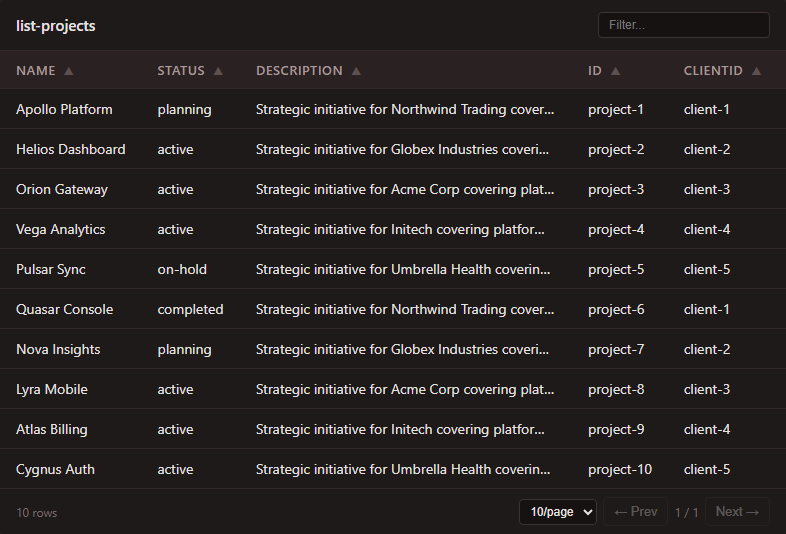 |
title, columns (JSON), rows (JSON), status-field |
Tabular data with status coloring | Try it |
<burnish-chart> |
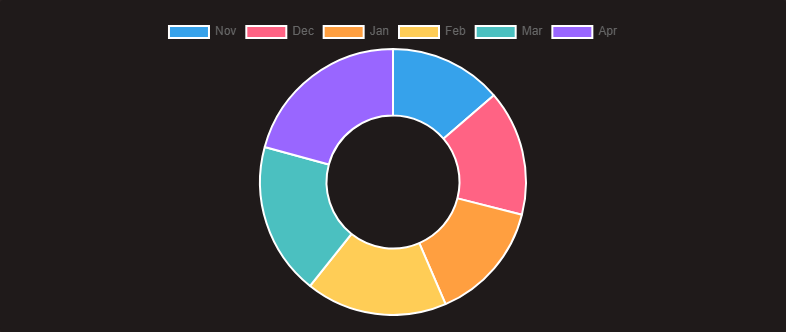 |
type (line/bar/doughnut), config (JSON) |
Chart.js visualizations | Try it |
<burnish-section> |
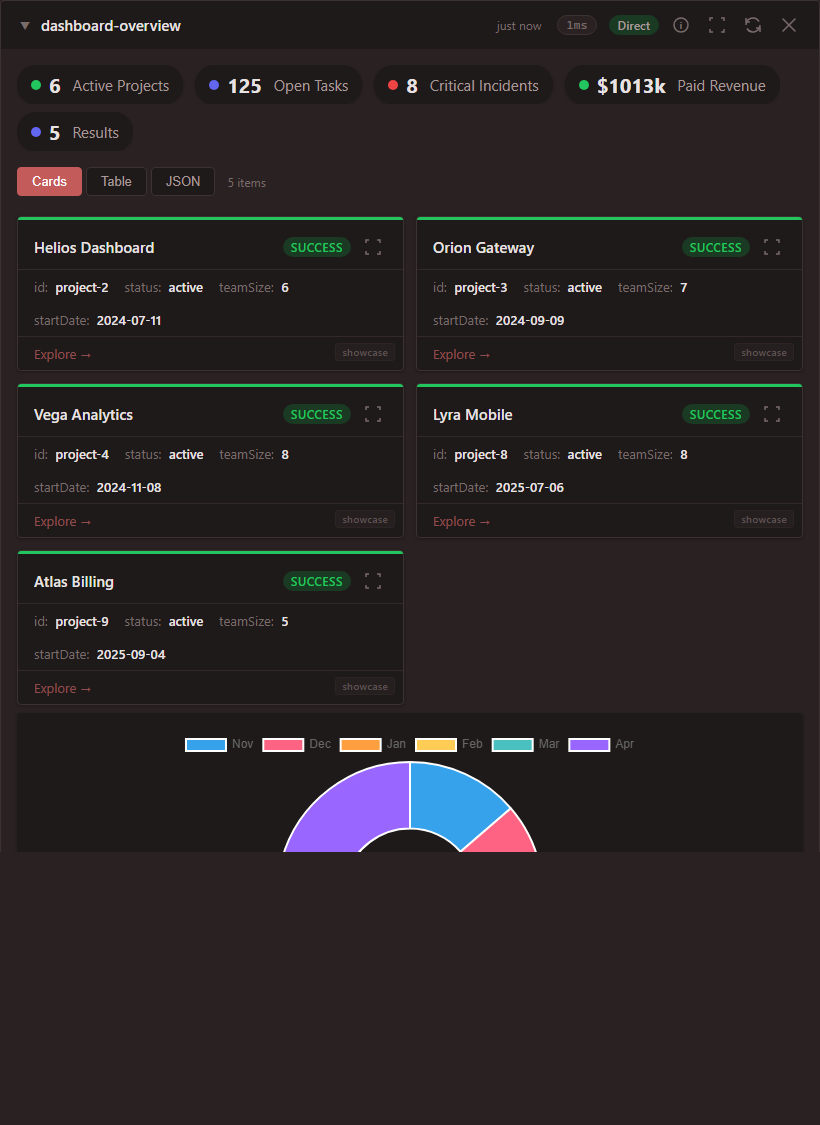 |
label, count, status, collapsed |
Collapsible grouping container | Try it |
<burnish-metric> |
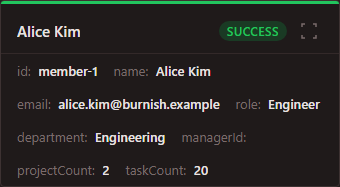 |
label, value, unit, trend (up/down/flat) |
Single KPI display | Try it |
<burnish-message> |
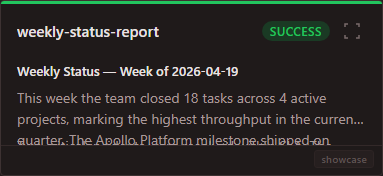 |
role (user/assistant), content, streaming |
Chat bubbles | Try it |
<burnish-form> |
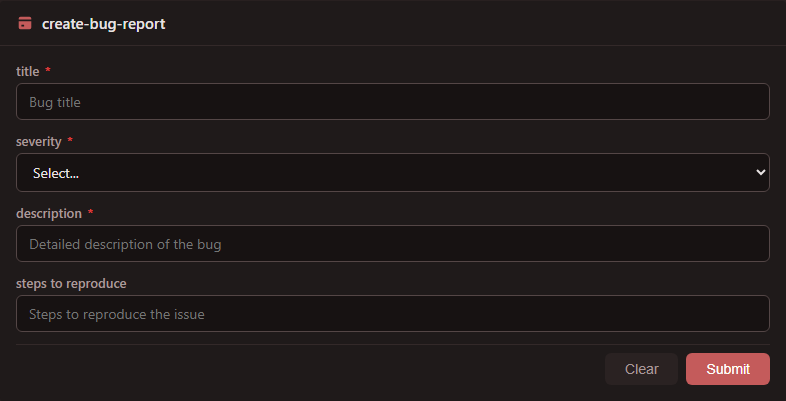 |
title, tool-id, fields (JSON) |
User input / tool execution | Try it |
<burnish-actions> |
 |
actions (JSON: [{label, action, prompt, icon?}]) |
Contextual next-step buttons | Try it |
<burnish-pipeline> |
 |
steps (JSON: [{server, tool, status}]) |
Real-time tool chain visualization | Try it |
Status values: success, warning, error, muted, info — mapped to semantic colors via CSS custom properties.
Action types: read (auto-invoke, safe) and write (shows form, requires user confirmation).
SDK integration
Middleware
Add Burnish Explorer to your MCP server with one line:
import { withBurnishUI } from "burnish/middleware";
await withBurnishUI(server, { port: 3001 });
Schema export
npx burnish export -- npx @your-org/your-server > schema.json
Use in your own project
CDN (no build step)
<script type="module"
  src="https://esm.sh/@burnishdev/[email protected]"></script>
<link rel="stylesheet"
  href="https://cdn.jsdelivr.net/npm/@burnishdev/[email protected]/src/tokens.css" />

<burnish-card
  title="API Gateway"
  status="success"
  body="All systems operational"
  meta='[{"label":"Uptime","value":"99.9%"},{"label":"Latency","value":"42ms"}]'
  item-id="api-gw-1">
</burnish-card>
npm
npm install @burnishdev/components
import '@burnishdev/components';

// Components auto-register with burnish-* prefix.
// Custom prefix:
import { BurnishCard } from '@burnishdev/components';
customElements.define('my-card', class extends BurnishCard {});
Renderer
npm install @burnishdev/renderer
import { findStreamElements, appendStreamElement } from '@burnishdev/renderer';

const elements = findStreamElements(chunk);
for (const el of elements) {
  appendStreamElement(container, stack, el, safeAttrs, sanitize);
}
Configuration
MCP servers
Configure in apps/demo/mcp-servers.json when running from source, or pass --config to the CLI:
{
  "mcpServers": {
    "example": {
      "command": "npx",
      "args": ["-y", "@burnishdev/example-server"]
    },
    "filesystem": {
      "command": "npx",
      "args": ["-y", "@modelcontextprotocol/server-filesystem", "/path/to/dir"]
    },
    "github": {
      "command": "npx",
      "args": ["-y", "@modelcontextprotocol/server-github"],
      "env": {
        "GITHUB_PERSONAL_ACCESS_TOKEN": "${GITHUB_PERSONAL_ACCESS_TOKEN}"
      }
    }
  }
}
All configured servers connect at startup. Their tools are available immediately.
Development
git clone https://github.com/danfking/burnish.git
cd burnish
pnpm install          # Install all dependencies
pnpm build            # Build all packages
pnpm dev              # Start the demo
pnpm test             # Run Playwright tests
pnpm clean            # Clean all build artifacts
burnish/
├── packages/
│   ├── components/       @burnishdev/components — 10 Lit web components
│   ├── renderer/         @burnishdev/renderer — streaming parser + sanitizer
│   ├── app/              @burnishdev/app — drill-down logic + stream orchestration
│   ├── server/           @burnishdev/server — MCP hub + guards + intent resolver
│   ├── example-server/   @burnishdev/example-server — showcase MCP server (34 tools)
│   └── cli/              burnish CLI — npx burnish launcher + middleware
├── apps/
│   └── demo/
│       ├── server/       Hono API
│       └── public/       SPA shell (ES modules, no framework)
└── package.json          pnpm workspace root
Prerequisites
- Node.js 20+
- pnpm 9+
How it works
    ┌──────────────────────────────────┐
    │        MCP Servers                │
    │  (filesystem, GitHub, DB, ...)    │
    └──────────────┬───────────────────┘
                   │ tool calls / results
                   ▼
    ┌──────────────────────────┐
    │  Schema-Driven UI        │
    │                          │
    │  • List tools             │
    │  • Generate forms         │
    │  • Map results → comps    │
    └──────────┬───────────────┘
               │
               ▼
    ┌──────────────────────────┐
    │  Streaming Renderer      │
    │                          │
    │  • Parse tags on arrival  │
    │  • Sanitize (DOMPurify)  │
    │  • Append to DOM         │
    └──────────┬───────────────┘
               │
               ▼
    ┌──────────────────────────┐
    │  Web Components (Lit 3)  │
    │                          │
    │  • Shadow DOM isolation  │
    │  • JSON attribute parsing│
    │  • Event-driven drill-   │
    │    down navigation       │
    └──────────────────────────┘
Burnish reads the MCP server's tool list, generates forms from JSON Schema, and maps results directly to components — no LLM in the loop. Everything runs locally.
Coming soon: Navigator
Navigator is the planned LLM-powered natural-language layer over Explorer mode — ask a question and Burnish picks the right tools across your connected servers, rendering the answer with the same components you see today. Explorer mode (what you use now) stays free, local, and zero-LLM.
Privacy & Telemetry
Burnish collects opt-in, anonymous telemetry to measure real adoption (see issue #382). It is off by default. On the first interactive run of the CLI you'll see a prompt asking whether to enable it — pressing Enter or anything other than y keeps it off.
What we send (only if you opt in):
v— burnish CLI versionos— OS family:darwin,linux,win32, orothernode— Node.js major versionbucket— coarse invocation-count bucket:1,2-5,6-20, or21+id— a random install ID (UUID) generated once on first opt-inschema_version— payload schema version (currently"1")
What we never send: server URLs, tool names, schemas, arguments, file paths, hostnames, usernames, IP addresses we can see beyond the TCP connection, or any content from your MCP servers. There is no per-tool or per-schema tracking.
How to opt out at any time:
- Set the environment variable
BURNISH_TELEMETRY=0(also acceptsfalse,off,no). This overrides any stored choice. - Or delete / edit the stored choice file:
- macOS / Linux:
~/.config/burnish/telemetry.json(honors$XDG_CONFIG_HOME) - Windows:
%APPDATA%\burnish\telemetry.json
- macOS / Linux:
Telemetry is a single fire-and-forget HTTPS POST to https://burnish-demo.fly.dev/telemetry/v1/ping with a short timeout. If the endpoint is unreachable, the CLI behaves identically — nothing is retried or queued. Telemetry is skipped entirely in non-interactive and CI environments when no choice has been stored.
License
Install Burnish in Claude Desktop, Claude Code & Cursor
unyly install burnishInstalls into Claude Desktop, Claude Code, Cursor & VS Code — handles npx, uvx and build-from-source repos for you.
First time? Get the CLI: curl -fsSL https://unyly.org/install | sh
Or configure manually
Run in your terminal:
claude mcp add burnish -- npx -y burnishStep-by-step: how to install Burnish
FAQ
Is Burnish MCP free?
Yes, Burnish MCP is free — one-click install via Unyly at no cost.
Does Burnish need an API key?
No, Burnish runs without API keys or environment variables.
Is Burnish hosted or self-hosted?
Self-hosted: the server runs locally on your machine via the install command above.
How do I install Burnish in Claude Desktop, Claude Code or Cursor?
Open Burnish on unyly.org, pick your client tab (Claude Desktop, Claude Code, Cursor) and press Install — the config is generated automatically, no JSON editing.
Changes
Versions and requested access over time.
- New version published
- New version published
- New version published
- New version published
- New version published
- New version published
- New version published
- New version published
Related MCPs
LibreOffice Tools
Enables AI agents to read, write, and edit Office documents via LibreOffice with token-efficient design. Supports multiple formats including DOCX, XLSX, PPTX, a
 by passerbyflutter
Figma
Extract design specs and assets
 by Figma
dannote/figma-use
Figma control: create shapes, text and components, and set styles, auto-layout, variables and exports.
 by dannote
Logo.dev
Search and retrieve company logos by brand or domain. Customize size, format, and theme to match your design needs. Accelerate design, prototyping, and content
 by NOVA-3951
Design Inspiration Server
Searches top design platforms like Dribbble and Behance to provide UI inspiration, color palettes, and layout patterns via the Serper API. It allows users to re
 by YonasValentin
PIX4Dmatic
Enables GUI automation for controlling PIX4Dmatic on Windows through MCP. Supports launching, focusing, capturing screenshots, sending hotkeys, clicking UI elem
 by jangjo123
mcp-dockmaster
An Open-Sourced UI to install and manage MCP servers for Windows, Linux and macOS.
ariekogan/ateam-mcp
Build, validate and deploy multi-agent AI solutions on the ADAS platform: design skills with tools and manage the solution lifecycle.
 by ariekogan
thinkchainai/mcpbundles
Create custom tool bundles, connect providers with OAuth or API keys, and use one MCP server across many integrations, with a UI for bundles and credentials.
 by thinkchainai
jau123/MeiGen-AI-Design-MCP
Image generation and editing with a curated prompt library, prompt enhancement and routing across local ComfyUI, MeiGen Cloud and OpenAI-compatible APIs.
 by jau123
Compare Burnish with
Not sure what to pick?
Find your stack in 60 seconds
Author?
Embed badge for your README
Browse similar
All design MCPs