
Azure Ai Search Foundry Iq Live Knowledge Sources
FreeNot checkedReusable accelerator for Foundry IQ live grounding with Fabric Ontology and MCP Server Knowledge Sources.

About
Reusable accelerator for Foundry IQ live grounding with Fabric Ontology and MCP Server Knowledge Sources.
README
Go from clone to a proved live Azure AI Search MCP Server Knowledge Source, then extend the same guarded lifecycle to a governed Fabric Ontology.



Execution manual | First live in Codespaces | Offline trace demo | KO/EN walkthrough

This accelerator is for three successive jobs:
| You are here | Finish this | Path |
|---|---|---|
| Evaluator | Inspect the answer, activity, references, and source identities without cloud access. | ./liveks try |
| Azure implementer | Deploy and prove one live MCP Server KS without Fabric. | mcp-only |
| Fabric implementer | Add an existing or greenfield ontology and prove both source paths. | byo-fabric or full |
The repository is a reusable accelerator, not a production reference architecture. Coding-agent behavior is specified separately in AGENTS.md; human onboarding stays focused on the three outcomes above.
30-Second Replay
From a fresh clone, inspect the complete answer-and-evidence contract before installing packages or configuring Azure:
git clone --depth 1 https://github.com/microsoft/azure-ai-search-foundry-iq-live-knowledge-sources.git
cd azure-ai-search-foundry-iq-live-knowledge-sources
./liveks try --evidence-out .deployment/first-run-evidence.json
Python 3.11 or newer is the only requirement. Require Contract: PASS (4/4 assertions): the known synthetic fact, both required activity types, both required reference types, and both Knowledge Source names must be present.
REPLAY - NO AZURE CALL: this command proves the checked-in response contract only. It does not prove that Azure AI Search, MCP Server KS, or Fabric ran live.
The ignored capsule records repository revision, runtime, fixture digest, source counts, and assertion status without query, answer, raw response, or credentials. Pull-request validation runs the same command and retains the capsule as a short-lived workflow artifact.
First Actual Live: MCP-Only
Use the checked-in Codespaces environment to avoid installing Python, Node.js, Azure CLI, Bicep, and Azure Developer CLI yourself. Container creation runs only replay, dependency bootstrap, profile listing, and offline doctor; it never signs in or creates cloud resources.
Open the guarded Codespaces procedure.
For a local clone, bootstrap and initialize the same profile:
./liveks bootstrap
./liveks init --profile mcp-only --env liveks-mcp
Then sign in and inspect readiness before provisioning:
az login --tenant <tenant-guid>
azd auth login
./liveks doctor --env liveks-mcp
./liveks plan --env liveks-mcp
plan is non-provisioning. Review its tool, authentication, resource, duration, and cost checks. Only then run:
./liveks up --env liveks-mcp
up first runs an ARM preview and requires the exact confirmation create liveks-mcp. It provisions Azure AI Search, Azure OpenAI, hosting, the public Microsoft Learn MCP Server KS, and an MCP-only Knowledge Base, then runs verification. This is one-command provisioning after readiness passes, not an unreviewed installer.
Typical duration is 10-20 minutes, subject to subscription, region, and model availability. No Fabric workspace, ontology, capacity, or delegated Fabric token is required.
Prove It Is Live
./liveks verify --env liveks-mcp --format json
./liveks mcp \
  --env liveks-mcp \
  --query "What must be configured for an Azure AI Search MCP Server knowledge source?" \
  --expect-term "Azure AI Search"
Require all of these, not just a plausible answer:
app-status=pass,mcp-retrieve=passbacked bymcpServeractivity or references,- Knowledge Source
microsoft-learn-mcp-ks, - tool
microsoft_docs_search, - native MCP
tools-list,tools-call, andgrounding-contentpasses.

This visual is derived from a controlled live E2E run. The auditable, identifier-free record is mcp-only-live-proof.sample.json. It retains source type, expected identities, counts, API version, pass status, and cleanup outcome; it excludes endpoints, tenant identifiers, query, answer, raw response, and credentials. A static image alone is not an acceptance test.
Expand To Fabric
Move to Fabric only when the first live route is understood and the tenant is ready:
| Profile | Use when | Authored input | Ownership result |
|---|---|---|---|
byo-fabric |
A governed workspace and ontology already exist. | fabric.workspace_id and fabric.ontology_id in ignored YAML. |
Generated Azure assets are deleted; existing Fabric assets are preserved. |
full |
An approved greenfield demo must create the sample stack. | Fabric quota plus --accept-fabric-capacity. |
Generated Azure and Fabric assets are ownership-checked and deleted. |
./liveks init --profile byo-fabric --env liveks-byo
# Add the existing Fabric IDs to .liveks/liveks-byo.yaml.
./liveks doctor --env liveks-byo
./liveks plan --env liveks-byo
./liveks up --env liveks-byo
BYO Fabric typically takes 10-25 minutes after its IDs and delegated authorization are ready. full commonly takes 30-60 minutes and creates a billable Fabric F2 capacity. Read Fabric BYO validation or Fabric prerequisites before using either path.
Components At A Glance
| Component | What it does | Proof to inspect |
|---|---|---|
| MCP Server Knowledge Source | Calls an allowed tool on a remote HTTPS MCP server during Knowledge Base retrieval. | mcpServer activity or references and the invoked tool name. |
| Fabric Ontology Knowledge Source | Grounds a business question in governed Fabric entities and relationships. | fabricOntology activity or references plus Fabric source data. |
| Foundry IQ Knowledge Base | Plans retrieval across attached sources and produces one grounded result. | Answer content, activity, references, and sourceData. |
| Native Knowledge Base MCP endpoint | Exposes knowledge_base_retrieve to MCP-compatible clients. |
tools/list, tools/call, and a known-fact match. |
| LiveKS CLI | Validates, plans, deploys, verifies, invokes MCP, and cleans up. | Stable status envelopes and nonzero failures. |
There are two distinct MCP directions:
Northbound: MCP client -> Knowledge Base MCP endpoint -> Foundry IQ -> Knowledge Source
Southbound: Foundry IQ -> MCP Server Knowledge Source -> remote HTTPS MCP tool
The Fabric path uses a native Fabric Ontology Knowledge Source. It is not routed through the external MCP Server KS.
Confirm Grounding
Do not treat a successful deployment message or final answer as routing proof:
./liveks verify --env <environment> --format json
The verifier checks each source independently before combined planner routing:
| Profile | Required source proof |
|---|---|
mcp-only |
mcpServer activity or references from the MCP-only Knowledge Base. |
byo-fabric |
MCP evidence plus fabricOntology evidence from the Fabric-only Knowledge Base. |
full |
Both source checks, generated Fabric readiness, app status, and ownership evidence. |
For the checked-in synthetic Airline Ops contract, Fabric validation asks:
Which airlines have the highest customer-care exposure this month?
The sample ontology should rank Alpine Air first and return Fabric activity or references. Another BYO ontology must use a known question and non-sensitive expected fact from its own domain.
Sanitized reports stay under ignored deployments/<environment>/. Raw responses, tokens, endpoints, and tenant-specific identifiers must stay out of git. Follow Post-Deployment Tests for the trace-level pass/fail contract.
Call The Knowledge Base Through MCP
After REST evidence proves the source independently, invoke the same single-source Knowledge Base through its native MCP endpoint:
./liveks mcp \
  --env liveks-mcp \
  --query "What must be configured for an Azure AI Search MCP Server knowledge source?" \
  --expect-term "Azure AI Search"
For the checked-in Airline Ops Fabric contract:
./liveks mcp \
  --env liveks-byo \
  --query "Which airlines have the highest customer-care exposure this month?" \
  --expect-term "Alpine Air"
Expected sanitized output:
LiveKS mcp: PASS
[PASS] tools-list: Knowledge Base publishes knowledge_base_retrieve.
[PASS] tools-call: knowledge_base_retrieve returned 1 text block(s).
[PASS] grounding-content: MCP content matched 1/1 expected term(s).
Omitting --expect-term proves the MCP protocol surface only and leaves grounding at warning. The sample default reads a Search admin key transiently through Azure CLI and never prints or persists it. Organization-managed identities with Search Index Data Reader can use --auth bearer.
Read Call the Knowledge Base Through MCP for authentication, delegated Fabric authorization, and controlled failure handling.
Configuration And Compatibility
.liveks/<environment>.yaml is the canonical human-authored ledger. azd env is generated deployment state. Secret fields use {env: VARIABLE_NAME} references; raw values never belong in YAML.
| Profile | Cloud mutation | Required configuration |
|---|---|---|
offline |
None | None |
mcp-only |
Generated Azure resources | Azure sign-in; profile defaults are otherwise runnable |
byo-fabric |
Generated Azure resources only | Existing Fabric workspace and ontology IDs |
full |
Generated Azure and Fabric resources | Fabric quota and explicit capacity acceptance |
The live profiles are pinned to 2026-05-01-preview. LiveKS rejects 2026-04-01 stable because MCP Server KS, Fabric Ontology KS, message input, answer synthesis, and configurable reasoning are preview-dependent in this implementation. The stable API remains valid for its generally available sources and minimal, extractive retrieval; this repository does not yet implement that separate lane.
Read the stable vs preview compatibility matrix.
Important boundaries:
- Fabric live retrieve requires a raw end-user Search token in
x-ms-query-source-authorization, without aBearerprefix. - MCP Server KS requires a reachable remote HTTPS endpoint; local stdio servers cannot be attached directly.
- The native MCP result does not expose separate retrieve
activityandreferences; prove source execution through REST first. - Browser code never receives Search admin keys or Azure OpenAI keys.
- Telemetry is disabled by default.
- Do not commit customer data, tenant IDs, workspace or ontology IDs, keys, tokens, raw live responses, or private screenshots.
See Configuration, Security and Governance, Troubleshooting, and Public Preview Limitations.
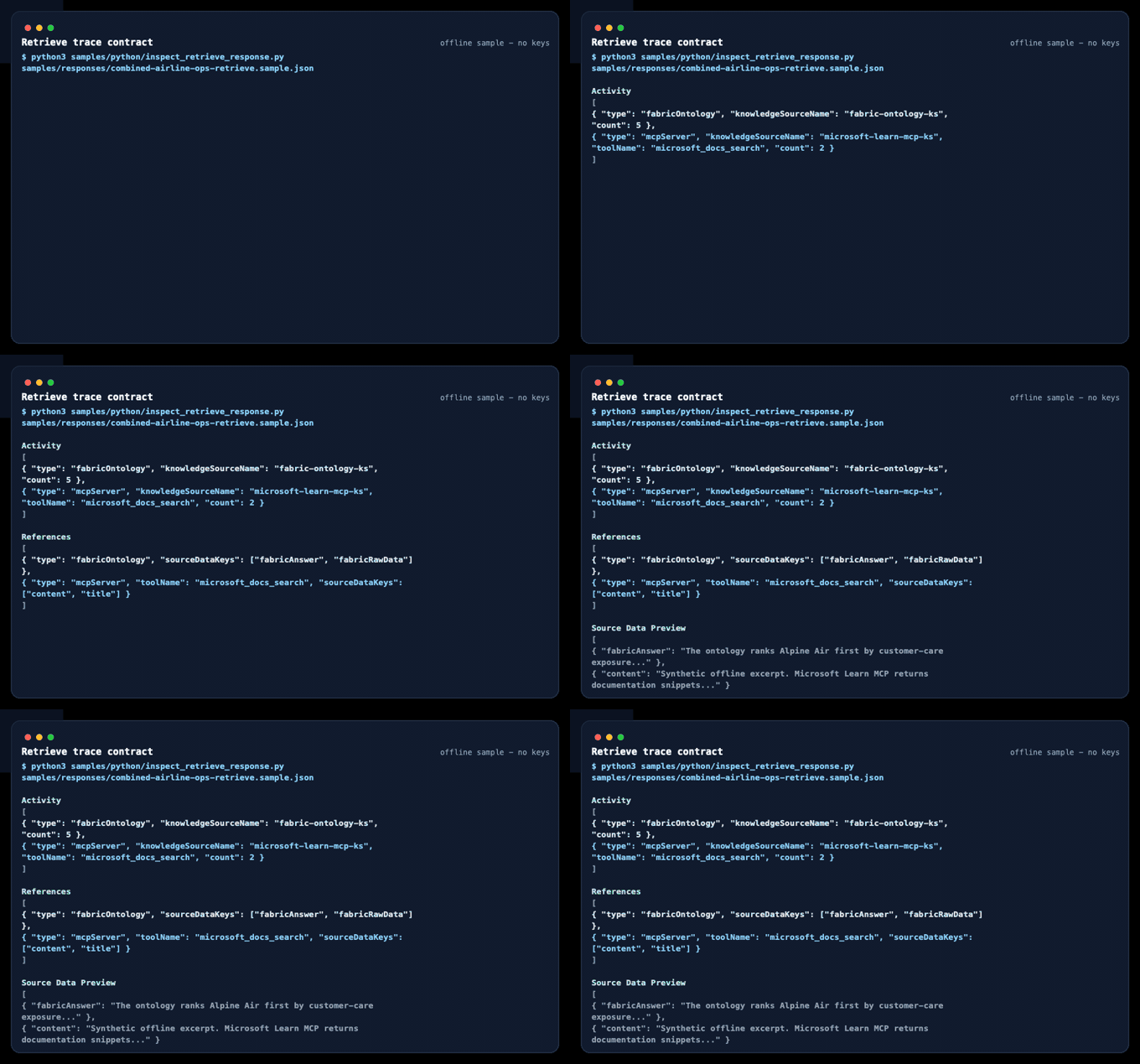
Inspect The Offline Trace
Expand the checked-in response without an Azure subscription, tenant, Fabric workspace, or key:
./liveks try --details
./liveks try --sample mcp --details
The answer is printed first, followed by MCP Server KS and Fabric Ontology KS evidence. This is replay only.
Verify And Clean Up
Before cleanup, open the App URL in deployments/<environment>/deployment-summary.md and complete the Guided Live Demo.
./liveks down --env <environment>
Require resource-group-absent=pass. A full run that generated Fabric capacity must also report fabric-capacity-absent, plus either fabric-capacity-resource-group-absent for a generated group or fabric-capacity-resource-group-preserved for a pre-existing group.
For a controlled end-to-end rehearsal:
./liveks e2e --env liveks-mcp --cleanup --yes
Use exactly one of --cleanup or --keep-resources. Prefer cleanup and record the owner whenever resources are retained.
Architecture
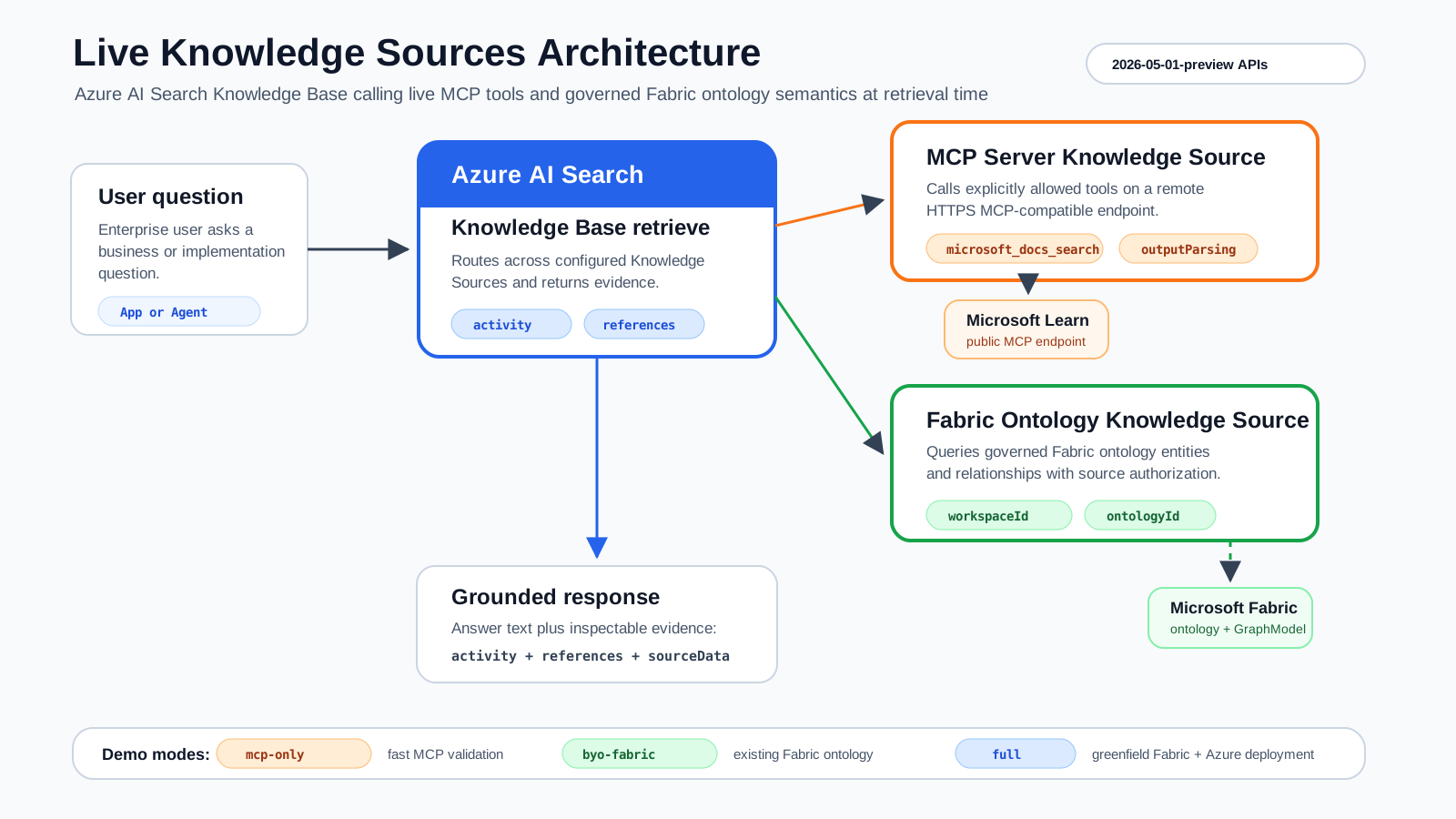
Question
  -> Foundry IQ Knowledge Base
    -> MCP Server KS: implementation guidance
    -> Fabric Ontology KS: governed business semantics
  -> grounded result + activity + references + sourceData
  -> native knowledge_base_retrieve MCP tool
The Airline Ops data is synthetic supporting material, not the main product surface. See the Airline Ops Ontology Contract.
Repository Map
.devcontainer/         Reproducible Codespaces and local Dev Container setup
liveks, liveks.ps1     Cross-platform lifecycle entry points
config/, profiles/    Canonical schema and executable profile defaults
src/liveks/            Configuration, planning, deploy, verify, MCP, and cleanup CLI
infra/                 Bicep for Azure AI Search, Azure OpenAI, Storage, and hosting
static-app/            Pages replay UI and Azure Static Web Apps managed API
samples/               REST, Python, responses, synthetic data, evidence, and ontology contract
notebooks/             Guided MCP and Fabric walkthroughs
docs/                  Execution manual, concepts, troubleshooting, and operations
Generated configuration, locks, deployment evidence, app builds, and logs stay under ignored .liveks/, .deployment/, deployments/, and build directories.
Local Validation
bash scripts/validate-local.sh
git diff --check
The gate checks configuration and CLI contracts, safe dev container behavior, notebooks, links, sample and repository hygiene, secrets, the Pages demo build, Windows launcher behavior, and Bicep.
Official Microsoft Manuals
- Agentic retrieval overview
- What is a Knowledge Source?
- Create an MCP Server knowledge source
- Create a Fabric Ontology knowledge source
- Create a Knowledge Base
- Query a Knowledge Base using retrieve or MCP
- Microsoft Fabric Ontology overview
Issues and PRs are welcome. Read CONTRIBUTING.md, SECURITY.md, and SUPPORT.md. This project is licensed under the MIT License.
from github.com/microsoft/azure-ai-search-foundry-iq-live-knowledge-sources
Installing Azure Ai Search Foundry Iq Live Knowledge Sources
This server has no published package — it is built from source. Open the repository and follow its README.
▸ github.com/microsoft/azure-ai-search-foundry-iq-live-knowledge-sourcesFAQ
Is Azure Ai Search Foundry Iq Live Knowledge Sources MCP free?
Yes, Azure Ai Search Foundry Iq Live Knowledge Sources MCP is free — one-click install via Unyly at no cost.
Does Azure Ai Search Foundry Iq Live Knowledge Sources need an API key?
No, Azure Ai Search Foundry Iq Live Knowledge Sources runs without API keys or environment variables.
Is Azure Ai Search Foundry Iq Live Knowledge Sources hosted or self-hosted?
Self-hosted: the server runs locally on your machine via the install command above.
How do I install Azure Ai Search Foundry Iq Live Knowledge Sources in Claude Desktop, Claude Code or Cursor?
Open Azure Ai Search Foundry Iq Live Knowledge Sources on unyly.org, pick your client tab (Claude Desktop, Claude Code, Cursor) and press Install — the config is generated automatically, no JSON editing.
Related MCPs
GitHub
PRs, issues, code search, CI status
 by GitHub
Filesystem
Secure file operations with configurable access controls.
Memory
Knowledge graph-based persistent memory system.
Template MCP Server
A CLI tool to create a new Model Context Protocol server project with TypeScript support, dual transport options, and an extensible structure
 by mcpdotdirect
Amap Maps Mcp Server
MCP server for using the AMap Maps API
 by duxiaohui
Supabase
Database, auth and storage
 by Supabase
Everything
Reference / test server with prompts, resources, and tools.
Git
Tools to read, search, and manipulate Git repositories.
Sequential Thinking
Dynamic and reflective problem-solving through thought sequences.
Time
Time and timezone conversion capabilities.
Compare Azure Ai Search Foundry Iq Live Knowledge Sources with
Not sure what to pick?
Find your stack in 60 seconds
Author?
Embed badge for your README
Browse similar
All development MCPs