
AWS CloudGuardMCP
FreeNot checkedAn intelligent AWS monitoring and incident response solution using Anthropic's Model Context Protocol (MCP). Enables users to monitor AWS resources, analyze Clo

About
An intelligent AWS monitoring and incident response solution using Anthropic's Model Context Protocol (MCP). Enables users to monitor AWS resources, analyze CloudWatch logs and metrics, and automatically create Jira tickets with remediation steps.
README
🚨 WHAT'S NEW 🚨
CROSS-ACCOUNT MONITORING NOW AVAILABLE!
New Feature Alert: You can now monitor and create Jira tickets for resources across multiple AWS accounts! Simply provide your account ID and role name with cross-account access permissions once prompted by the host LLM, and the monitoring MCP server will assume that role to fetch data from other accounts.
How it works:
- Specify that you want to use cross-account access
- Provide the target AWS account ID (12-digit number)
- Provide the IAM role name with necessary permissions
- The system automatically handles role assumption and data retrieval
This enhancement allows centralized monitoring and incident management across your AWS organization! Build centralized dashboards, custom analysis and more, all through Natural Language.
An intelligent AWS monitoring and incident response solution using Anthropic's Model Context Protocol (MCP). This solution empowers users to monitors AWS resources, analyzes CloudWatch logs and metrics for various services (Amazon Bedrock, EC2, IAM, CloudTrail, VPC, RDS, etc), identifies trends, patterns and issues, and creates comprehensive Jira tickets with remediation steps. This eliminates hours of manual analysis and sifting through dashboards and log chunks by interacting with your MCP system in real time in natural language.
YouTube demo: https://www.youtube.com/watch?v=BNoEMFc2Rv4
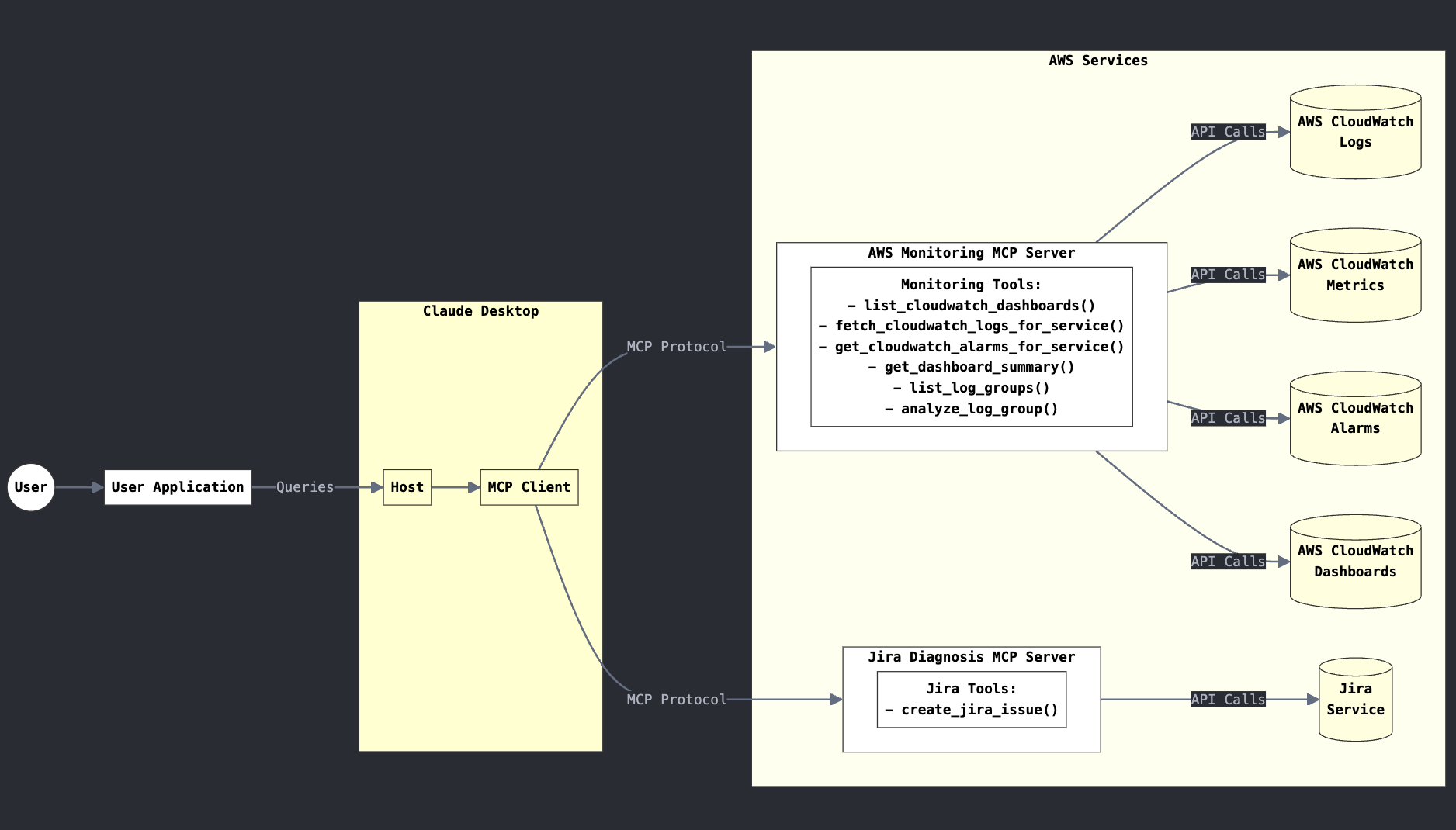
What is Model Context Protocol (MCP)?
MCP provides a standardized way to connect AI models to virtually any data source or tool. Using a client-server architecture, MCP enables developers to expose their data through lightweight MCP servers while building AI applications as MCP clients that connect to these servers. Through this architecture, MCP enables users to build more powerful, context-aware AI agents that can seamlessly access the information and tools they need.
Overview
This tool provides an intelligent interface to AWS CloudWatch logs, metrics, and alarms using Anthropic's Claude model. It functions as a multi-MCP server solution that can:
Monitor AWS Services: Analyze CloudWatch logs and metrics for various AWS services
Detect Issues: Identify patterns, errors, and anomalies in your AWS environment
Create Jira Tickets: Automatically generate well-structured Jira tickets with detailed information
Recommend Solutions: Include remediation steps in tickets based on AWS best practices
Features
Multi-Server Architecture: Separate MCP servers for monitoring and ticketing
Natural Language Interface: Interact with your AWS environment using plain English
Comprehensive AWS Service Coverage: Monitor EC2, Lambda, RDS, Bedrock, S3, and more
Intelligent Analysis: Detect patterns and anomalies in logs and metrics
Automatic Jira Integration: Create detailed tickets with proper formatting
Solution Recommendations: Tickets include AWS-recommended remediation steps
Requirements
- Python 3.12
- AWS credentials with CloudWatch access
- Jira account with API access
- Anthropic API access (for Claude integration)
- Claude Desktop (optional)
## Solution structure
MCP_AWS_Incident_Response/
├── README.md
├── client.py
├── globals.py
├── main.py
├── pyproject.toml
├── server_scripts/
│   ├── monitoring_agent_server.py
│   └── diagnosis_agent_server.py
└── uv.lock
Installation
Install uv (Python package manager):
    # On macOS and Linux
    curl -LsSf https://astral.sh/uv/install.sh | sh

    # On Windows
    powershell -ExecutionPolicy ByPass -c "irm https://astral.sh/uv/install.ps1 | iex"
Clone this repository:
    git clone https://github.com/madhurprash/AWS_CloudGuardMCP.git
    cd AWS_CloudGuardMCP
Set up the Python virtual environment and install dependencies:
    uv venv --python 3.12
    source .venv/bin/activate  # On Windows: .venv\Scripts\activate
    uv pip install --requirement pyproject.toml
Configure your AWS credentials if not done already:
    mkdir -p ~/.aws
    # Set up your credentials in ~/.aws/credentials and ~/.aws/config
Usage
- Export the environment variables:
export JIRA_API_TOKEN="<your-jira-api-token" && export JIRA_USERNAME="<your-jira-username>" && export JIRA_INSTANCE_URL="<your-jira-instance-url>" && export JIRA_CLOUD="True" && export PROJECT_KEY="<jira-project-key>" && echo "Jira environment variables exported successfully"
Running with the Client: The simplest way to use the solution is through the provided client:
    # this is the MCP client, connects to the servers, lists the available tools
    # and allows a ReACT agent to be run and interact with the server tools based
    # on the user query
    uv run client.py --model-id=<bedrock-model>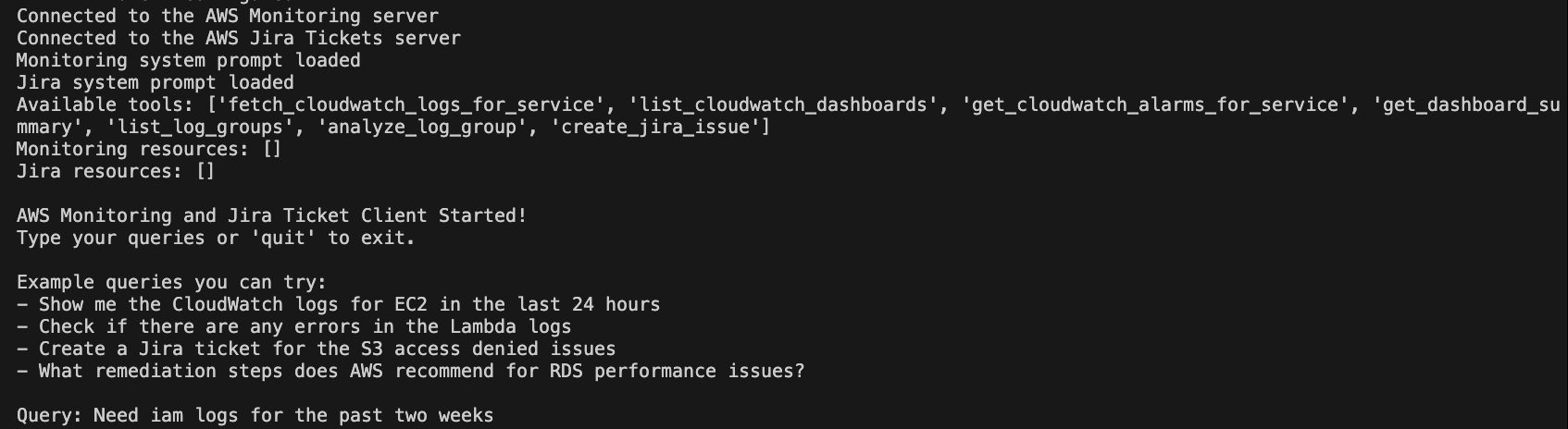
- This will start an interactive chat interface where you can:
- Ask about AWS logs and metrics
- Request analysis of specific services
- Create Jira tickets for identified issues
Configuration with Claude Desktop
You can also use this solution directly with Claude Desktop by adding the following to your Claude Desktop configuration file:
{
  "mcpServers": {
    "aws_monitoring": {
      "command": "/path/to/your/venv/bin/python3 [this is in your virutal environment built from the `uv` commands above]",
      "args": [
        "/path/to/your/repo/server_scripts/monitoring_agent_server.py"
      ],
      "env": {
        "AWS_ACCESS_KEY_ID": "YOUR_ACCESS_KEY_ID",
        "AWS_SECRET_ACCESS_KEY": "YOUR_SECRET_ACCESS_KEY",
        "AWS_REGION": "<your-aws-region>",
        "BEDROCK_LOG_GROUP": "<your-bedrock-log-group> [optional]",
        "MCP_TRANSPORT": "stdio"
      }
    },
    "jira_server": {
      "command": "/path/to/your/venv/bin/python3 [this is in your virutal environment built from the `uv` commands above]",
      "args": [
        "/path/to/your/repo/server_scripts/diagnosis_agent_server.py"
      ],
      "env": {
        "JIRA_API_TOKEN": "YOUR_JIRA_API_TOKEN",
        "JIRA_USERNAME": "[email protected]",
        "JIRA_INSTANCE_URL": "https://your-instance.atlassian.net",
        "JIRA_CLOUD": "True",
        "PROJECT_KEY": "YOUR_PROJECT_KEY",
        "MCP_TRANSPORT": "stdio"
      }
    }
  }
}
The configuration file path depends on your operating system:
macOS:~/Library/Application Support/Claude/claude_desktop_config.jsonWindows:%APPDATA%\Claude\claude_desktop_config.jsonLinux:~/.config/Claude/claude_desktop_config.json
Available Tools
Monitoring Server Tools
| Tool | Description |
|---|---|
list_cloudwatch_dashboards() |
Lists all CloudWatch dashboards in your AWS account |
fetch_cloudwatch_logs_for_service(service_name, days, filter_pattern) |
Retrieves CloudWatch logs for a specified service |
get_cloudwatch_alarms_for_service(service_name) |
Fetches CloudWatch alarms for a specific service |
get_dashboard_summary(dashboard_name) |
Retrieves and summarizes the configuration of a dashboard |
list_log_groups(prefix) |
Lists all CloudWatch log groups, optionally filtered by prefix |
analyze_log_group(log_group_name, days, max_events, filter_pattern) |
Analyzes a specific CloudWatch log group for insights |
Jira Server Tools
| Tool | Description |
|---|---|
create_jira_issue(summary, description) |
Creates a new issue in Jira with the specified details |
Supported AWS Services
This solution supports monitoring and analysis of the following AWS services:
- EC2/Compute Instances [ec2]
- Lambda Functions [lambda]
- RDS Databases [rds]
- CloudTrail [cloudtrail]
- S3 Storage [s3]
- VPC Networking [vpc]
- WAF Web Security [waf]
- Bedrock [bedrock/generative AI]
- IAM Logs [iam]
Example Queries
Once connected through the client or Claude Desktop, you can ask questions like:
- "Show me the CloudWatch logs for EC2 in the last 24 hours"
- "Are there any errors in the Lambda logs?"
- "List all active CloudWatch alarms"
- "Create a Jira ticket for the EC2 memory utilization issue"
- "What remediation steps does AWS recommend for RDS performance issues?"
Workflow
Monitoring Phase:
- Request logs and metrics for specific AWS services
- Analyze data for patterns, errors, and anomalies
- Identify potential issues requiring attention
Diagnosis Phase:
- Investigate identified issues in depth
- Determine root causes and impact
- Search for AWS-recommended remediation steps
Ticketing Phase:
- Create detailed Jira tickets with all necessary information
- Include evidence, impact assessment, and remediation steps
- Track issues through to resolution
Security Considerations
- Store your AWS credentials and Jira API tokens securely
- Never commit credentials to version control
- Use IAM roles with minimum required permissions
- Consider using AWS Secrets Manager for credential management
Development
To extend the functionality:
- Add new monitoring tools to
monitoring_agent_server.py - Add new diagnostic tools to
diagnosis_agent_server.py - Update the client to utilize new features
Installing AWS CloudGuardMCP
This server has no published package — it is built from source. Open the repository and follow its README.
▸ github.com/madhurprash/AWS_CloudGuardMCPFAQ
Is AWS CloudGuardMCP MCP free?
Yes, AWS CloudGuardMCP MCP is free — one-click install via Unyly at no cost.
Does AWS CloudGuardMCP need an API key?
No, AWS CloudGuardMCP runs without API keys or environment variables.
Is AWS CloudGuardMCP hosted or self-hosted?
A hosted option is available: Unyly runs the server in the cloud, no local setup required.
How do I install AWS CloudGuardMCP in Claude Desktop, Claude Code or Cursor?
Open AWS CloudGuardMCP on unyly.org, pick your client tab (Claude Desktop, Claude Code, Cursor) and press Install — the config is generated automatically, no JSON editing.
Related MCPs
Notion
Read and write pages in your workspace
 by Notion
Linear
Issues, cycles, triage — from Claude
 by Linear
Google Drive
Search and read your Drive files
 by Google
mindsdb/mindsdb
Connect and unify data across various platforms and databases with [MindsDB as a single MCP server](https://docs.mindsdb.com/mcp/overview).
 by mindsdb
fulcradynamics/fulcra-context-mcp
MCP server for accessing personal health and biometric data including sleep stages, heart rate, HRV, glucose, workouts, calendar, and location via the Fulcra Li
 by fulcradynamics
aymericzip/intlayer
A MCP Server that enhance your IDE with AI-powered assistance for Intlayer i18n / CMS tool: smart CLI access, access to the docs.
 by aymericzip
rinadelph/Agent-MCP
A framework for creating multi-agent systems using MCP for coordinated AI collaboration, featuring task management, shared context, and RAG capabilities.
 by rinadelph
WhenLabs-org/when
Developer toolkit: auto-detect stack for AI context files, catch port conflicts, validate .env schemas, spot docs drift, audit dependency licenses, and time cod
 by WhenLabs-org
Beltran12138/wecom-docs-mcp-server
WeCom (Enterprise WeChat) document operations via MCP: create, read, and edit Docs and Smartsheets (9 tools). Fills the doc-CRUD gap — existing WeCom MCP server
 by Beltran12138
madbonez/caldav-mcp
Universal MCP server for CalDAV protocol integration. Works with any CalDAV-compatible calendar server including Yandex Calendar, Google Calendar (via CalDAV),
 by madbonez
Compare AWS CloudGuardMCP with
Not sure what to pick?
Find your stack in 60 seconds
Author?
Embed badge for your README
Browse similar
All productivity MCPs