
Armor Wallet
FreeNot checkedEnables direct blockchain operations, crypto trading, and wallet management through the Armor Wallet API with JWT authentication and detailed logging for portfo

About
Enables direct blockchain operations, crypto trading, and wallet management through the Armor Wallet API with JWT authentication and detailed logging for portfolio monitoring and trading strategy execution.
README
Alpha Test version 0.1.24
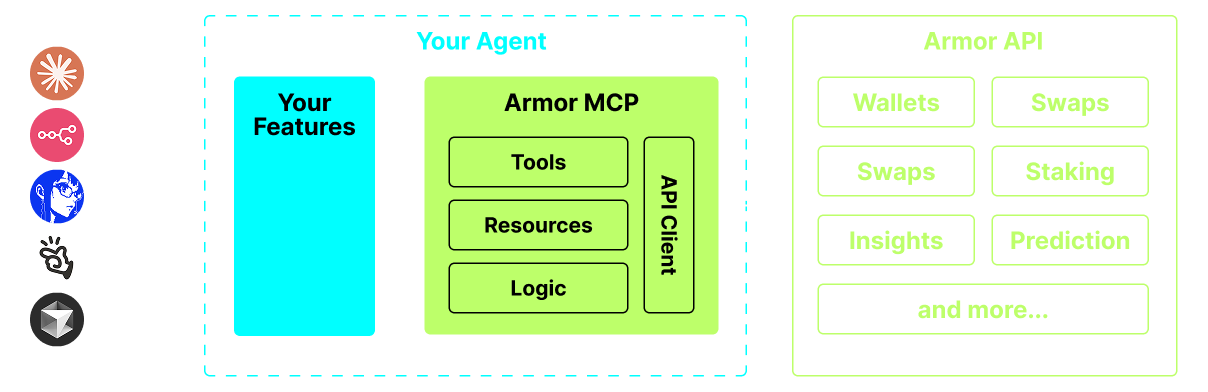
A single source for integrating AI Agents with the Crypto ecosystem. This includes Wallet creation and management, swaps, transfers, event-based trades like DCA, stop loss and take profit, and much more. The Armor MCP supports Solana in Alpha and, when in beta, will support more than a dozen blockchains, including Ethereum. Base, Avalanche, Bitcoin, Sui, Berachain, megaETH, Optimism, Ton, BNB, and Arbitrum, among others. Using Armor's MCP you can bring all of crypto into your AI Agent with unified logic and a complete set of tools.
Features
🧠 AI Native
📙 Wallet Management
🔃 Swaps
🌈 Specialized trades (DCA, Stop Loss etc.)
⛓️ Multi-chain
↔️ Cross-chain transations
🥩 Staking
🤖 Fast intergration to Agentic frameworks
👫 Social Sentiment
🔮 Prediction
Requirements
1. Make sure you have python installed
2. Install uv
Linux / Windows
pip install uv
Mac
brew install uv
3. Claude Desktop or your AI Agent will run the MCP
See Usage & Configuration for details.
Alpha Testing
We are currently in pre-alpha, and we are testing the capabilities of various agents and agentic frameworks like Claude Desktop, Cline, Cursor, n8n, etc.
Current Features & Tools
- Wallet Management
- Grouping & Organization
- Archiving
- Swap & Trades
- Normal swap
- DCA (place / list / cancel)
- Scheduled Orders
- Limit Orders (place / list / cancel)
- Staking and Unstaking
- Token Search and Trending Tokens
- Statistical Calculator for accurate Analysis
- Supports Solana blockchain
Coming Soon
- More Blockchain Support
- Minting
- Armor Agents as a Tool (or A2A)
MCP Setup
Currently you need to have the Armor NFT to get an API Key. Get it here
Usage & Configuration
To use the Armor MCP with your agent, you need the following configuration, replace <PUT-YOUR-KEY-HERE> with your API key:
{
  "mcpServers": {
    "armor-crypto-mcp": {
      "command": "uvx",
      "args": ["armor-crypto-mcp@latest", "--version"],
      "env": {
        "ARMOR_API_KEY": "<PUT-YOUR-KEY-HERE>"
      }
    }
  }
}
Use in Claude Desktop
- Must have Developer Mode enabled
- Open Claude Desktop's File Menu top left of the window.
- Go to File > Settings
- Under Developer, click Edit Configuration
- In the config file, insert the
armor-wallet-mcpsection from above - Make sure to replace the placeholder with your API key
- Save the file and start a new Chat in Claude Desktop
Use in Cline
- Click on the
MCP Serversbutton in the Cline tab in VSCode on the left panel - Scroll to the bottom of the left panel and click on
Configure MCP Servers - In the config file, insert
armor-wallet-mcpsection from above - Make sure to replace the placeholder with your API key
- Save the file, click
Doneunder theMCP Serverstab and start chatting with Cline
Use in n8n
- Open the n8n app
- Bottom-left of screen click
...next to your username and clickSettings - On the left panel, click
Community nodesand thenInstall a Community Nodebutton - In the search field for
npm Package Nametype in mcp - Install
MCP Nodes - Add any MCP node, for example:
List Tools - In the MCP Client
Parameterstab, clickSelect Credentialand clickCreate new credential - Under
Commandenteruvx - Under
Argumentsenterarmor-crypto-mcp - Under
EnvironmentsenterARMOR_API_KEY=eyJhbGciOiJIUzI1NiIsIn...paste the full API Key value after the= - Back in the
Parameterstab you can choose the MCPOperationfor that Node
Using Armor MCP
Once you have setup the Armor MCP here are some prompts you can use to get started
Installing Armor Wallet
This server has no published package — it is built from source. Open the repository and follow its README.
▸ github.com/armorwallet/armor-crypto-mcpFAQ
Is Armor Wallet MCP free?
Yes, Armor Wallet MCP is free — one-click install via Unyly at no cost.
Does Armor Wallet need an API key?
No, Armor Wallet runs without API keys or environment variables.
Is Armor Wallet hosted or self-hosted?
Self-hosted: the server runs locally on your machine via the install command above.
How do I install Armor Wallet in Claude Desktop, Claude Code or Cursor?
Open Armor Wallet on unyly.org, pick your client tab (Claude Desktop, Claude Code, Cursor) and press Install — the config is generated automatically, no JSON editing.
Related MCPs
Stripe
Payments, customers, subscriptions
 by Stripe
malamutemayhem/unclick-agent-native-endpoints
110+ tools for AI agents spanning social media, finance, gaming, music, AU-specific services, and utilities. Zero-config local tools plus platform connectors. n
 by malamutemayhem
whiteknightonhorse/APIbase
API hub covering travel (Amadeus, Sabre), Polymarket prediction markets, crypto and weather, paid per call via x402 in USDC.
 by whiteknightonhorse
trackerfitness729-jpg/sitelauncher-mcp-server
Deploy live HTTPS websites on subdomains or custom .xyz domains, paid in USDC on Base, with templates for crypto tokens and AI agent profiles.
 by trackerfitness729-jpg
embeddedlayers/mcp-analytics
Statistical analysis, forecasting and ML on CSV files or live data from Shopify, Stripe, GA4 and more, with interactive HTML reports.
 by embeddedlayers
carrierone/verilexdata-mcp
Pay-per-query x402 datasets: NPI healthcare, SEC filings, OFAC sanctions, crypto whales, Polymarket signals, patents and economic indicators.
 by carrierone
paracetamol951/P-Link-MCP
HTTP 402 (Payment Required) implementation using Solana.
 by paracetamol951
tipdotmd/tip-md-x402-mcp-server
Cryptocurrency tipping using the x402 payment protocol and CDP Wallet.
 by tipdotmd
laundromatic/shopgraph
Structured product data from the open web — Schema.org + AI extraction for e-commerce enrichment. Pay per call via Stripe. [shopgraph.dev](https://shopgraph.dev
 by laundromatic
mrslbt/xendit-mcp
Xendit payment gateway for Southeast Asia: invoices, disbursements, balance checks and bank transfers.
 by mrslbt
Compare Armor Wallet with
Not sure what to pick?
Find your stack in 60 seconds
Author?
Embed badge for your README
Browse similar
All finance MCPs