
ArcadeData/arcadedb
FreeNot checkedBuilt into ArcadeDB, a multi-model database (graph, document, key-value, time-series, vector) with SQL, Cypher, Gremlin and MongoDB QL support.

About
Built into ArcadeDB, a multi-model database (graph, document, key-value, time-series, vector) with SQL, Cypher, Gremlin and MongoDB QL support.
README
Multi Model DBMS Built for Extreme Performance










| Test suite | Runs | Status |
|---|---|---|
| Java CI - test | every push to main |  |
| HA integration (Raft, embedded) | daily |  |
| HA resilience (Docker, fault injection) | daily |  |
| HA chaos (randomized faults, 60 min) | weekly |  |
| Load tests | daily |  |
| Bolt driver-version matrix | daily |  |
| Native image build | daily |  |
| Benchmarks | weekly |  |



ArcadeDB is a Multi-Model DBMS created by Luca Garulli, the same founder of OrientDB, after SAP's acquisition. Written from scratch with a brand-new engine made of Alien Technology, ArcadeDB is able to crunch millions of records per second on common hardware with minimal resource usage. ArcadeDB reuses OrientDB's SQL engine (heavily modified) and some utility classes. It's written in LLJ: Low Level Java - still Java21+ but only using low level APIs to leverage advanced mechanical sympathy techniques and reduce Garbage Collector pressure. Highly optimized for extreme performance, it runs from a Raspberry Pi to multiple servers on the cloud.
ArcadeDB is fully transactional DBMS with support for ACID transactions, structured and unstructured data, native graph engine (no joins but links between records), full-text indexing, geospatial querying, and advanced security.
ArcadeDB supports the following models:
- Graph Database (compatible with Neo4j Cypher, Apache Tinkerpop Gremlin and OrientDB SQL)
- Document Database (compatible with the MongoDB driver + MongoDB queries and OrientDB SQL)
- Key/Value (compatible with the Redis driver)
- Search Engine
- Time Series (with InfluxDB Line Protocol, Prometheus remote_write/read, and PromQL support)
- Vector Embedding
- Geospatial
ArcadeDB understands multiple languages:
- SQL (from OrientDB SQL)
- Neo4j Cypher (Open Cypher)
- Apache Gremlin (Apache Tinkerpop v3.7.x)
- GraphQL Language
- MongoDB Query Language
ArcadeDB key capabilities:
- 70+ Built-in Graph Algorithms — Pathfinding, centrality, community detection, link prediction, graph embeddings, and more — all available out of the box
- Parallel Query Execution — SQL queries leverage multiple CPU cores for faster execution on large datasets
- Materialized Views — Pre-computed query results stored and automatically maintained
- MCP Server — Built-in Model Context Protocol server for AI assistant and LLM integration
- AI Assistant — Integrated AI assistant in Studio (Beta) for query help and database management
- Geospatial Indexing — Native spatial queries and proximity searches with
geo.*SQL functions - TimeSeries — Columnar storage with Gorilla/Delta-of-Delta compression, InfluxDB/Prometheus ingestion, PromQL queries, Grafana integration
- Hash Indexes — Extendible hashing for faster exact-match lookups alongside LSM-Tree indexes
ArcadeDB can be used as:
- Embedded from any language on top of the Java Virtual Machine
- Embedded from Python via bindings: arcadedb-embedded-python
- Remotely by using HTTP/JSON
- Remotely by using a Postgres driver (ArcadeDB implements Postgres Wire protocol)
- Remotely by using a Redis driver (only a subset of the operations are implemented)
- Remotely by using a MongoDB driver (only a subset of the operations are implemented)
- By AI assistants via the built-in MCP Server (Model Context Protocol)
For more information, see the documentation.
Use Cases
Explore real-world examples in the arcadedb-usecases repository — self-contained projects with Docker Compose, SQL schemas, and runnable demos covering:
- Recommendation Engine — graph traversal + vector similarity + time-series
- Knowledge Graphs — co-authorship and citation networks with full-text search
- Graph RAG — retrieval-augmented generation with LangChain4j and Neo4j Bolt
- Fraud Detection — graph, vector, and time-series signals with Cypher
- Real-time Analytics — IoT and service monitoring with time-series
- Social Network Analytics — materialized view dashboards with polyglot queries
- Supply Chain — multi-tier visibility with PostgreSQL protocol and JavaScript
Getting started in 5 minutes
Start ArcadeDB Server with Docker:
docker run --rm -p 2480:2480 \
           -e ARCADEDB_SETTINGS="-Darcadedb.server.rootPassword=playwithdata -Darcadedb.server.defaultDatabases=Imported[root]{import:https://github.com/ArcadeData/arcadedb-datasets/raw/main/orientdb/OpenBeer.gz}" \
           arcadedata/arcadedb:latest
Pass database settings in ARCADEDB_SETTINGS and any extra JVM flags in JAVA_OPTS: Docker replaces
an environment variable rather than appending to it, so keeping the two apart leaves the image's own
garbage collector and heap sizing (ARCADEDB_OPTS_GC and ARCADEDB_OPTS_MEMORY) intact. The heap is
sized as a percentage of the container memory limit, so docker run -m 512m and a multi-GB
production container both work without further tuning.
The image runs on Java 25, where server.sh also enables compact object headers (-XX:+UseCompactObjectHeaders),
after checking that the JVM accepts the flag (a bare distribution on Java 25 or later does the same); set
ARCADEDB_OPTS_HEADERS to override it, or to an empty value to opt out.
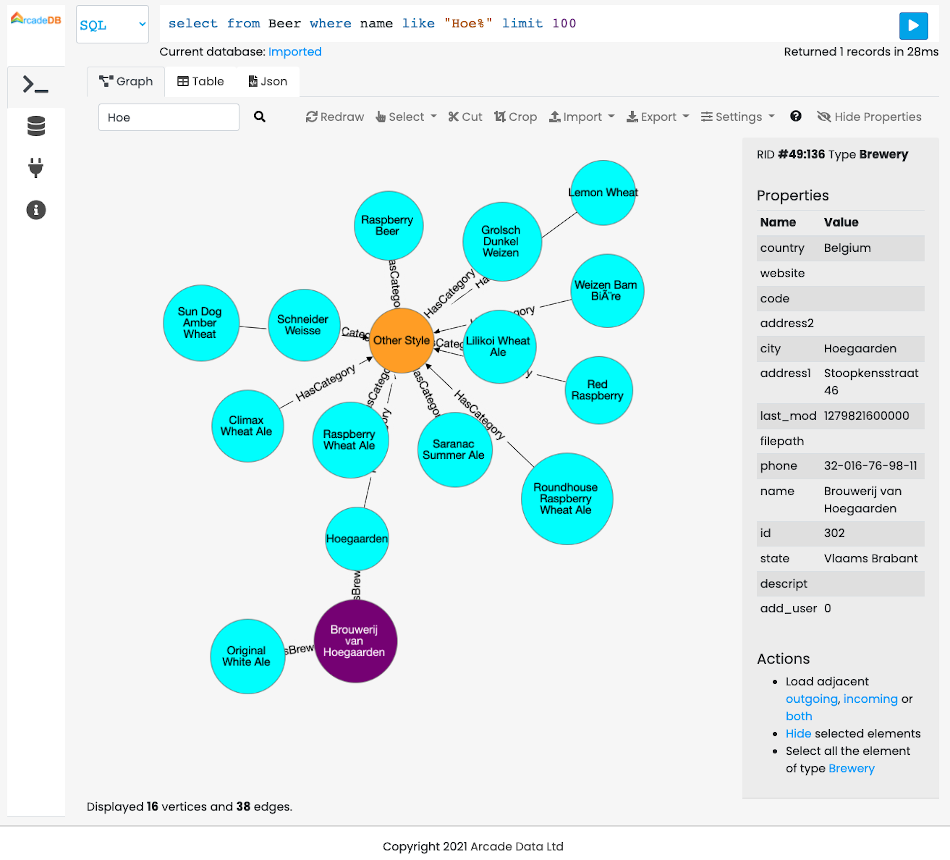
Now open your browser on http://localhost:2480 and play with ArcadeDB Studio and the
imported OpenBeer database to find your favorite beer.
ArcadeDB is cloud-ready with Docker and Kubernetes support.
You can also download the latest release, unpack it on your local hard drive and
start the server with bin/server.sh or bin/server.bat for Windows.
Releases
There are four variants of (about monthly) releases:
full- this is the complete package including all modulesminimal- this package excludes thegremlin,redisw,mongodbw,graphqlmodulesheadless- this package excludes thegremlin,redisw,mongodbw,graphql,studiomodulesbase- core engine, server, and network only — excludes all optional modules (console,gremlin,studio,redisw,mongodbw,postgresw,grpcw,graphql,metrics)
The nightly builds of the repository head can be found here.
You can also build a custom distribution with only the modules you need using the Custom Package Builder:
curl -fsSL https://github.com/ArcadeData/arcadedb/releases/download/26.3.1/arcadedb-builder.sh | \
  bash -s -- --version=26.3.1 --modules=gremlin,studio
Available optional modules: console, gremlin, studio, redisw, mongodbw, postgresw, grpcw, graphql, metrics. The
builder supports interactive mode, Docker image generation, and offline builds from local Maven repositories.
An experimental GraalVM native-image build (fast startup, low RAM, no JVM required) is also available - see docs/native-image.md for prerequisites, the build/target matrix, and Docker usage.
Java Versions
Starting from ArcadeDB 24.4.1 code is compatible with Java 21.
Java 21 packages are available on Maven central and docker images on Docker Hub.
We also support Java 17 on a separate branch java17 for those who cannot upgrade to Java 21 yet through GitHub packages.
To use Java 17 inside your project, add the repository to your pom.xml and reference dependencies as follows:
<repositories>
    <repository>
        <name>github</name>
        <id>github</id>
        <url>https://maven.pkg.github.com/ArcadeData/arcadedb</url>
    </repository>
</repositories>
<dependencies>
<dependency>
    <groupId>com.arcadedb</groupId>
    <artifactId>arcadedb-engine</artifactId>
    <version>26.3.1-java17</version>
</dependency>
</dependencies>
Docker images are available on ghcr.io too:
docker pull ghcr.io/arcadedata/arcadedb:26.3.1-java17
Embedding Gremlin alongside the engine
Always use the shaded classifier for gremlin when embedding it, whether alongside
arcadedb-engine or on its own. Its ANTLR runtime is relocated into a private package, so it
never collides with the engine's ANTLR 4.13.2 on a shared classpath.
The plain arcadedb-gremlin jar resolves ANTLR to the engine's 4.13.2 (pulled transitively via
arcadedb-engine), which the engine's SQL/Cypher parsers require. TinkerPop's Gremlin
string-query parser ships a precompiled ANTLR 4.9.1 parser that only deserializes against the
relocated runtime inside the shaded jar, so the plain jar alone will not run Gremlin string
queries - use the shaded classifier.
<dependency>
    <groupId>com.arcadedb</groupId>
    <artifactId>arcadedb-engine</artifactId>
    <version>26.8.1</version>
</dependency>
<dependency>
    <groupId>com.arcadedb</groupId>
    <artifactId>arcadedb-gremlin</artifactId>
    <version>26.8.1</version>
    <classifier>shaded</classifier>
</dependency>
Building and Testing
Build the entire project (skipping tests):
mvn clean install -DskipTests
Build the Docker image (skipping tests):
mvn clean install -DskipTests -Pdocker
Running Unit Tests:
Run the full unit test suite:
mvn test
Some tests are tagged to indicate their cost:
slow- functional tests that take noticeably long (large batches, multi-second elapsed time, big payloads)benchmark- microbenchmarks not intended for regular CI runs; excluded by default (see below)
benchmark-tagged tests are excluded by default, so a plain mvn test already skips them. To also skip
slow tests and run only the fast ones:
mvn test -DexcludedGroups="slow,benchmark"
To run only a specific tag (e.g. benchmark tests in isolation), clear the default exclusion or it cancels out the selection and nothing runs:
mvn test -Dgroups="benchmark" -DexcludedGroups=
Running Integration Tests:
Run all the integration tests (requires Docker):
mvn verify -Pintegration
Run integration tests excluding the end-to-end, load, and HA tests:
mvn verify -Pintegration -pl !e2e,!load-tests,!e2e-ha
Running End-to-End Tests:
All end-to-end tests (requires Docker):
mvn verify -Pintegration -pl e2e,load-tests,e2e-ha
Test Suites at a Glance
The codebase is covered by several complementary test suites, each with a distinct scope. The "CI" column says when each one runs; the scheduled ones have a status badge at the top of this page.
| Suite | How it runs | CI | Scope |
|---|---|---|---|
| Unit tests | mvn test (*Test) |
every PR | Fast, in-process tests of a single component in isolation: engine internals (storage, pages, WAL, indexes, serialization), query parsing and execution (SQL, Cypher, Gremlin, GraphQL), schema, graph traversals, and security. The bulk of coverage; no external services required. CI splits them into lanes by JUnit tag: slow (long functional tests) and vector (LSM vector-index rebuilds) run in their own lanes, benchmark is excluded by default. |
| Integration tests | mvn verify -Pintegration (*IT) |
every PR | Tests spanning multiple components or a running server within the same JVM/module: HTTP/REST API, wire protocols (Postgres, MongoDB, Redis, Bolt, gRPC), and cross-module behavior. Some require Docker. |
HA integration (ha-raft) |
mvn verify -Pintegration -pl ha-raft |
daily | Raft high-availability clusters of several servers started inside one JVM: replication, leader election, schema and security propagation, snapshot install, and catch-up of lagging followers. Moved out of the PR pipeline because of its length. |
End-to-end (e2e) |
mvn verify -Pintegration -pl e2e |
every PR | Black-box tests against a real ArcadeDB server in a Docker container (Testcontainers), exercising it the way external clients do: JDBC/Postgres queries, the remote Java API, server-side JavaScript functions, and the Bolt and gRPC drivers. |
Load tests (load-tests) |
mvn verify -Pintegration -pl load-tests |
daily | Throughput and stability under sustained concurrent workloads against single-server and three-node clusters in containers, including high-volume document and time-series ingestion. Verifies no data loss or corruption under contention. |
HA end-to-end (e2e-ha) |
mvn verify -Pintegration -pl e2e-ha |
daily | Resilience and correctness of the Raft cluster under scripted failures: leader failover, rolling restarts, split-brain, network partitions/delay/packet loss, replication convergence, and cluster-wide operations (backup/restore, import, drop database, user management). Uses Testcontainers and fault injection (Toxiproxy). |
HA chaos (HaChaosIT) |
mvn verify -Pintegration -pl e2e-ha -Dit.test=HaChaosIT -Dfailsafe.excludedGroups= |
weekly | Long randomized run (60 minutes by default) against a containerized cluster: concurrent writers while a seeded scheduler injects faults (kill, stop, rolling restart, pause, isolate, split, latency, packet loss, and a follower frozen for more than 60 s that must recover without reformatting its Raft storage), and every acknowledged write is checked against all replicas after each step. Each run prints its seed so a failure can be replayed with -Dchaos.seed=...; tune with -Dchaos.nodes, -Dchaos.duration, -Dchaos.faults, -Dchaos.writers. Tagged chaos, so the plain e2e-ha run skips it. |
| Benchmarks | mvn verify -Dgroups=benchmark -DexcludedGroups= |
weekly | Microbenchmarks and comparison runs (@Tag("benchmark")). They measure rather than assert, and are excluded from every other run. |
Python client (e2e-python) |
cd e2e-python && pytest tests/ |
every PR | Verifies the Postgres wire protocol against real Python clients (psycopg2, asyncpg) and the SQLAlchemy ORM, and the Bolt protocol against the official neo4j driver, running against a server in a Docker container (Testcontainers). |
JavaScript client (e2e-js) |
cd e2e-js && npm install && npm test |
every PR | Verifies Node.js client compatibility over the Bolt (neo4j-driver) and Postgres (pg) protocols, running against a server in a Docker container (Jest + Testcontainers). |
C# client (e2e-csharp) |
cd e2e-csharp/ArcadeDB.E2ETests && dotnet test |
every PR | Verifies the Postgres wire protocol (Npgsql) and the Bolt protocol (Neo4j.Driver, plain and TLS) from .NET, running against a server in a Docker container (xUnit + Testcontainers). |
Go client (e2e-go) |
cd e2e-go && go test ./... |
every PR | Bolt conformance with the official neo4j-go-driver, plain and TLS, against a server in a Docker container. Implements the shared scenario spec in bolt/conformance/spec.yaml, like the other client suites. |
| Bolt driver matrix | bolt-nightly.yml workflow |
daily | Reruns the Bolt tests of the JavaScript, Python, C# and Go suites against several released versions of each official driver, and publishes the result in COMPATIBILITY.md. |
Studio (e2e-studio) |
cd e2e-studio && npm install && npm test |
every PR | Browser tests of the Studio web UI with Playwright: database creation, queries and charts, graph view (styling, context menu, export), table views, and vector search. |
Community
Join our growing community around the world, for ideas, discussions and help regarding ArcadeDB.
- Chat live with us on Discord
- Follow us on Twitter
- or on Bluesky
- Connect with us on LinkedIn
- or on Facebook
- Questions tagged
#arcadedbon Stack Overflow - View our official Blog
Security
For security issues kindly email us at [email protected] instead of posting a public issue on GitHub.
License and Attribution
ArcadeDB is Free for any usage and licensed under the liberal Open Source Apache 2 license. We are committed to remaining Open Source Forever — see our Governance for the structural guarantees that make this more than a promise. If you need commercial support, or you need to have an issue fixed ASAP, check our pricing page.
For third-party attributions and copyright notices, see:
- NOTICE - Required legal attributions
- ATTRIBUTIONS.md - Detailed third-party acknowledgments
- LICENSE - Full license text
- GOVERNANCE.md - License guarantee and project governance
Thanks To
 for providing YourKit Profiler to our
committers.
for providing YourKit Profiler to our
committers.
Contributing
We would love for you to get involved with ArcadeDB project. If you wish to help, you can learn more about how you can contribute to this project in the contribution guide.
Have fun with data!
The ArcadeDB Team
Stargazers over time
Installing ArcadeData/arcadedb
This server has no published package — it is built from source. Open the repository and follow its README.
▸ github.com/ArcadeData/arcadedbFAQ
Is ArcadeData/arcadedb MCP free?
Yes, ArcadeData/arcadedb MCP is free — one-click install via Unyly at no cost.
Does ArcadeData/arcadedb need an API key?
No, ArcadeData/arcadedb runs without API keys or environment variables.
Is ArcadeData/arcadedb hosted or self-hosted?
Self-hosted: the server runs locally on your machine via the install command above.
How do I install ArcadeData/arcadedb in Claude Desktop, Claude Code or Cursor?
Open ArcadeData/arcadedb on unyly.org, pick your client tab (Claude Desktop, Claude Code, Cursor) and press Install — the config is generated automatically, no JSON editing.
Related MCPs
Postgres
Query your database in natural language
 by Anthropic
wenb1n-dev/SmartDB_MCP
Connect to multiple databases at once (MySQL, PostgreSQL, SQL Server, MariaDB, Dameng, Oracle) for operations, health analysis and SQL optimization.
 by wenb1n-dev
Postgres Server
This server enables interaction with PostgreSQL databases through the Model Context Protocol, optimized for the AWS Bedrock AgentCore Runtime. It provides tools
 by madhurprash
PostgreSQL
Read-only database access with schema inspection.
by modelcontextprotocolRedis
Interact with Redis key-value stores.
by modelcontextprotocolSQLite
Database interaction and business intelligence capabilities.
by modelcontextprotocolmxcp
Open-source framework for building enterprise-grade MCP servers using just YAML, SQL, and Python, with built-in auth, monitoring, ETL and policy enforcement.
 by raw-labs
julien040/anyquery
Query apps with SQL from a single local-first binary; also connects to PostgreSQL, MySQL and SQLite-compatible databases.
 by julien040
drakonkat/wizzy-mcp-tmdb
Search and retrieve movie, TV show and person information from The Movie Database (TMDB) API.
 by drakonkat
longevity-genie/opengenes-mcp
Query the OpenGenes database for aging and longevity research.
 by longevity-genie
Compare ArcadeData/arcadedb with
Not sure what to pick?
Find your stack in 60 seconds
Author?
Embed badge for your README
Browse similar
All data MCPs