
Aigui
FreeMaintainedRender streaming LLM output as live UI in React, Vue or DOM — and a Claude Code / Codex plugin that lets the agent draw charts, 3D scenes and animated topologie

About
Render streaming LLM output as live UI in React, Vue or DOM — and a Claude Code / Codex plugin that lets the agent draw charts, 3D scenes and animated topologies.
README
npm npm downloads CI License: MIT
Render a streaming LLM answer as live UI — markdown, charts, diagrams, maths, 3D, topologies and app-defined cards — in React, Vue or plain DOM.

Live demos · Use it from Claude Code or Codex — the agent draws charts, diagrams, 3D and topologies for you, as pictures or a live page: install the plugin.
 |
 |
 |
 |
 |
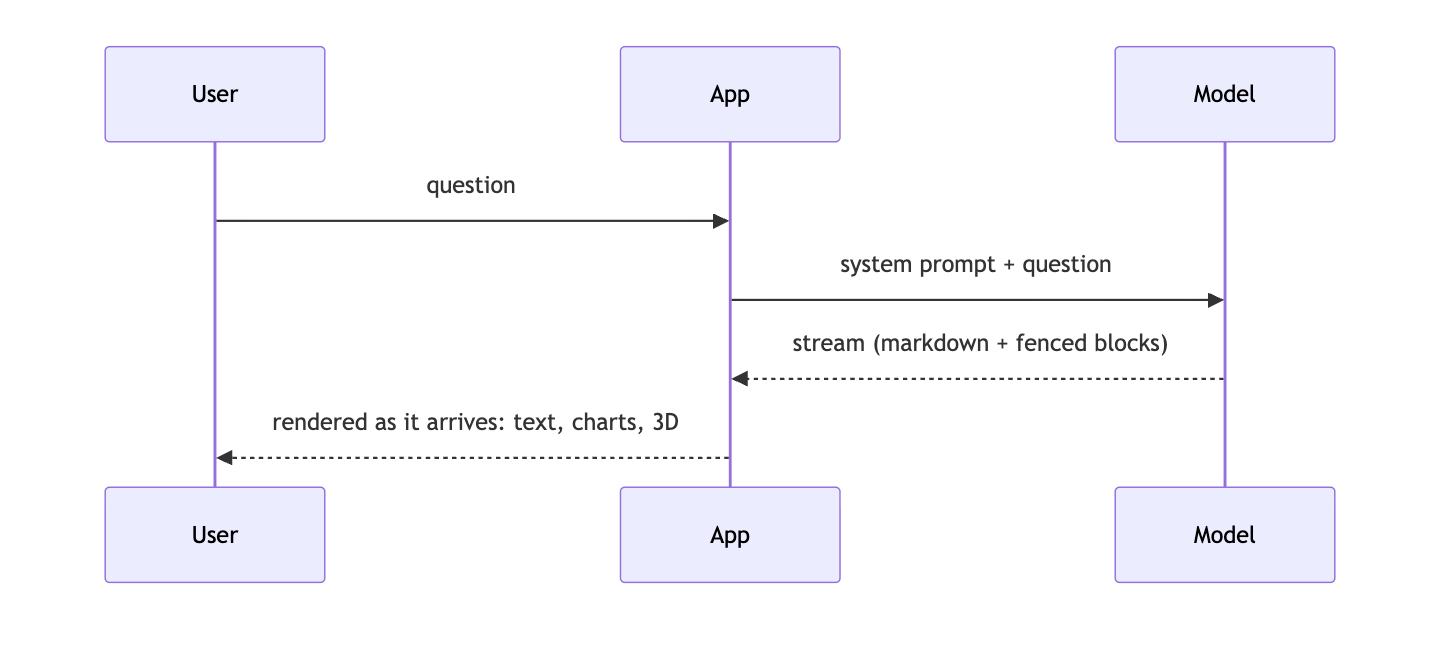 |
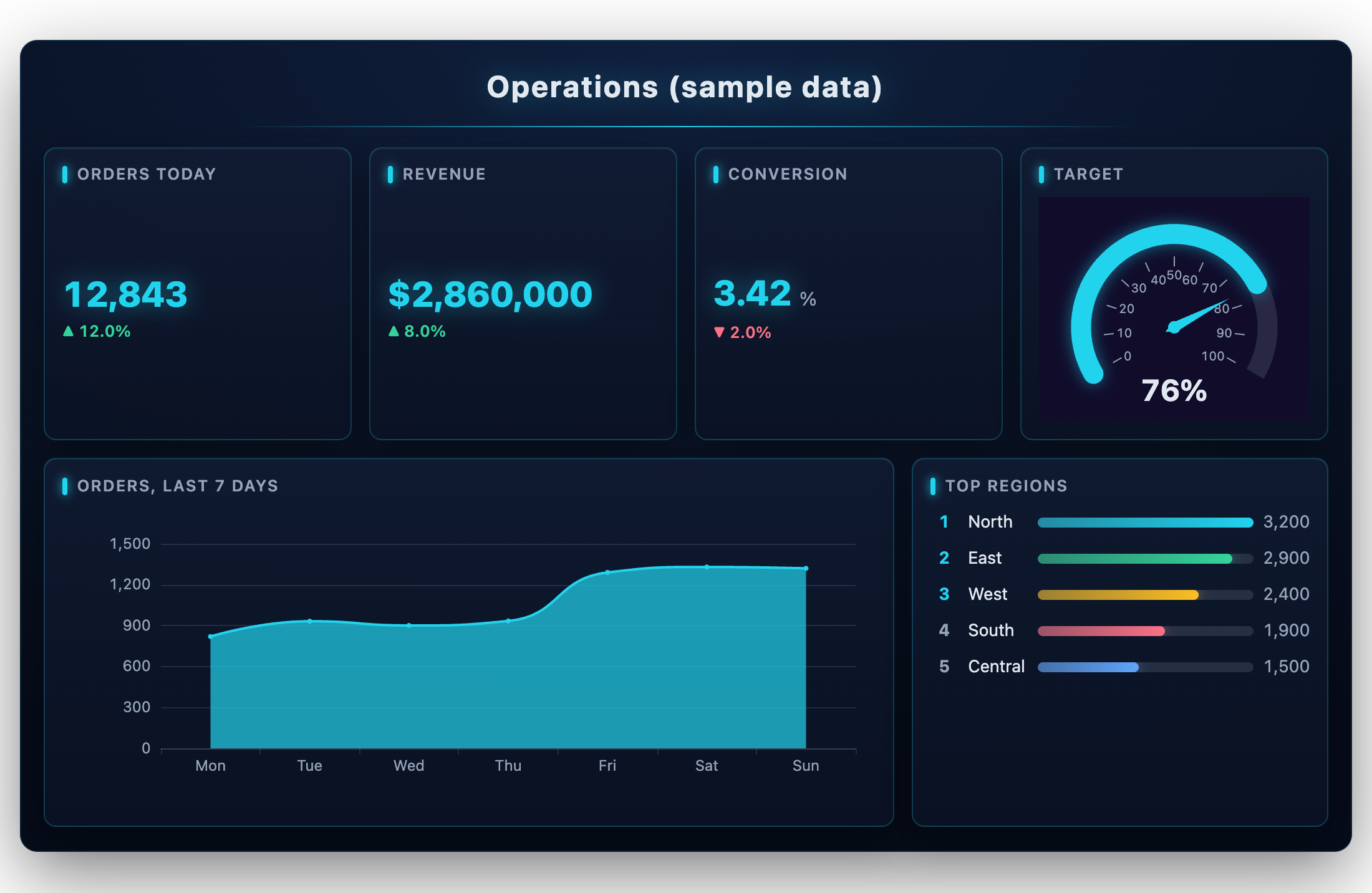
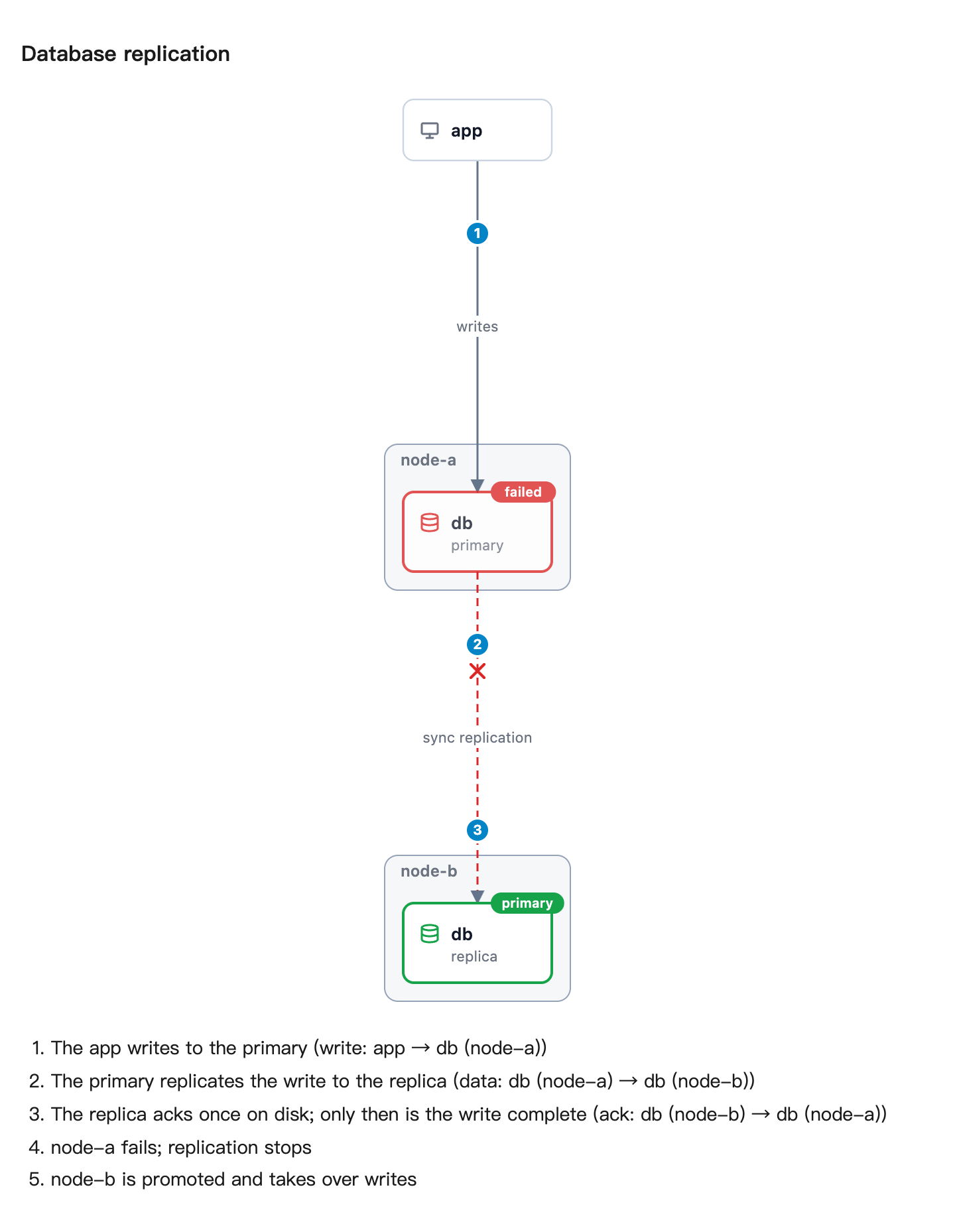
Every picture above was drawn by AIGUI from a fenced block a model wrote; the data is sample data.
Install
pnpm add @ai-gui/core @ai-gui/react      # or @ai-gui/vue, @ai-gui/vanilla
pnpm add @ai-gui/plugin-chart @ai-gui/plugin-mermaid @ai-gui/plugin-katex   # any plugins
Quick start
import { useRef } from "react"
import { buildSystemPrompt } from "@ai-gui/core"
import { AIRenderer } from "@ai-gui/react"
import { chart } from "@ai-gui/plugin-chart"
import { mermaid } from "@ai-gui/plugin-mermaid"

const plugins = [chart(), mermaid()]
const system = buildSystemPrompt({ base: "You are a helpful assistant.", plugins })

export function Answer() {
  const ref = useRef(null)
  async function ask(question: string) {
    const res = await fetch("/api/chat", { method: "POST", body: JSON.stringify({ system, question }) })
    ref.current.reset()
    await ref.current.feed(res.body) // renders as the tokens arrive
  }
  return <AIRenderer ref={ref} plugins={plugins} />
}
buildSystemPrompt tells the model which blocks it may write; pass locale: "zh-CN" for the rules in Chinese. The backend only streams text — any language works.
In Claude Code and Codex
# Claude Code
/plugin marketplace add liliang-cn/aigui
/plugin install aigui@aigui

# Codex
codex plugin marketplace add liliang-cn/aigui
codex plugin add aigui@aigui
The agent can then draw: aigui_render returns PNGs, aigui_open opens a live page in your browser, aigui_edit changes a page in place, aigui_export saves it as PNG, PDF, a self-contained HTML file or a GIF/WebM of it playing, and aigui_topology draws a system straight from its docker-compose or Kubernetes files. Page text is English unless you ask for another language. See @ai-gui/mcp.
To see the pictures inside Claude Code instead of an image viewer, add the img-view mod: /plugin install img-view@aigui. It shows each drawing in a pane beside the conversation, as real pixels in kitty, Ghostty, iTerm2 and WezTerm and as colour block art in any other terminal.
Docs
- All packages on npm: npmjs.com/org/ai-gui
- Full guide — cards, actions, channels, plugins in depth
- AGENTS.md — integrating the SDK, what the model may write, releasing
- Each package's README, under packages/
License
MIT
Install Aigui in Claude Desktop, Claude Code & Cursor
unyly install aiguiInstalls into Claude Desktop, Claude Code, Cursor & VS Code — handles npx, uvx and build-from-source repos for you.
First time? Get the CLI: curl -fsSL https://unyly.org/install | sh
Or configure manually
Run in your terminal:
claude mcp add aigui -- npx -y @ai-gui/mcpStep-by-step: how to install Aigui
FAQ
Is Aigui MCP free?
Yes, Aigui MCP is free — one-click install via Unyly at no cost.
Does Aigui need an API key?
No, Aigui runs without API keys or environment variables.
Is Aigui hosted or self-hosted?
Self-hosted: the server runs locally on your machine via the install command above.
How do I install Aigui in Claude Desktop, Claude Code or Cursor?
Open Aigui on unyly.org, pick your client tab (Claude Desktop, Claude Code, Cursor) and press Install — the config is generated automatically, no JSON editing.
Changes
Versions and requested access over time.
- New version published
Related MCPs
GitHub
PRs, issues, code search, CI status
 by GitHub
Filesystem
Secure file operations with configurable access controls.
Memory
Knowledge graph-based persistent memory system.

Unyly Deploy
Deploy sites and MCP servers to Unyly straight from your AI agent
 by Unyly
Amap Maps Mcp Server
MCP server for using the AMap Maps API
 by duxiaohui
PayMCP
Lightweight payments layer for MCP servers: turn tools into paid endpoints with a two-line decorator. [PyPI](https://pypi.org/project/paymcp/) · [npm](https://w
 by blustAI
Server For Power BI
Enables exploring Microsoft Fabric / Power BI workspaces and semantic models, and executing ad-hoc DAX queries.
 by Mitsubishi-Fuso
Gpt Image 2 Mcp
RunAPI GPT Image 2 MCP server for image generation: create tasks, poll results, and check pricing across 1 model from Claude Code, Codex, Cursor, and VS Code.
 by runapi-ai
Template MCP Server
A CLI tool to create a new Model Context Protocol server project with TypeScript support, dual transport options, and an extensible structure
 by mcpdotdirect
Supabase
Database, auth and storage
 by Supabase
Compare Aigui with
Not sure what to pick?
Find your stack in 60 seconds
Author?
Embed badge for your README
Browse similar
All development MCPs