
Abrege
FreeNot checkedSummarize large documents of any size with scalable, AI-powered processing.

About
Summarize large documents of any size with scalable, AI-powered processing.
README
🔍 Overview
Abrege is a scalable document summarization tool built to handle documents of any length, i1. Text Extraction Retrieves the document's content using:
- Standard parsing (e.g., for PDFs, Word files)
- OCR (for scanned images or PDFs)ing those over 500 pages. It supports various file formats and uses an intelligent asynchronous Map-Reduce architecture to deliver concise, high-quality summaries—no matter the input size.
Supported input formats:
.pdf,.docx,.odt,.odp.png(via OCR)- URLs
- Raw text
Demo
| Document Summarization | Text Summarization | URL Summarization |
|---|---|---|
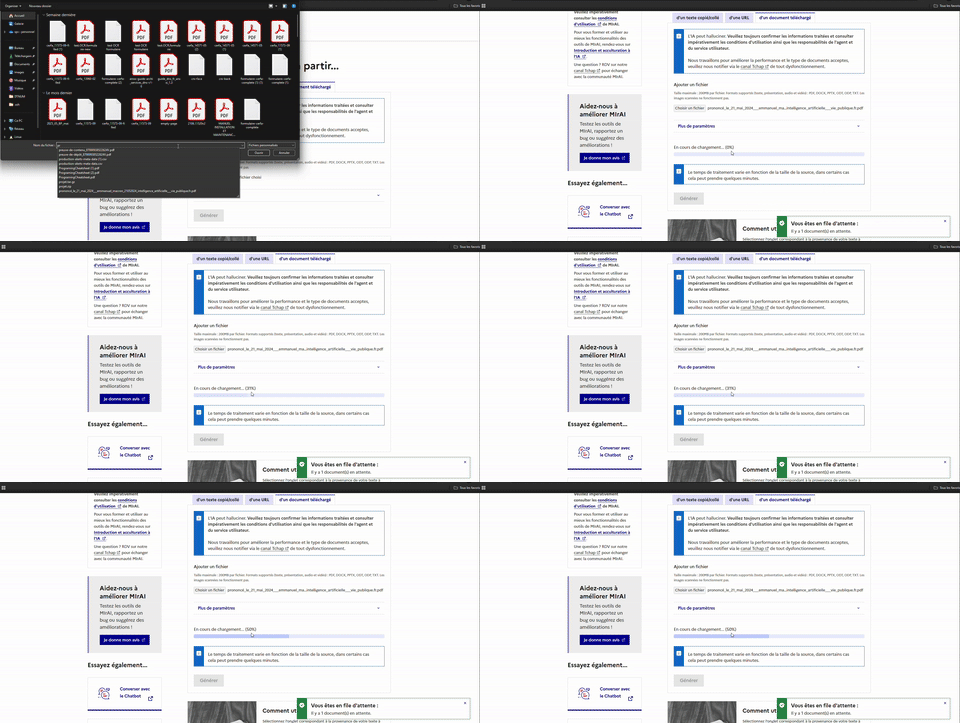 |
 |
 |
⚙️ How It Works
Abrege breaks down the summarization process into three key phases:
Text Extraction Retrieves the document’s content using:
- Standard parsing (e.g., for PDFs, Word files)
- OCR (for scanned images or PDFs)
Chunking The text is split into manageable sections that fit within the LLM's context window.
Summarization (Map-Reduce)
- Map Phase: Each chunk is summarized in parallel using async workers.
- Reduce Phase: The partial summaries are merged into a final global summary.
📊 Total LLM calls ≈
total_tokens // llm_max_context + 1The+1is for the final reduction step.
Getting Started
Prerequisites
Install system dependencies:
# For development environment
make install

# For system dependencies (Linux/macOS)
make install-local
🐳 Run Locally (Docker Compose)
Start the full stack:
# Launch development environment
make up

# Or use Docker Compose directly
docker compose up
For frontend development:
# Setup and launch frontend
make up-frontend
To stop services:
make down
🧱 Build Docker Images
# Build all images
make build

# Or build specific services
make build-abrege-api
make build-abrege-service
🧪 Testing
All tests are managed via the Makefile. Available test commands:
Core Service Tests
make test-src
Tests the core src module with coverage reporting.
API Tests
make test-abrege-api
Tests the API layer with coverage reporting.
End-to-End Tests
make test-abrege-service
Runs comprehensive end-to-end tests via the test runner.
🧹 Development Tools
# Code linting
make lint

# Clean up cache and temporary files
make clean

# Clean frontend dependencies
make clean-front

# View all available commands
make help
🧱 Architecture
For a detailed sequence diagram of the document processing flow, see docs/diagram.md.
For the full list of environment variables and Docker volumes, see docs/variables.md.
Components
API: Accepts inputs and initiates the processing pipeline.
Task Broker: Handles message queueing (e.g., Redis, RabbitMQ).
Workers:
- Extract text from documents or images
- Summarize chunks in parallel
- Merge partial summaries
KEDA: Automatically scales workers based on queue load.
Installing Abrege
This server has no published package — it is built from source. Open the repository and follow its README.
▸ github.com/IA-Generative/abregeFAQ
Is Abrege MCP free?
Yes, Abrege MCP is free — one-click install via Unyly at no cost.
Does Abrege need an API key?
No, Abrege runs without API keys or environment variables.
Is Abrege hosted or self-hosted?
Self-hosted: the server runs locally on your machine via the install command above.
How do I install Abrege in Claude Desktop, Claude Code or Cursor?
Open Abrege on unyly.org, pick your client tab (Claude Desktop, Claude Code, Cursor) and press Install — the config is generated automatically, no JSON editing.
Related MCPs
Fetch
Web content fetching and conversion for efficient LLM usage.
AWS KB Retrieval
Retrieval from AWS Knowledge Base using Bedrock Agent Runtime.
 by modelcontextprotocol
Spring AI MCP Server
Provides auto-configuration for setting up an MCP server in Spring Boot applications.
llm-analysis-assistant
A very streamlined mcp client that supports calling and monitoring stdio/sse/streamableHttp, and can also view request responses through the /logs page. It also
 by xuzexin-hz
MCP-Agent
A simple, composable framework to build agents using Model Context Protocol by [LastMile AI](https://www.lastmileai.dev)
 by lastmile-ai
Spring AI MCP Client
Provides auto-configuration for MCP client functionality in Spring Boot applications.
mcp.natoma.ai
A Hosted MCP Platform to discover, install, manage and deploy MCP servers by [Natoma Labs](https://www.natoma.ai)
MCPHub
Website to list high quality MCP servers and reviews by real users. Also provide online chatbot for popular LLM models with MCP server support.
MCP Servers Rating and User Reviews
Website to rate MCP servers, write authentic user reviews, and [search engine for agent & mcp](http://www.deepnlp.org/search/agent)
mkinf
An Open Source registry of hosted MCP Servers to accelerate AI agent workflows.
Compare Abrege with
Not sure what to pick?
Find your stack in 60 seconds
Author?
Embed badge for your README
Browse similar
All ai MCPs